
TechnoTouch Business Futurist Keynote Speaker, Web Designer, Marketing Strategist

Ask the TechnoFuturist, Marlene Brown!

Want to know more about the future, the Internet, the Web, the latest viruses or hoaxes, marketing trends, technology challenges? Sign up for our Free Marm's Memo and Reports.

Web designer, Keynote speaker, Marketing Futurist
Future is now!


Virus & Hoax Info + Tech Info + Avoid Worm Emails + Badtrans + Sulfnbk

W32/MTX * W32.Marijuana * W32/SirCam * W32Badtrans * W32Nimda

W32Magistr * W32Naked * Acid.A * Win32Invalid* W32CPost * CodeBlue

Viruses * AnnaKournikova * HoaxList * VirusTips * Code Red * W32Hybris

EmailVirus * PrettyPark * WildVirus * NetTaxHoax * ILoveYou * JS/Kak

Class.ED/Trojan.Thief
Mirc/VanHoutenWorm
I-Worm.BadAss/VBS

Back to top Virus Prevention

Recent Hoaxes You Need to Be Aware Of (updated daily/weekly)

Bugs Life Hoax
AOL - AOL/Intel
Urban Legends
Internet Tax Hoax

Back to top

Technology Issues You May Find of Value and/or Fun! (updated regularly)

Tech Milestones

Tech
Quizzes
/ Articles

Fun Tech Quizzes

Glossary Terminology

Yr2000
Countdown

Y2K/E-biz
Updates


Back to top

Business Futurist, Professional Speaker, Technology speaker, Internet speaker, Sales speaker, Marketing, Marmel Consulting, Software program, Author, Marlene Brown


Recently Surfaced Worms & Viruses include:

Badtrans

W32Nimda
W32Hybris

W32Magistr.b@MM

Code Red.a
Code Blue
Code Red.c

W32/SirCam@MM
W32.Marijuana (W32.Mari)
W32/Badtrans@MM

Acid.A
W32/MTX@MM
Win32Invalid
W32/CPost
W32/Fever@M 5/21/01 Virus E-mail
VBS/VBSWG.Z@MM 5/16/01 Virus VbScript
VBS/Hard@MM 5/12/01 Virus VBScript worm
VBS/SST.gen@MM 5/9/01 Virus VBScript worm
W32/Roach@MM 5/9/01 Internet Worm File Infector
SunOS/BoxPoison.worm 5/9/01 Internet Worm Remote Access
PERL/WSFT-Exploit 5/9/01 Trojan Remote Access
Sadcase 5/2/01 Trojan File Deletion
JS/Yama.gen@M 5/2/01 Virus Internet Worm
VBS/Haptime@MM 4/29/01 Virus E-mail
New York Big Dirt 4/26/01 Hoax -
W32/Hello.worm 4/23/01 Virus Internet Worm
W32/Naked@MM
(more info here)
VBS/OnTheFly (Anna Kournikova) (more info here)
JS/Kak.worm.a (more info here)
Snowhite and the Seven Dwarfs (more info here)

W32/ProLin@MM (more info here)
W32/XTC@MM
W97M/Npol.a
W97M/Nalp.gen 9
W95/MTX.gen@M
W32/Hybris.gen@M
Back Orifice
VBS/Yello 11/11/00 Virus mIRC Worm Low
Backdoor-IW
W32/Lara.worm 1
W32/Tetris.worm
Virus mIRC
VBS/Jean@MM
VBScript
W95/Ussrhymn
W32/Navidad@M
VBS/Scary.A@MM
VBScript
W97M/Melissa.a@MM
W97M/Smac.d
BackDoor-JD
W32/Pretty.Worm
Medium IRC/Sheep
QDel122
BackDoor-AQ
VBS/Req.A@MM
VBS/Loveletter.as
VBScript
Mailbomb
IRC/Zippy.worm
Virus mIRC
W95/Music@M
W97M/Surlaw
AdClicker
X97M/Laroux.ho
JS/KillMBR
Trojan VbScript
W32/Navidad@M (more info on this virus here)
VBS/Loveletter.a
IRC/Stages.worm
BackDoor-G
W32/QAZ.worm
W32/FunLove.4099
PalmOS/LibertyCrack
BackDoor-G2.svr.21
W32/MTX@m
W97M/Resume.a@mm
W32/Pretty.worm.unp
W32/Ska@m
W32/Pretty.Worm
APStrojan.qa
VBS/Netlog.worm.a
W95/CIH.1003 Pokey
VBS/Freelink@MM
W97M/Ethan.a
VBS/Loveletter.bd
Your friend D@fit
Girl Thing hoax
Joke.Scared

Back to top

Business Futurist, Professional Speaker, Technology speaker, Internet speaker, Sales speaker, Marketing, Marmel Consulting, Software program, Author, Marlene Brown

Protect your Address Book:

Help ensure you don't send out a virus through your emails:

When/if a worm virus gets into your computer it heads straight for your e-mail address book and sends itself to everyone in there, thus infecting all your friends and business colleagues. The following won't keep the virus from getting into your computer, but it will stop it from using your address book to spread further, and it will alert you to the fact that the worm has gotten into your system.

What to do: open your address book and click on "new contact" just as you would do if you were adding a new friend to your list of e-mail addresses. In the window where you would type your friend's first name, type in !000 (that's an exclamation mark followed by 3 zeros). In the window below where it prompts you to enter the new e-mail address, type in WormAlert. Then complete everything by clicking add, enter, ok, etc.

Here's why it works: the "name" !000 will be placed at the top of your address book as entry #1. This will be where the worm will start in an effort to send itself to all your friends. But when it tries to send itself to !000, it will be undeliverable because of the phony e-mail address you entered (WormAlert). If the first attempt fails (which it will because of the phony address), the worm goes no further and your friends will not be infected. Here's the second great advantage of this method: if an e-mail cannot be delivered,you will be notified of this in your Inbox almost immediately. Hence, if you ever get an e-mail telling you that an e-mail addressed to WormAlert could not be delivered,you know right away that you have the worm virus in your system. You can then take steps to get rid of it.

Back to top

Business Futurist, Professional Speaker, Technology speaker, Internet speaker, Sales speaker, Marketing, Marmel Consulting, Software program, Author, Marlene Brown

November 25, 2001: A new variant of Badtrans has been discovered. While the virus is being seen and stopped at corporate gateways and mailservers, the home user segment has become infected. This is due to the fact that home users tend to update their DAT files less frequently. This new variant of Badtrans drops a password stealing trojan. Your risk of infection is higher if you do not have the 4168 DAT files or above.

Badtrans.a details: This mass mailing worm attempts to send itself using Microsoft Outlook by replying to unread email messages. It also drops a remote access trojan.
When run, the worm displays a message box entitled, "Install error" which reads, "File data corrupt: probably due to a bad data transmission or bad disk access." A copy is saved into the WINDOWS directory as INETD.EXE, an entry is entered into the WIN.INI file to run INETD.EXE at startup, KERN32.EXE (a backdoor trojan) and HKSDLL.DLL are written to the WINDOWS SYSTEM directory, and a registry entry is created to load the trojan upon system startup.

Once running, the trojan attempts to mail the victim's IP Address to the author. Once this information is obtained, the author can connect to the infected system via the Internet and steal personal information such as usernames, and passwords. The next time Windows is loaded, the worm attempts to email itself by replying to unread messages in Microsoft Outlook folders. The worm will be attached to these messages using one of a variety of filenames:

The message body may contain the text:
Take a look to the attachment.

This mass mailing worm attempts to send itself using Microsoft Outlook by replying to unread and read email messages. It also mails itself to email addresses found within files that exist on your system. This trojan logs keystrokes for the purpose of stealing personal information (such as credit card and bank account numbers and passwords). This information is later emailed to the virus author(s).

When run, this variant copies itself to the WINDOWS SYSTEM directory as KERNEL32.EXE and creates a registry run key to load itself at startup. Additionally, the virus prepends the return address used with an "_" (underscore). Thus replying to an infected message will fail to reach the intended recipient.

Another message subject is typically: "Re:"

The message attachment name will be one of a variety of names. This new variant uses the iframe exploit and incorrect MIME header to run automatically on unpatched systems. See Microsoft Security Bulletin (MS01-020) for more information and a patch.
Method Of Infection of Badtrans.a variant:
This worm utilizes MAPI messaging to mail itself to regular email correspondence. It will arrive as an attachment that is 13,312 bytes in length and uses one of a number of various names.

Badtrans.b variant:
This worm utilizes MAPI messaging to mail itself to regular email correspondence. It will arrive embedded in an email message which often has the subject "Re:". Exploiting a MIME header vulnerability, the virus can execute upon viewing the email message. The message body is empty. It will arrive as an attachment that is 29,020 bytes in length and uses one of a number of various filenames.

Removal Instructions
All Windows Users:
Use current engine and DAT files for detection and removal.

Install the Microsoft Security Bulletin (MS01-020) patch
EXTRA.DAT files:
The following Extra.DAT and Super Extra.DAT files are also available:
EXTRA.DAT
SUPER EXTRA.DAT

Manual Removal Instructions (Disclaimer: This is for information purposes only. If you aren't aware enough of how to do this, you should ask your systems administrator)

WINDOWS 95/98/ME

Restart Windows in Safe Mode (reboot your computer, just before the large WINDOWS startup screen comes up, hit the F5 key). You can recognize that you're in Safe Mode by the text Safe Mode in the 4 corners of the desktop.
Click START | RUN, type %WINDIR% and hit ENTER
Delete the INETD.EXE file (if present)

Click START | RUN, type %WINDIR%\SYSTEM and hit ENTER
Delete the following files (if they exist):

KERN32.EXE
KERNEL32.EXE
KDLL.DLL
HKSDLL.DLL

Click START | RUN, type REGEDIT and hit ENTER

Click the (+) next to HKEY_LOCAL_MACHINE

Click the (+) next to SOFTWARE

Click the (+) next to MICROSOFT

Click the (+) next to WINDOWS

Click the (+) next to CURRENTVERSION

Click RUNONCE

Click on KERNEL32 on the right and hit DELETE on the keyboard

Restart the computer
WINDOWS NT/2000/XP

Type CTRL-ALT-DEL at the same time
Choose TASK MANAGER and then choose the PROCESS tab
Locate the KERNEL32.EXE process, click it, and choose END PROCESS
Click START | RUN, type %WINDIR% and hit ENTER
Delete the INETD.EXE file (if present)

Click START | RUN, type %WINDIR%\SYSTEM32 and hit ENTER
Delete the following files (if they exist):

KERN32.EXE
KERNEL32.EXE
KDLL.DLL
HKSDLL.DLL

Click START | RUN, type REGEDIT and hit ENTER

Click the (+) next to HKEY_CURRENT_USER

Click the (+) next to SOFTWARE

Click the (+) next to MICROSOFT

Click the (+) next to WINDOWS NT

Click the (+) next to WINDOWS

If INETD.EXE is found on the right panel, Double Click on RUN on the right and delete the INETD.EXE value

Additional Windows ME Info:
NOTE: Windows ME utilizes a backup utility that backs up selected files automatically to the C:\_Restore folder. This means that an infected file could be stored there as a backup file, and VirusScan will be unable to delete these files. These instructions explain how to remove the infected files from the C:\_Restore folder.

Disabling the Restore Utility

1. Right click the My Computer icon on the Desktop.
2. Click on the Performance Tab.
3. Click on the File System button.
4. Click on the Troubleshooting Tab.
5. Put a check mark next to "Disable System Restore".
6. Click the Apply button.
7. Click the Close button.
8. Click the Close button again.
9. You will be prompted to restart the computer. Click Yes.
NOTE: The Restore Utility will now be disabled.
10. Restart the computer in Safe Mode.
11. Run a scan with VirusScan to delete all infected files, or browse the the file's located in the C:\_Restore folder and remove the file's.
12. After removing the desired files, restart the computer normally.
NOTE: To re-enable the Restore Utility, follow steps 1-9 and on step 5 remove the check mark next to "Disable System Restore". The infected file's are removed and the System Restore is once again active.

Back to top

Business Futurist, Professional Speaker, Technology speaker, Internet speaker, Sales speaker, Marketing, Marmel Consulting, Software program, Author, Marlene Brown

W32/Nimda@MM High Risk Virus Discovered: 9/18/01

Virus Characteristics:
This threat can infect all unprotected users of Win9x/NT/2000/ME
Its main goal is simply to spread over the Internet and Intranet, infecting as many users as possible and creating so much traffic that networks are virtually unusable.
All end users and administrators running Microsoft Internet Explorer (ver 5.01 or greater), are advised to install this patch for the Incorrect MIME Header Can Cause IE to Execute E-mail Attachment vulnerability. All IIS administrators should also install the August 15, 2001 Cumulative Patch for IIS.

This is a mass-mailing worm, which also spreads via open shares, the Microsoft Web Folder Transversal vulnerability (also used by W32/CodeBlue), and a Microsoft content-type spoofing vulnerability. It also attempts to create a share (c:), and checks for the presence of the trojan dropped by the W32/CodeRed.c worm The email attachment name varies and may use the icon for an Internet Explorer HTML document.

The most significant methods of propagation are as follows:
The email messages created by the worm specify a content-type of audio/x-wav with an executable attachment type. Thus when a message is accessed, the attachment can be executed without the user's knowledge. When infecting, it appends HTML documents with javascript code which opens a new browser window containing the infectious email message itself (taken from the dropped file README.EML). Thus when this infected HTML is accessed (locally or remotely) the machine viewing the page is then infected.

Once infected, your system is used to seek out others to infect over the web. As this creates a lot of port scanning, this can cause a network traffic jam. It copies itself to the WINDOWS SYSTEM directory as LOAD.EXE and creates a SYSTEM.INI entry to load itself at startup:
Shell=explorer.exe load.exe -dontrunold

Additional events are:
- A MIME encoded version of the work is created in each folder on the drive (often as README.EML, can also be .NWS files)
- Certain executable files are selected by the worm and altered.
The virus contains the string : Concept Virus (CV) V.5, Copyright (C) 2001 R.P.China

Removal Instructions:
This threat can infect all unprotected users of Win9x/NT/2000/ME Infected systems must apply these patches prior to cleaning or reinfection may take place.
All end users and administrators running Microsoft Internet Explorer (ver 5.01 or greater), are advised to install this patch for the Incorrect MIME Header Can Cause IE to Execute E-mail Attachment vulnerability.

Customizing the program file extension list using VirusScan 4.5 (and higher) may result in a lack of protection against this trojan. As always, AVERT recommends that users configure VirusScan to scan all files. If this is not an option in your environment, the default extension list should be used.

This provided Extra Dat should be used for detection and removal.
Extra.Dat (Ver 3)
Nimda3.Exe (Ver 3)
This includes detection and removal for infected .ASP, .DLL, .EML, .EXE, .HTM, .HTML, and .NWS files (with ALL files being scanned).
Note that when repairing infected .ASP, .HTM, and .HTML files, they are properly truncated to remove the infectious javascript call. The dropped copies of the worm are deleted, and infected .EXE files are also repaired.

Aliases: W32/Minda@MM

Business Futurist, Professional Speaker, Technology speaker, Internet speaker, Sales speaker, Marketing, Marmel Consulting, Software program, Author, Marlene Brown


W32/Hybris.gen@MM

Virus Information
This worm will be received in an email message which may contain the following information:

From: Hahaha [hahaha@sexyfun.net]
Subject: Snowhite and the Seven Dwarfs - The REAL story!
Body: Today, Snowhite was turning 18. The 7 Dwarfs always where very educated and polite with Snowhite. When they go out work at mornign, they promissed a *huge* surprise. Snowhite was anxious. Suddlently, the door open, and the Seven Dwarfs enter...

Attachment: sexy virgin.scr or joke.exe or midgets.scr or dwarf4you.exe

When first executed, this worm tries to infect the WSOCK32.DLL file in the WINDOWS\SYSTEM directory. First it tries to infect the WSOCK32.DLL file directly. If it fails because the file is already in use, then it creates an infected copy on the WSOCK32.DLL in a new file. This new file goes by an extensionless filename made up of 8 random characters. A line is then created in the WININIT.INI file to rename this newly created file to WSOCK32.DLL, thus overwriting the original WSOCK32.DLL file. This change takes place the next time the system is booted. A registry value under Software\Microsoft\Windows\CurrentVersion\RunOnce\(default) is also created to run the worm at the next bootup, in case the previous attempts to infect WSOCK32.DLL fail.
The modified WSOCK32.DLL file watches all Internet activity and attempts to mail a copy of the worm, in the form of a .EXE or .SCR file, to any valid e-mail address sent over the Internet connection, whether part of a e-mail message, web page, or newsgroup posting. AVERT cautions all users to delete unexpected attachments. W32/Hybris.gen@M is sent unknowingly by the infected user.

This Internet worm originally downloaded encrypted update components from an Internet web site, similar to the method first used by W95/Babylonia, but the site hosting the virus was taken down. The original plugins were:
HTTP.DAT
NEWS.DAT
ENCR.DAT
PR0N.DAT
SPIRALE.DAT
SUB7.DAT
DOSEXE.DAT
AVINET.DAT

Currently this virus downloads plugins from alt.comp.virus. The virus contains an internal list of several news servers it can access. It searches the newsgroup for any plugins that it doesn't have, or has older versions of. Since the worm searches all Internet activity for e-mail addresses, people who post to alt.comp.virus using their real e-mail address may get many copies of the worm when Hybris searches alt.comp.virus for new plugins.
When a full moon occurs according to the computer's internal clock, the virus will randomly post its plugins to the alt.comp.virus newsgroup. It uses a mail-to-news gateway at anon.lcs.mit.edu to send plugins with a fake return address of root@microsoft.com.

This Internet worm contains the text:
HYBRIS
(c) Vecna

Indications Of Infection:
Mail recipients claiming they received an attachment from you when one was never sent. Depending on plugins installed, spiral graphic on the screen, inability to access antivirus sites.

Method Of Infection:
The format of the newsgroup-posted message is as follows:
anon.lcs.mit.edu!nym.alias.net!mail2news
Message-ID: 20001113080521.28781.qmail@nym.alias.net
From: [USE-AUTHOR-ADDRESS-HEADER@[127.1]]
Author-Address: anonymous [AT]anon [DOT]lcs [DOT]mit [DOT] edu
Subject: http [code containing upper- and lower-case letters]
Mail-To-News-Contact: postmaster@nym.alias.net
Organization: mail2news@nym.alias.net
Newsgroups: alt.comp.virus
Lines: 46
KUWJGJWCVICGIWIWCZIWHCFXCHB [continues]....
[more coded lines]
[terminated by four asterisks]
****
The plugins are saved to the WINDOWS\SYSTEM directory with a random name consisting of a name consisting of eight random letters and an extension consisting of three random letters. The plugins are signed using public-key cryptography. That means that all the copies of the worm carry a public key which will only accept plugins digitally signed by the private key. Only the virus author has the private key so only plugins that he approves will be accepted by the virus. Some of the current plugins are:
@@@@ or SPIRALE - This creates a file which displays a graphic of a "spiral" that cannot be closed or stopped. The file has a name consisting of eight random letters, and is loaded using the run= line of the [windows] section of win.ini. This spiral graphic is launched by this Internet worm on September 24th, or when the number of minutes are equal to 59 in the year 2001.
I_RZ - Adds a copy of the worm to ZIP and RAR archives containing EXE files. The original EXE file is renamed to an EX$ extension, and a copy of the virus takes the place of the original EXE file.
AVIP or AVINET.DAT - Blocks the infected computer from visiting certain antivirus websites by IP address, similiar to the W95/MTX virus.
SUB7 - Searches for computers infected with the BackDoor-G trojan, and copies and executes itself on infected machines.
ENCR or POLY - Encrypts the virus with a polymorphic routine. Note that in spite of the polymorphic routine, VirusScan detects all of the permutations of the virus when using updated engine and DAT files.
TEXT or PR0N - This creates the message that the virus is sent with, depending on the language installed on the infected system:

English:
From: Hahaha [hahaha@sexyfun.net]
Subject: Snowhite and the Seven Dwarfs - The REAL story!
Body: Today, Snowhite was turning 18. The 7 Dwarfs always where very educated and polite with Snowhite. When they go out work at mornign, they promissed a
*huge* surprise. Snowhite was anxious. Suddlently, the door open, and the Seven Dwarfs enter...
Attachment: sexy virgin.scr or joke.exe or midgets.scr or dwarf4you.exe
French:
From: Hahaha [hahaha@sexyfun.net]
Subject: Les 7 coquir nains *or* Blanche neige et ...les sexe nains
Body: C'etait un jour avant son dix huitieme anniversaire. Les 7 nains, qui avaient aidé 'blanche neige' toutes ces années après qu'elle se soit enfuit de chez sa belle mère, lui avaient promis une *grosse* surprise. A 5 heures comme toujours, ils sont rentrés du travail. Mais cette fois ils avaient un air coquin... Attachment: blancheneige.exe or sexynain.scr or blanche.scr or nains.exe
Spanish:
From: Hahaha [hahaha@sexyfun.net]
Subject: Enanito si, pero con que pedazo!
Body: Faltaba apenas un dia para su aniversario de de 18 años. Blanca de Nieve fuera siempre muy bien cuidada por los enanitos. Ellos le prometieron una *grande* sorpresa para su fiesta de compleaños. Al entardecer, llegaron. Tenian un brillo incomun en los ojos... Attachment: enano.exe or enano porno.exe or blanca de nieve.scr or enanito fisgon.exe
Portuguese:
From: Hahaha [hahaha@sexyfun.net]
Subject: Branca de Neve pornô!
Body: Faltava apenas um dia para o seu aniversario de 18 anos. Branca de Neve estava muito feliz e ansiosa, porque os 7 anões prometeram uma *grande* surpresa.
As cinco horas, os anõezinhos voltaram do trabalho. Mas algo nao estava bem... Os sete anõezinhos tinham um estranho brilho no olhar...
Attachment: branca de neve.scr or atchim.exe or dunga.scr or anão pornô.scr
A later version of the plugin creates e-mails by choosing random words from "Anna" "Raquel Darian" "Xena" "Xuxa" "Suzete" "famous" "celebrity rape" "leather" and "sex" "sexy" "hot" "hottest" "cum" "cumshot" "horny "anal" "gay" "oral" , etc.

Note that the infected e-mails do not actually come from the sexyfun.net domain, they are sent unknowingly with a fake return address by infected users.
If Hybris does not have a plugin capable of generating message text, it will send a message with no subject or sender and a copy of itself with a name consisting of eight random letters.
DOSEXE.DAT or EXEI- Infects DOS EXE files to contain a virus dropper. These files can be repaired by VirusScan as W32/Hybris.exe.
I_PE - Infects PE files without increasing their size. It also adds data so that some checksumming algorithms will generate the same checksum before and after infection. These files cannot be repaired.
HTTP - This downloaded plugins from a website before it was shut down.
NEWS - This plugin posts plugins and downloads new ones from alt.comp.virus as described above.
Because plugins can change the virus behaviour so quickly, infected users are urged to use the latest engine and DAT files, and to set their antivirus software to scan all files. VirusScan will repair the infected wsock32.dll as W32/Hybris.gen.dll@M, but we recommend users restore it from the original disks to be certain.
Removal Instructions:
Use specified engine and DAT files for detection and removal.
Windows 95/98 systems require rebooting to MS-DOS mode and scanning with the command line scanner SCANPM in order to clean such files as EXPLORER.EXE and TASKMON.EXE. Use the command line scanner such as
"SCANPM.EXE C: /CLEAN /ALL"
The WSOCK32.DLL file can be restored from backup. This can be done by:
Windows ME:
NOTE: Windows ME utilizes a backup utility that backs up selected files automatically to the C:\_Restore folder. This means that an infected file could be stored there as a backup file, and VirusScan will be unable to delete these files. These instructions explain how to remove the infected files from the C:\_Restore folder.
Disabling the Restore Utility
1. Right click the My Computer icon on the Desktop.
2. Click on the Performance Tab.
3. Click on the File System button.
4. Click on the Troubleshooting Tab.
5. Put a check mark next to "Disable System Restore".
6. Click the Apply button.
7. Click the Close button.
8. Click the Close button again.
9. You will be prompted to restart the computer. Click Yes.
NOTE: The Restore Utility will now be disabled.
10. Restart the computer in Safe Mode.
11. Run a scan with VirusScan to delete all infected files, or browse the the file's located in the C:\_Restore folder and remove the file's.
12. After removing the desired files, restart the computer normally.
NOTE: To re-enable the Restore Utility, follow steps 1-9 and on step 5 remove the check mark next to "Disable System Restore". The infected file's are removed and the System Restore is once again active.
Use SFC to recover WSOCK32.DLL using instructions below for Windows 98/2000.
Windows 98/2000
- Click the START MENU|RUN, type SFC and click OK.
- Choose Extract one file from the installation disk
- Type C:\WINDOWS\SYSTEM\WSOCK32.DLL in the box and click Start.
- In the Restore from box type C:\WINDOWS\OPTIONS\CABS or browse to the Win98 directory on your Windows98 CD-ROM
- Click OK and follow remaining prompts
Wsock32.dll file exists within the Precopy1.cab cabinet file on the Windows 98 CD-ROM.
Windows95
WSOCK32.DLL can be found in the following CAB files:
Win95_11.cab on the Windows 95 CD-ROM
Win95_18.cab on the Windows 95 OSR2 CD-ROM
Win95_12.cab on the Windows 95 DMF disks
Win95_19.cab on the Windows 95 non-DMF disks
Below is an example for standard Windows 95
- Click the START MENU|SHUT DOWN choose RESTART IN MS-DOS MODE
- Type: EXTRACT /A C:\WINDOWS\OPTIONS\CABS\WIN95_11.CAB WSOCK32.DLL /L C:\WINDOWS\SYSTEM
or
- Insert your Windows95 CD-ROM and type:
EXTRACT /A D:\WIN95\WIN95_11.CAB WSOCK32.DLL /L C:\WINDOWS\SYSTEM Where D: is your CD-ROM drive
WindowsNT 4.0
Rename the Wsock32.dll file in the Windows\System32 folder to Wsock32.old.
For information about how to rename a file, click Start, click Help, click the Index tab, type renaming, and then double-click the ''Renaming files'' topic.
Click Start, point to Programs, and then click Command Prompt.
Type cd\, and then press ENTER.
Insert the Windows NT CD-ROM into the CD-ROM drive, and then close the Windows NT screen if it appears.
Type the following line at the command prompt, and then press ENTER.
expand <drive>:\i386\wsock32.dl_ c:\<windows>\system32\wsock32.dll
where <drive> is the drive letter assigned to your CD-ROM drive,
and where <windows> is the name of the folder in which
Windows NT is installed.
Type exit, and then press ENTER to return to windows.
Aliases: dwarf4you.exe, Hybris, I-Worm.Hybris , I-Worm.Hybris.b, Snowhite and the Seven Dwarfs, TROJ_HYBRIS.A, W32/Hybris.dll@M , W32/Hybris.plugin@M, W95.Hybris.Gen.dr, W95/Hybris.worm, Win98.Vecna.23040

Disclaimer: again, if you are not confident that you know what you're doing, have your IT person do this. DON'T OPEN attachments from people you don't know or attachments in emails with no message or messages you find strange. Make sure you have an anti-virus program on the hard drive of all your machines, AND keep it updated. Scan your machine often. Enjoy all of the many benefits e-mail brings to all of us, but exercise caution.

Back to top

Business Futurist, Professional Speaker, Technology speaker, Internet speaker, Sales speaker, Marketing, Marmel Consulting, Software program, Author, Marlene Brown


Code Blue

Virus Information
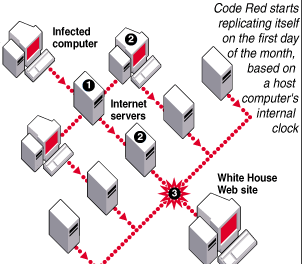
The infamous "Code Red" worm, which, together with its variants, caused millions of dollars in damage during July and August, has apparently spawned a cousin dubbed "Code Blue" which could spread across the globe.

Similar to the Code Red worms, the Code Blue variant is already striking computers in China, said a worker at the police-run Computer Virus Treatment Center in Tianjin, about an hour's drive outside of Beijing.

Code Red worms caused about US$2.4 billion in estimated cleanup costs, according to Computer Economics. Michael Erbschloe, a vice president at Computer Economics, reported that it's too early to tell if the alleged Code Blue is really nothing more than a variant of the Code Red viruses. "We continue to get reports of new worms, but most of them are directly related to the first Code Red," Erbschloe said.

The first Code Red worm infected more than 250,000 systems in the United States in only nine hours on July 19th, shortly after it was first reported, according to the FBI-affiliated National Infrastructure Protection Center. In August, a second version of the worm was discovered, preying on computers and servers linked to the Internet and running Microsoft (Nasdaq: MSFT) Internet Information Server (IIS) software.

Code Red II faded quickly as people downloaded free patches from Microsoft's Web site that plugged the hole the worm used to enter computers. The origin is still unknown, but the U.S. General Accounting Office -- a nonpartisan arm of Congress -- said in written testimony that the worms were created at a university in Guangdong, China. Chinese government officials have vehemently denied having anything to do with the virus outbreak.

Besides the cost, which is calculated to be the highest ever caused by a computer virus, some U.S.-based firms have suffered poor public relations and a loss of customers. Subscribers to Qwest's (NYSE: Q) DSL service have been knocked out repeatedly by the worms, but the company has stood pat on refusing to offer refunds. The earlier worm self-propagated in a manner quite similar to the more famous Code Red. It also targeted the White House Web site.

Back to top

Business Futurist, Professional Speaker, Technology speaker, Internet speaker, Sales speaker, Marketing, Marmel Consulting, Software program, Author, Marlene Brown


W32/magistr.b@mm

Virus Information
A growing number of systems have become infected with the W32/magistr.b@mm worm in Europe and South America. Currently, there is a low incidence of this worm in North America. This is a medium risk virus that is spread via email. The messages sent by the worm contain varying subject headings, body text, and attachments. The body of the message is derived from the contents of other files on the victim's computer. It may send more than one attachment and may include non-EXE or non-viral files along with an infectious .EXE file.

Five minutes after the virus is activated, it attempts to send copies of itself to email addresses found in the Windows Address Book, and in the Outlook Express, Netscape and Eudora mailboxes on the hard drive.
The virus payload may also cause the following:
* Erasure of CMOS/BIOS info
* Destruction of sectors on the hard disk
* Deletion of all .NTZ files on the machine
* Termination of Zone Alarm firewall program
* Creation of a SYSTEM.INI [boot] shell value to run itself at startup
* Overwrites the WIN.COM/NTLDR
=============
The infected email can come from addresses that you recognize. The messages sent by the worm contain varying subject headings, body text, and attachments. The body of the message is derived from the contents of other files on the victim's computer. It may send more than one attachment and may include non-EXE or non-viral files along with an infectious .EXE file.

The virus proceeds by infecting 32-bit PE (Portable Executable) type .EXE files found in the WINDOWS SYSTEM directory and subdirectories. The viral code is encrypted, polymorphic, and uses anti-debugging techniques to make it difficult to detect.

Five minutes after the virus is activated, it attempts to send copies of itself to email addresses gathered from the Windows Address Book, Outlook Express mailboxes, Netscape mailboxes, and Eudora mailboxes. These addresses are saved to a hidden .DAT file somewhere on the hard disk (varies). It may also attach .GIF files found on the hard drive to the emails it sends out.


Update your anti-virus software, and perform a scan on your hard drive. If W32/Magistr.b@MM is found, use the delete option to remove it.

Back to top

Business Futurist, Professional Speaker, Technology speaker, Internet speaker, Sales speaker, Marketing, Marmel Consulting, Software program, Author, Marlene Brown

CodeRed.a

Virus Information
Discovery Date: 07/17/2001
Origin: Unknown
Type: Internet Worm
Risk Assessment: High

Virus Characteristics
UPDATE July 30, 2001:
Users may see reissued alerts by other security organizations as well as additional media coverage of this threat over the next 24-48 hours. This threat does not generally affect an end-user's PC, but rather it attacks unpatched administrator's Microsoft IIS web servers. However, all Internet users can feel the effects of this worm, such as requested web pages being defaced or unavailable, due to the actions of this worm.

Your environment is at High Risk if:

1) You have Microsoft Index Server 2.0, or Indexing Service installed with Windows 2000 or IIS.

2) You have not updated these components with the latest patch from Microsoft.

The exploit, a buffer overflow, is used to spread this worm (Unchecked Buffer in Index Server ISAPI Extension Could Enable Web Server Compromise).

It exists in memory only and no written file ever exists on the hard disk.

It spreads through TCP/IP transmissions on port 80. By making use of this exploit, the worm is able to send itself as a TCP/IP stream directly to the its victims, which in turn scans the web for other systems to infect. Once infected, this viral code checks for the existence of C:\notworm. If the file C:\notworm is present the worm stops seeking other machines to infect.

Affected English language web servers have their web pages defaced with the message:

Welcome to http://www.worm.com !

Hacked By Chinese!


Method Of Infection
This worm makes uses of a Microsoft Index Server buffer overflow exploit to execute itself in memory.

Removal Instructions
Install the patch from Microsoft. For more information and to obtain a patch for this vulnerability, visit Microsoft's website.

Note that on top of applying the patch, rebooting of the server is also required to remove the worm from memory. Without the patch, the machine will simply become reinfected using the same vulnerability.

The worm does NOT affect Desktop or NT file servers.

As always, make sure you have the latest anti-virus software running on your machine.


Aliases
Name - Code Red
W32/Bady.worm

Back to top

Business Futurist, Professional Speaker, Technology speaker, Internet speaker, Sales speaker, Marketing, Marmel Consulting, Software program, Author, Marlene Brown


W32/CodeRed.c

Virus Characteristics:
This threat only affects Microsoft Windows 2000 running web servers. Although WinNT is vulnerable to this exploit, the worm crashes on WinNT.

Your environment is at HIGH RISK if:
1) You have Microsoft IIS server installed with Windows 2000.
2) You have NOT updated this server with the latest patch from Microsoft.

The exploit, a buffer overflow, is used to spread this worm.

This Virus exists in memory only (however, the .C variant does write a trojan program to the hard disk). As such, the trojan can be detected with the latests DATs and engine, but the virus can not.

The virus spreads through TCP/IP transmissions on port 80. By making use of this exploit, the worm is able to send itself as a TCP/IP stream directly to the its victims, which in turn scans the web for other systems to infect.

This is a rewrite of the W32/CodeRed.a.worm This variant does not deface web pages or contain a DDoS payload. It uses the atom "CodeRedII" for self-recognition and thus does not reinfect already infected systems.

It checks whether Chinese is the language installed on the system. If it is Chinese, it creates 600 threads and spreads for 48 hours. On a non-Chinese system it creates 300 threads and spreads for 24 hours. After that, it reboots the system. On 12am Oct 1, 2001 GMT, it reboots the computer, thus clearing the worm portion from memory. However, since not all clocks are set correctly, the computer will almost immediately get reinfected and reboot the computer again and again and again.

It tries to copy %windir%\CMD.EXE to the following files:
c:\inetpub\scripts\root.exe
c:\progra~1\common~1\system\MSADC\root.exe
d:\inetpub\scripts\root.exe
d:\progra~1\common~1\system\MSADC\root.exe.

It also tries to create a backdoor trojan (detected as W32/CodeRed.c trojan with the 4152 DATs) which it saves to c:\explorer.exe and d:\explorer.exe. This exploits the "Relative Shell Path" Vulnerability, which states that Windows will run c:\explorer.exe before %windir%\explorer.exe. So, the trojan can be run where EXPLORER.EXE is called. The trojan does nothing more than write certain values to the registry every 10 minutes. It is these registry values that opens a security hole in your system.

On the next reboot, the trojan carries out its payload and then calls the original explorer.exe. The trojan adds a value to the following registry key, to disable local file system security:

HKLM\SOFTWARE\Microsoft\Windows NT\CurrentVersion\
Winlogon\SFCDisable

Two values are added to the following key to enable a remote attacker to have access to the C: and D: drives, via a web browser:

HKLM\SYSTEM\CurrentControlSet\Services\
W3SVC\Parameters\Virtual Roots.

Also under this key, the /SCRIPT and /MSADC values are configured to allow read/write access to the paths associated with these values.

These changes allow a remote attacker to carry out shell function on the local system by sending commands to it via a URL.

Indications Of Infection:
Presence of the files:
c:\inetpub\scripts\root.exe
c:\progra~1\common~1\system\MSADC\root.exe
d:\inetpub\scripts\root.exe
d:\progra~1\common~1\system\MSADC\root.exe.

Method Of Infection:
This worm makes uses of a Microsoft Index Server buffer overflow exploit to execute itself in memory.

Removal Instructions:
Microsoft has released a tool to "eliminate the obvious effects of the Code Red II worm"

-- Trojan Removal --
To detect and remove the trojan, update to the 4152 DATs. If the trojan is detected it will be deleted, and the registry keys which allow a remote attacker to have access to the C: and D: drives, via a web browser, will be deleted as well.
Additionally, administrators need to remove the /C and /D virtual shares through the Internet Services Manager, and if necessary should restore the permissions on the /SCRIPTS and /MSADC virtual directories for each virtual website. The Windows File Protection/System File Checker registry value should be restored to the desired setting (0 is the default):

HKLM\SOFTWARE\Microsoft\Windows NT\CurrentVersion\
Winlogon\SFCDisable

Delete the following files:
c:\inetpub\scripts\root.exe
c:\progra~1\common~1\system\MSADC\root.exe
d:\inetpub\scripts\root.exe
d:\progra~1\common~1\system\MSADC\root.exe

-- Virus Removal --
Install the patches from Microsoft. For more information and to obtain the patches for these vulnerabilities, visit Microsoft's sites:
Unchecked Buffer in Index Server ISAPI Extension Could Enable Web Server Compromise

"Relative Shell Path" Vulnerability
Note that on top of applying the patch, rebooting of the server is also required to remove the worm from memory. Without the patch, the machine will simply become reinfected using the same vulnerability.

The worm does NOT affect desktop systems or pure file servers.

Disclaimer: Remember that this information -- as with all information on this website -- is provided as a public service to help you understand Viruses, Worms, and Hoaxes. Check with your Internet Manager for his or her recommendations; Make sure your have an Anti-Virus program running on your machine; Scan your system regularly; Don't open files from people you don't know; Check the websites of vendors of your software for patches.

Back to top

Business Futurist, Professional Speaker, Technology speaker, Internet speaker, Sales speaker, Marketing, Marmel Consulting, Software program, Author, Marlene Brown


W32/SirCam@mm (Sir Cam Virus)

A growing number of computers are being infected with W32/SirCam@MM. This is a High Risk Virus for Consumers! The infected email can come from addresses that you recognize. Attached is a file with two different extensions. The file name itself varies.

The email message can appear as follows:

Subject: [filename (random)]
Body: [content varies]

---ENGLISH VERSION---

Hi! How are you?

I send you this file in order to have your advice
or I hope you can help me with this file that I send
or I hope you like the file that I sendo you
or This is the file with the information that you ask for

See you later. Thanks

---SPANISH VERSION---

Hola como estas ?

Te mando este archivo para que me des tu punto de vista
or Espero me puedas ayudar con el archivo que te mando
or Espero te guste este archivo que te mando
or Este es el archivo con la información que me pediste

Nos vemos pronto, gracias.

The virus searches for .GIF, .JPG, .JPEG, .MPEG, .MOV, .MPG, .PDF, .PNG, .PS, and .ZIP files in the MY DOCUMENTS folder and attempts to send copies of these documents to email recipients found in the Windows Address Book and addresses found in cached files.

PREVENTION:* Don't open attachments from people you don't know, no matter how appealing they may look!
* Get protected. If you don't already have virus protection software on your machine, you should. If you're a home or individual user, it's as easy as downloading any of these top-rated programs then following the installation instructions. If you're on a network, check with your network administrator first.
* Scan your system regularly. If you're just loading anti-virus software for the first time, it's a good idea to let it scan your entire system. It's better to start with your PC clean and free of virus problems. Often the antivirus program can be set to scan each time the computer is rebooted or on a periodic schedule. Some will scan in the background while you are connected to the Internet. Make it a regular habit to scan for viruses.
* Update your anti-virus software. Now that you have virus protection software installed, make sure it's up-to-date. Some antivirus protection programs have a feature that will automatically link to the Internet and add new virus detection code whenever the software vendor discovers a new threat. You can also scan your system for the lastest security updates.

=====================

Back to top

Business Futurist, Professional Speaker, Technology speaker, Internet speaker, Sales speaker, Marketing, Marmel Consulting, Software program, Author, Marlene Brown

W32.Marijuana (W32.Mari)

W32.Marijuana (W32.Mari) is a non-destructive worm with an agenda that will leave you dazed and confused. If you click on the attachment, Marijuana spreads to everyone listed in that user's Outlook address book. It will also change your default Internet Explorer page to a pro-marijuana Web site. At the moment, Marijuana is a low-threat, and currently ranks as 4 on the ZDNet Virus Meter.

How it works Marijuana arrives as an e-mail with the following information:
Subject: check this out!!!
Once installed, Marijuana sends copies of itself to all the address found in the infected computer's Outlook address book. The worm also puts a marijuana leaf icon on the system tray. If the infected user clicks on the icon, a pop-up dialog box displays with the following text:

I think i speak for every pot smoker in North America when i say: *Legalize Marijuana*...I mean if people with AIDS, Cancer and other deaises can use it then why cant the rest of us (pot smokers) use it?,I don't think that's very fair (Do you?). If it's legal to grow and use in places like: Australia (for personal use) then why not in North america? If doctors are useing it as a treament for illness then it must no be *THAT* harmful (So why can't other people use it?). I really do think the federal government should consider legalization of marijuana. Well that's really all i have to say on the matter, but i do hope somebody, somewhere listens to what i have to say and does not just regard this as just another *virus* because it's more than that, it's a message, a message for freedom, the freedom to smoke up and have the chose to do so *WITHOUT* fear of punishment from the law and the government. Thank you for your time.

What It Does Marijuana changes the default home page of Internet Explorer to a Web site promoting the legal use of marijuana, changes the Windows registration to "I'm a Pot Head," and the company to "Stoner's Pot Place."
Marijuana also triggers every afternoon at 4:20 with another dialog box that reads, "The Marijuana Virus!!" and includes the text, "It's 4:20, Time to toke up :)."
Removal Most antivirus software companies are expected to update their signature files to include Marijuana. For more information on removing Marijuana from your system, see Sophos.

Prevention Here are the basic steps for containing the latest worm:
* Download Microsoft's Outlook Security Patch. If you haven't already installed it, download the Outlook 98 Security Patch or the Outlook 2000 Security Patch. Please note that this patch does not include Outlook Express.
* Turn off Windows Scripting Host. Recent virus outbreaks have exploited known vulnerabilities in Visual Basic Scripting under Windows. To limit your risk of infection, you should turn off Windows Scripting Host.
* "Don't open attachments!" One of the best ways to prevent virus infections is not to open attachments, especially when viruses such as this virus are being actively circulated. Even if the e-mail is from a known source, be careful. A few viruses take the mailing lists from an infected computer and send out new messages with its destructive payload attached. Always scan attached files first for viruses. Unless it's a file or image you are expecting, delete it.
* Get protected. If you don't already have virus protection software on your machine, you should. If you're a home or individual user, it's as easy as downloading any of these top-rated programs then following the installation instructions. If you're on a network, check with your network administrator first.
* Scan your system regularly. If you're just loading anti-virus software for the first time, it's a good idea to let it scan your entire system. It's better to start with your PC clean and free of virus problems. Often the antivirus program can be set to scan each time the computer is rebooted or on a periodic schedule. Some will scan in the background while you are connected to the Internet. Make it a regular habit to scan for viruses.
* Update your anti-virus software. Now that you have virus protection software installed, make sure it's up-to-date. Some antivirus protection programs have a feature that will automatically link to the Internet and add new virus detection code whenever the software vendor discovers a new threat. You can also scan your system for the lastest security updates.

Back to top

Business Futurist, Professional Speaker, Technology speaker, Internet speaker, Sales speaker, Marketing, Marmel Consulting, Software program, Author, Marlene Brown

=====================

The virus Acid.A was intended to propagate by infecting Word Documents in Microsoft WORD Version 97 on Windows platforms. The virus consists of the macro(s): AUTOOPEN, FILENEW, FILESAVE, FILESAVEAS, FILEPRINT, FILEPRINTPREVIEW, TOOLSMACRO, VIEWVBCODE, FILETEMPLATES, KILLBAV, TIMER, ACID, ACID2

in an infected document. The macros are stored in a module ACID.

Indications Of Infection:

The virus will copy the viral code to the users NORMAL.DOT, but it hasn't proven successful in infecting document files. Future variants might replicate properly and have nearly identical features to this variant. On an infected system the virus hides the TOOLS|MACRO, FILE|TEMPLATES and VIEW|VBCODE functionality. The virus changes Microsoft Word in the main application title bar to ULTRAS. When opening a file, the virus searches for the following file group and deletes the files where possible:
C:\Program Files\AntiViral Toolkit Pro\*.*
C:\Program Files\Command Software\F-PROT95\*.*
C:\Program Files\McAfee\VirusScan\*.*
C:\Program Files\Norton AntiVirus\*.*
C:\Program Files\FindVirus\*.*
C:\f-macro\*.*
C:\Tbavw95\*.*

When opening a file on the 1st, a MessageBox like

- ULTRAS X

You Infected WM97.ACID by ULTRAS

OK

is displayed. Then the active document is saved with the password ACID BY ULTRAS and this text is also inserted in the document in 65-Point blue letters.

When opening a file on the 9th, the same MessageBox is displayed. The virus saves the file with the password ULTRASand this text is also inserted in the document in 140-Purple letters.

When opening a file on the 17th, the virus inserts ULTRAS into the document and the virus searches for the following file group and deletes the files where possible:

C:\Autoexec.bat
C:\Config.sys
C:\Command.com

When opening a file on the 25th, the virus inserts ACID BY ULTRAS into the document and the virus searches for the following file group and deletes the files where possible:

C:\Windows\*.ini
C:\Windows\System\*.dll

Method Of Infection:

As this is an intended virus, there is no method of infect. It does not infect.

Removal Instructions:

Script,Batch,Macro and non memory-resident:
Use specified engine and DAT files for detection and removal.
PE,Trojan,Internet Worm and memory resident:
Use specified engine and DAT files for detection. To remove, boot to MS-DOS mode or use a boot diskette and use the command line scanner:

SCANPM /ADL /CLEAN /ALL
Additional information for Windows ME users:
NOTE: Windows ME utilizes a backup utility that backs up selected files automatically to the C:\_Restore folder. This means that an infected file could be stored there as a backup file, and VirusScan will be unable to delete these files. These instructions explain how to remove the infected files from the C:\_Restore folder.
Disabling the Restore Utility

1. Right click the My Computer icon on the Desktop.
2. Click on the Performance Tab.
3. Click on the File System button.
4. Click on the Troubleshooting Tab.
5. Put a check mark next to "Disable System Restore".
6. Click the Apply button.
7. Click the Close button.
8. Click the Close button again.
9. You will be prompted to restart the computer. Click Yes.
NOTE: The Restore Utility will now be disabled.
10. Restart the computer in Safe Mode.
11. Run a scan with VirusScan to delete all infected files, or browse the file's located in the C:\_Restore folder and remove the file's.
12. After removing the desired files, restart the computer normally.
NOTE: To re-enable the Restore Utility, follow steps 1-9 and on step 5 remove the check mark next to "Disable System Restore". The infected file's are removed and the System Restore is once again active.

================

W32/APost@mm ("APost" or "New Backdoor") worm has been spreading through the Microsoft Outlook email program. The infected email can come from addresses that you recognize and may contain the following information:

Subject: As per your request!

Body: Please find attached file for your review. I look forward to hear from you again very soon. Thank you.

Attachment: README.EXE

Running the attachment causes the worm to copy itself to the Windows directory and send a copy of itself to every entry in the user's Microsoft Outlook Address Book. It will then display a small dialog box titled "Urgent!". This dialog box contains one single large button labeled "Open". If this button is pressed then the worm sends out further copies of itself, displays an error message box with the title "WinZip SelfExtractor: Warning" and then terminates

================


Back to top

Business Futurist, Professional Speaker, Technology speaker, Internet speaker, Sales speaker, Marketing, Marmel Consulting, Software program, Author, Marlene Brown


Top and/or New Viruses include:

W32/Badtrans@MM, W32/Matcher@MM, W32.Magistr.24876@mm, W32/MTX@MM, Win32Invalid


1. W32/Badtrans@MM is a mass-mailing worm that spreads via the email program MS Outlook. This worm creates an Outlook object that sends an infected document as a reply to all unread email messages. If the attachment is opened, the worm displays a message box:
Title: Install error
Message: File data corrupt: probably due to a bad data transmission or bad disk access. Once running, the Trojan attempts to mail the victim's IP Address to the author. When this information is obtained, the author can connect to the infected system via the Internet and steal personal information such as usernames, and passwords. In addition, the Trojan is capable of capturing other vital information such as credit card and bank account numbers.

========================

2. W32/Matcher@MM is a mass-mailing worm that spreads via MS Outlook.
Once running, the program attempts to email itself to everyone in the Outlook Address book repeatedly, until the worm is removed from the system. The email message appears as follows:
Subject: Matcher
Body: Want to find your love mates!!! Try this its cool... Looks and Attitude Maching to opposite sex.
Attachment: Matcher.exe
Virus Characteristics: This threat is detected heuristically with the current engine and 4096 DATs (released in September, 2000) as "New Backdoor". Specific detection is included in the 4134 DATs.
Aliases: Matcher (F-Secure), Troj_Matcher.A (Trend), W32.Matcher (NAV), W32/Matcher (Panda, Sophos) , Win32.Matcher.Worm (CA)
This mass mailing worm requires the Visual Basic 6 (or higher) runtime library to function. When run, it copies itself to the WINDOWS SYSTEM directory as Matcher.exe and creates a registry run key to load the worm at startup:
HKLM\SOFTWARE\Microsoft\Windows\CurrentVersion\
Run\(Default)=%SysDir%\matcher.exe
Once running, the program attempts to email itself to everyone in the Outlook Address book using the following information:
The worm also attempts to modify the AUTOEXEC.BAT file as follows:
@echo off
echo from: Bugger
pause
Indications Of Infection
- Email correspondence informing you that you have sent them an attachment when you did not
- Presence of Matcher.exe in the WINDOWS SYSTEM directory
- Presence of the registry key:
HKLM\SOFTWARE\Microsoft\Windows\CurrentVersion\
Run\(Default)=%SysDir%\matcher.exe
Method Of Infection:
Executing the email attachment Matcher.exe will infect the local machine. The worm mails this attachment to all recipients in the Outlook Address Book repeatedly, until the worm is removed from the system.
Removal Instructions:
Use specified engine and DAT files for detection and removal.
Manual Removal Instructions
Delete the registry keys as mentioned
Restart the computer
Delete the files mentioned

=====================

3. W32.Magistr.24876@mm is a virus that has email worm capability. It is also network aware. It infects Windows Portable Executable (PE) files, with the exception of .dll system files, and sends email messages to addresses that it gathers from the Outlook/Outlook Express mail folders (.dbx, .mbx), the sent items file from Netscape, and Windows address books (.wab), which are used by mail clients such as Microsoft Outlook and Microsoft Outlook Express,. The email message may have up to two attachments, and it has a randomly generated subject line and message body.
Also Known As: I-Worm.Magistr, PE_MAGISTR.A, W32.Magistr@mm
Large scale e-mailing: Uses email addresses from the Windows Address Book files and Outlook Express Sent Items folder.
Causes system instability: Overwrites hard drives, erases CMOS, flashes the BIOS.
Releases confidential info: It could send confidential Microsoft Word documents to others.
Subject of email: Randomly generated text that can be up to 60 characters long.
Name of attachment: One randomly named infected executable and several randomly selected text or document files
Target of infection: All Windows PE files that are not .dll files.
Technical description:
When a file that is infected by W32.Magistr.24876@mm is executed, it searches in memory for a readable, writable, initialized section inside the memory space of Explorer.exe. If one is found, a 110-byte routine is inserted into that area, and the TranslateMessage function is hooked to point to that routine. This code first appeared in W32.Dengue.
When the inserted code gains control, a thread is created and the original TranslateMessage function is called. The thread waits for three minutes before activating. Then the virus obtains the name of the computer, converts it to a base64 string, and depending on the first character of the name, creates a file in either the \Windows folder, the \Program Files folder, or the root folder. This file contains certain information, such as the location of the email address books and the date of initial infection. Then it retrieves the current user's email name and address information from the registry (Outlook, Exchange, Internet Mail and News), or the Prefs.js file (Netscape). The virus keeps in its body a history of the 10 most recently infected users, and these names are visible in infected files when the virus is decrypted. After this, the virus searches for the Sent file in the Netscape folder, and for .wab, .mbx, and .dbx files in the \Windows and \Program Files folders.
If an active Internet connection exists, the virus searches for up to five .doc and .txt files and chooses a random number of words from one of these files. These words are used to construct the subject and message body of the email message. Then the virus searches for up to 20 .exe and .scr files smaller than 128 KB, infects one of these files, attaches the infected file to the new message, and sends this message to up to 100 people from the address books. In addition there is a 20-percent chance that it will attach the file from which the subject and message body was taken, and an 80-percent chance that it will add the number 1 to the second character of the sender address. This last change prevents replies from being returned to you and possibly alerting you to the infection.
After the mailing is done, the virus searches for up to 20 .exe and .scr files, and infect one of these files. Then there is a 25-percent chance, if the Windows directory is named one of the following:
Winnt
Win95
Win98
Windows
that the virus will move the infected file into the \Windows folder and alter the file name slightly. Once the file is moved, a run= line is added to the Win.ini file to run the virus whenever the computer is started. In the other 75 percent of cases, the virus will create a registry subkey in
HKEY_LOCAL_MACHINE\SOFTWARE\Microsoft\Windows\CurrentVersion\Run
The name of this subkey is the name of the file without a suffix, and the value is the complete file name of the infected file. The virus then searches all local hard drives and all shared folders on the network for up to 20 .exe and .scr files to infect, and add the run= line if the \Windows folder exists in that location.
If the computer has been infected for one month and at least 100 people have been sent an infected file, and if at least three files contain at least three examples from a list of words,
then the virus will activate the first of its payloads.

This payload is similar to that of W32.Kriz, and it does the following:
Deletes the infected file
Erases CMOS (Windows 9x/Me only)
Erases the Flash BIOS (Windows 9x/Me only)
Overwrites every 25th file with the text YOUARESHIT as many times as it will fit in the file
Deletes every other file
Displays the following message:
Overwrites a sector of the first hard disk
This payload is repeated infinitely.
If the computer has been infected for two months, then on odd days the desktop icons are repositioned whenever the mouse pointer approaches, giving the impression that the icons are "running away" from the mouse:
If the computer has been infected for three months, then the infected file is deleted.
For files that are infected by W32.Magistr.24876@mm, the entry point address remains the same, but up to 512 bytes of garbage code is placed at that location. This garbage code transfers control to the last section. A polymorphic encrypted body is appended to the last section. The virus is hostile to debuggers and will crash the computer if a debugger is found.

To remove this worm:
1. Run LiveUpdate to make sure that you have the most recent virus definitions.
2. Start Norton AntiVirus (NAV), and run a full system scan, making sure that NAV is set to scan all files.
3. If any files are detected as infected by W32.Magistr.24876@mm, choose Repair.
NOTE: This virus contains bugs which will corrupt some files while attempting to infect them, as well as when the first payload activates. These files cannot be repaired; they must be restored from backup.

=====================

4. W32/MTX@MM is a combination of a Virus, Worm and Backdoor. Removal of this virus requires 4095 DAT files. This virus was discovered Aug 23, 2000.

This is a 32bit PE file infector for Windows 9x/NT systems. This virus modifies WSOCK32.DLL in an effort to hook SMTP traffic as an attachment. This virus searches for available shares through Network Neighborhood in an effort to transfer to host systems.

-Worm/Backdoor part: As it has mailing capabilities users may receive an e-mail with a file attachment, the name of the attachment is variable, but it may be like: I_am_sorry_doc.pif, or zipped_files.exe etc. Regardless of the deceiving filename and extension, the attached file as such is in fact a 32 bit "pe" file. (Portable Excutable file, common on win9x/winNT).

-Virus part: the virus also modified 32 bit pe files, like .EXE and .DLL, in the windows folder. It might search local mapped drives for target files.

When this virus sends itself via email, it could be one of the following file names, randomly picked. For removal instructions, check here.

Back to top

Business Futurist, Professional Speaker, Technology speaker, Internet speaker, Sales speaker, Marketing, Marmel Consulting, Software program, Author, Marlene Brown


5. August 30, 2001 Win32.Invalid.A@mm

It has just come in that a new Internet worm called Win32.Invalid.A@mm is being sent out in an email purporting to be from Microsoft Technical Support.

The worm is dangerous and encrypts .exe applications with a random key, rendering them unusable. It also checks that there is an Internet connection open and searches for files with the extension ".ht*" in your My Documents folder, takes the email addresses and forwards itself, reports anti-virus company Central Command.

It appears as follows:

From: "Microsoft Support" support@microsoft.com
Subject: Invalid SSL Certificate

Hello,

Microsoft Corporation announced that an invalid SSL certificate that web sites use is required to be installed on the user computer to use the https protocol. During the installation, the certificate causes a buffer overrun in Microsoft Internet Explorer and by that allows attackers to get access to your computer. The SSL protocol is used by many companies that require credit card or personal information so, there is a high possibility that you have this certificate installed. To avoid of being attacked by hackers, please download and install the attached patch. It is strongly recommended to install it because almost all users have this certificate installed without their knowledge.

Have a nice day,
Microsoft Corporation

Attachment: sslpatch.exe


The worm may be especially dangerous since many people are upgrading to Internet Explorer 6 and Media Player 7 at the moment, not to mention Windows XP.

Rumors that it isn't a worm at all but a service pack with a new "feature" that cuts out the middleman and screws up the computer have been vigorously denied by MS spokesgoblins. ®

=====================


W32/Naked@MM

Since its discovery early on March 6, 2001, a growing number of
computers have been infected with W32/Naked@MM. This is a
HIGH RISK virus that is spreading rapidly via the Windows email
program Outlook. The infected email can come from addresses that
you recognize. Attached is a file named NakedWife.exe, which
poses as a Flash movie. The email message can appear as follows:

Subject: Fw: Naked Wife

Body: My wife never look like that! ;-)

Best regards, (sender's name)

Attachment: NakedWife.exe

When run, it copies itself to a TEMP directory and displays a
window entitled "Flash" which reads "JibJab loading". It then
attempts to delete all .BMP, .COM, .DLL, .EXE, .INI, and .LOG files
in the WINDOWS and WINDOWS\SYSTEM directories and emails
itself to all recipients in the Windows Address Book using Microsoft
Outlook.

Again, DO NOT open any attachments sent from people you don't
know, AND make sure to keep your Anti-Virus program updated
(McAfee and Symantec are two good ones).

Back to top

Business Futurist, Professional Speaker, Technology speaker, Internet speaker, Sales speaker, Marketing, Marmel Consulting, Software program, Author, Marlene Brown


VBS/OnTheFly (Anna Kournikova) - Malicious Code - Original release

Discovered: February 12, 2001
Systems Affected: Users of Microsoft Outlook

Overview: The "VBS/OnTheFly" malicious code is a VBScript program. This is a HIGH RISK virus that spreads via email. This malicious code can infect a system if the enclosed email attachment is run.

Description: When the malicious code executes, it attempts to send copies of itself, using Microsoft Outlook, to all entries in each of the address books. The sent mail has the following characteristics:

Subject: "Here you have, ;o)"

Body: Hi: Check This!

ATTACHMENT: "AnnaKournikova.jpg.vbs"

Avoid executing code, including VBScripts, received through electronic mail, regardless of the sender's name, without prior knowledge of the origin of the code or a valid digital signature.

It is possible for the recipients to be be tricked into opening this malicious attachment since file will appear without the .VBS extension if "Hide file extensions for known file types" is turned on in Windows.

Impact: When the attached VBS file is executed, the malicious code attempts to modify the registry by creating the following key:

HKEY_CURRENT_USER\Software\OnTheFly="Worm made with Vbswg 1.50b"

Next, the it will then place a copy of itself into the Windows directory.

C:\WINDOWS\AnnaKournikova.jpg.vbs

Finally, the malicious code will attempt to send separate, infected email messages to all recipients in the Windows Address Book. Once the mail has been sent, the malicious code creates the following registry key to prevent future mailings of the malicious code.

HKEY_CURRENT_USER\Software\OnTheFly\mailed=1

The code's propagation can lead to congestion in mail servers that may prevent them from functioning as expected.

Solution: Update Your Anti-Virus Product: It is important for users to update their anti-virus software. Some anti-virus software vendors have released updated information, tools, or virus databases to help combat this malicious code.

Apply the Microsoft Outlook E-mail Security Update: To protect against this malicious code, users of Outlook 98 and 2000 may want to install the Outlook E-mail Security update. More information about this is available at
http://office.microsoft.com/2000/downloaddetails/Out2ksec.htm

Snowhite and the Seven Dwarfs - The REAL story! Sent From: hahaha@sexyfun.net Message: Today, Snowhite was turning 18. The 7 Dwarfs always where very educated and polite with Snowhite. When they go out work at mornign, they promissed a *huge* surprise. Snowhite was anxious. Suddlently, the door open, and the Seven Dwarfs enter... joke.exe

Do not open the executable joke, or you'll be spending some time reformatting executable files on your hard drive!

W32/ProLin@MM is an Internet worm that spreads via email. The email comes with an attachment named CREATIVE.EXE, which carries the icon of a Shockwave Media Player application. You may receive the email in this format: Subject = A great Shockwave flash movie Body = Check out this new flash movie that I downloaded just now ... It's Great Bye Attachment = creative.exe

If you run CREATIVE.EXE, it finds and alters all .JPG and .ZIP files on your system and forwards a copy of itself to everyone in your email address book. Do not run the attachment.

W32/Navidad@M This is an Internet worm which uses MAPI Outlook to spread. It will be received by email as a response to a sent email message to an infected user, with the attachment NAVIDAD.EXE. When ran, this worm displays a dialog box entitled, "Error" which reads "UI". A blue eye icon appears in the system tray next to the clock in the lower right corner of the screen, and a copy of the trojan is saved to the file "winsvrc.vxd" in the WINDOWS SYSTEM directory. A number of registry key values are created, and as these registry values use the incorrect file extension, an error message is displayed when attempting to launch any .EXE file. This problem can be recovered by opening an MS-DOS prompt and going into the Windows directory and then copying REGEDIT.EXE as REGEDIT.COM. You can then run REGEDIT from the START menu and browse to the registry path to remove the invalid entry mentioned above. This worm can be terminated on a system - when Navidad is running, click on the eye in the system tray. When the dialog box with the big button labeled don't press me (sic) appears, press the little close window button in the top right corner (marked X) Another message box pops up , pressing OK on this message box makes the worm exit - the eye disappears and the program terminates. Indications Of Infection - Presence of the EYE icon in the lower right corner of your screen - When the cursor is placed over the EYE icon, the text, "Lo estamos mirando..." is displayed. Translated this means, we are watching it. - When the "eye" icon is clicked, a button appears reading, "Nunca presionar este boton". Translated this means, never press this button. - When the button is pressed, a messages box is displayed entitled, "Feliz Navidad", which reads "Lamentablemente cayo en la tentacion y perdio su computadora". Translated this reads, Merry Christmas, Unfortunately you've given in to temptation and lose your computer. This worm will arrive as an email attachment with the name Navidad.exe. Running the attachment infects your machine. This worm can be terminated on a system - when Navidad is running, click on the eye in the system tray. When the dialog box with the big button labeled don't press me (sic) appears, press the little close window button in the top right corner (marked X) Another message box pops up , pressing OK on this message box makes the worm exit - the eye disappears and the program terminates.

PESKY WORM: JS/Kak.worm.a - This is an Internet worm which uses JavaScript and an ActiveX which called "Scriptlet Typelib" to propagate itself through email using MS Outlook Express. This worm consists of 3 components, an HTA file (HTML Application), a REG file (Registration Entries Update) and a BAT file (MS-DOS Batch). When an e-mail or newgroup message infected by this worm is opened by a reader which supports Javascript in HTML, the script checks to see if MS Internet Explorer 5 or higher is installed. If it is, using an ActiveX exploit known as "Scriptlet TypeLib", the script writes the KAK.HTA file to the Startup folder of the local machine. This will launch the code embedded in the HTA file at the next Windows startup. Microsoft has published a security update which addresses this ActiveX exploit and users are encouraged to update their systems with this component. With this update installed, users are questioned if they wish to run the ActiveX control which "might be unsafe".

This worm, first discovered in October 1999, has the ability to continuously re-infect if the preview pane is enabled and you browse between folders specifically the "sent" folder which happens to contain the Internet worm within a message. To obtain a patch from Microsoft, go to www.microsoft.com Email messages written in HTML format will be coded with the Internet worm on infected systems due to the default signature modification on infected systems. The email application Outlook is a target of this Internet worm for propagation due to its support for HTML format messages. If an email message is coded with the WScript/Kak.worm code and it is allowed to run, files are written to the local machine in different locations- c:\windows\kak.htm c:\windows\system\(name).hta kak.hta is written to either folder: French Windows c:\windows\Menu D&amp;#233marrer\Programmes\D&amp;#233marrage\ English Windows c:\windows\Start Menu\Programs\StartUp\

In the above list, "(name)" is a seemingly random 8 character name (e.g. 98278AE0.HTA) however it is related directly to a registry entry. This worm first copies the original AUTOEXEC.BAT file to AE.KAK. Then the AUTOEXEC.BAT file is modified to overwrite the file KAK.HTA and then delete it from the StartUp folder. The system registry is also modified when the script executes a shell registry update using regedit and the REG file written to the local system. The registry modification is this- HKLM\SOFTWARE\Microsoft\Windows\CurrentVersion\Run cAg0u = "C:\WINDOWS\SYSTEM\(name).hta" The entry "(name)" is an 8 character name (e.g. 98278AE0.HTA).

The email spreading method is possible by a registry modification which adds a signature to MS Outlook. The signature is set to include the file "C:\WINDOWS\kak.htm" and is set as the default signature such that the worm is spread on all outgoing email if the signature is included. Finally this worm also has a payload which is date activated. On the 1st of the month, and beginning from 6PM local time, a message is displayed: "Kagou-Anti-Kro$oft says not today!" Indications Of Infection Recipients of messages which contain Wscript/Kak.worm may receive warning messages such as: "Do you want to allow software such as ActiveX controls and plug-ins to run?" Users should select "NO" to this question. Also another warning dialogue box could be displayed: "Scripts are usually safe. Do you want to allow scripts to run?" Users should select "NO" also to this question.

Further indications of infection are the existence of files KAK.HTA and KAK.HTM as mentioned above, registry modifications as mentioned above, added or modified default signature as mentioned above. On the 1st of the month, and beginning from 6PM local time, a message is displayed: "Kagou-Anti-Kro$oft says not today!" Another possible message is a fake error message with this description: "S3 driver memory alloc failed" After this, Windows is instructed to shutdown. Method Of Infection Opening email messages which are composed in HTML format and which contain the script will install the Internet worm on supported systems as mentioned above. The HTA file is written to the local machine as is the HTM file and both are created at system startup, and with each composition of HTML format email message.

Removal of this Internet worm consists of several steps: * close email client(s) * install the MS patch mentioned above * remove KAK.HTA and/or KAK.HTM * turn off "preview pane"(optional) * delete the default email signature setting (Tools/Options/Signature) * delete messages which are not needed which may contain the embedded script Users may also benefit by removing Windows Scripting Host from their Windows environment. To do this in Windows 9x, go to "Control Panel" and choose "Add/Remove Programs". Click on the "Windows Setup" tab and double click on "Accessories". Scroll down to "Windows Script Host" and uncheck it and choose "OK". It may be necessary to reboot the system.

For additional help or support, visit Microsoft's Support Site. Users may also want to disable "Active Scripting" in the "Restricted Sites" zone and set E-Mail to run in the "Restricted Sites" zone. To do this: -open Internet Explorer -choose the Tools menu -choose Internet Options -click the Security tab -click the Restricted Sites icon -click "Custom Level" -scroll down to "Active Scripting" and set it to Disable or Prompt -Click OK -open Outlook -choose the Tools menu -choose Options -click the Security Tab -In the "Security Zones" section, choose the "Restricted Sites" zone Removal Instructions Script,Batch,Macro and non memory-resident: Use specified engine and DAT files for detection and removal. PE,Trojan,Internet Worm and memory resident: Use specified engine and DAT files for detection.

To remove, boot to MS-DOS mode or use an emergency boot diskette and use the command line scanner such as "SCANPM C: /CLEAN /ALL" AVERT Recommended Updates: Note1- Microsoft has released an update for * Outlook to protect against "Malformed E-mail MIME Header" vulnerability at this link * Outlook as an email attachment security update * Exchange 5.5 as a post SP3 Information Store Patch 5.5.2652.42 - this patch corrects detection issues with GroupShield For a list of attachments blocked by the Outlook patch and a general FAQ, visit this link. Additionally, Network Administrators can configure this update using an available tool - visit this link for more information.

Note - It is very common for macro viruses to disable options within Office applications for example in Word, the macro protection warning commonly is disabled. After cleaning macro viruses, ensure that your previously set options are again enabled.

Caledonia Virus -- discovered 10/22/99 has the variants of JS/Kak.worm.b Trojan VbScript KAK.HTA -» DAY.HTA KAK.HTM -» DAY.HTM and the Aliases of Kagou-Anti-Kro$oft, Kak, Kakworm, VBS.Kak.Worm, VBS/Kak, VBS_KAKWORM.A, VBS_KAKWORM.A-M, Wscript.Kak, Wscript.KakWorm. A related virus is VBS/Bubbleboy


More info on Virus removal (Note: when in doubt or if you're not sure, have your IP person do this). 1. Turn off PREVIEW PANE in your e-mail program FOR EXPRESS USERS: in your email program click on VIEW, then LAYOUT. Uncheck the box for PREVIEW PANE and apply. FOR OUTLOOK USERS: in e-mail click on VIEW and then PREVIEW. If it is on it will turn off. If it is off, it will turn on. TURN IT OFF) 2. Delete your default email signature if you have one (It carries the infection. You can re-create one later) FOR OUTLOOK EXPRESS USERS: in your email program click on TOOLS, then OPTIONS and then the SIGNATURES tab. Highlight any signatures in the box and click REMOVE and apply. FOR OUTLOOK USERS: in your email program click on TOOLS, then OPTIONS, then the MAIL FORMAT tab. At the bottom in the SIGNATURE box, if there is anything other than NONE, highlight it and click the SIGNATURE PICKER button. Highlight the signature and delete. Apply and close. 3. Delete messages which are not needed and which may contain the embedded script. This is important as you can reinfect yourself very easily. 4. Close your email program 5. Install the MS patch (Scriptlet/typelib Eyedog) at http://www.microsoft.com/TechNet/security/bulletin/ms99-032.asp 6. Scan (or your search) should have produced one or more files infected with Kak and you wrote the path down in step one.

Now follow the path to the infected files and delete them. Most likely it will be KAK.HTA and/or KAK.HTML from the START UP folder: (Go to C:Windows\Start Menu\Programs\Start Up. When you get to the Start Up window click on VIEW, then FOLDER OPTIONS, then the VIEW tab. Look for a line that reads SHOW ALL FILES and check the circle next to it. APPLY and close. Go back to the Start Up window and look for the KAK.HTA and/or KAK.HTML files and delete them.) If you also found additional files, follow their paths to their location and delete. 7. Edit your autoexec.bat file: Click on START then RUN and type SYSEDIT and enter. The top screen is the autoexec.bat screen. Find any reference to the worm by clicking on SEARCH and FIND and typing KAK and FIND NEXT(it will say KAK_____ and something after it) Delete ALL references to it and remember there may be more than one. Remember to do a FILE, SAVE before exiting autoexec.bat. Close the windows. 8. Turn Windows Scripting Host off: **Windows Scripting Host was not automatically installed with Windows 95, however it will be installed with Internet Explorer 5 (and versions thereafter), Windows 98 and Win2000. a. START b. SETTINGS c. CONTROL PANEL d. ADD/REMOVE PROGRAMS icon e. Windows Setup tab f. Double click on ACCESSORIES g. Find WINDOWS SCRIPTING HOST and UNCHECK the box. Apply changes. Close window. 9. Restart your computer and run a scan to ensure the worm is gone. Aliases: Backdoor.Trojan

This trojan works in a similar manner to other backdoor trojans. The trojan is distributed as a single executable, the installer. When the installer is run, it does the following: 1.Drops an executable loader program in the \Windows directory. 2.Drops a server DLL in the \Windows\System directory. 3.Modifies either WIN.INI or the Registry so that the loader will be executed when the system boots up. When the loader is run, it loads the server into memory. Once the server is in memory, it can allow unauthorized access to the user's computer. A client program can then be run from a remote location to make use of this access. The researchers at SARC have determined that there is very little risk associated with this trojan. In order for an intruder to gain unauthorized access to a user's computer, the intruder must know that the server has been loaded and is running properly.

Back to top

Business Futurist, Professional Speaker, Technology speaker, Internet speaker, Sales speaker, Marketing, Marmel Consulting, Software program, Author, Marlene Brown


Hoaxes & Hoax Info

VIRUS VS HOAX: More than 53,000 virus threats exist today. In addition to genuine viruses, there are numerous virus hoaxes, those dire email warnings about disk-eating attachments that sometimes land in your inbox. WOBBLER and Good Times are two of the best-known hoaxes, but there are many others. Next time you receive a well-meaning virus warning (unless it's from us, of course!), check our hoax page before you pass the message on to all your friends.

Virus hoaxes are more than mere annoyances, as they may lead some users to routinely ignore all virus warning messages, leaving them vulnerable to a genuine, destructive virus. Next time you receive an urgent virus warning message, be sure to check the list of known virus hoaxes below. Remember: Never open an email attachment unless you know what it is--even if it's from someone you know and trust. Always remain vigilant. Never open a suspicious attachment.

VIRUS HOAX INFORMATION: Although there are thousands of viruses discovered each year, there are still many that are clearly hoaxes only. Here is a list of viruses that DO NOT EXIST, despite rumor of their creation and distribution. Please ignore any messages regarding these supposed "viruses" and do not pass on any messages about them. Passing on messages about these hoaxes only serves to further propagate them.

MOST RECENT HOAXES (10-99 through 1-02)
Missing Child Hoax; Lump of Coal Virus Hoax; Windows will Fail on Jan 1 Hoax; Matrix Virus Hoax; ZZ331 Virus Hoax; Jan1st20.exe; Virus Hoax; CELLSAVER Virus Hoax; Phantom Menace Virus Hoax; Work Virus Hoax; Norman Virus Hoax; $800 from Microsoft Hoax; 3b Trojan (alias PKZIP Virus)

OTHER HOAXES ALPHABETICALLY
AIDS Hoax; A Moment Of Silence Hoax; America Online FlashNews Hoax; AOL4Free or What? Virus Hoax; AOL Year 2000 Update Hoax; Baby New Year Virus Hoax; Bad Times Hoax; Blue Mountain Virus Hoax; Blueballs Are Underrated Virus Hoax; BUDDYLST.ZIP Email Hoax; BUDSAVER.EXE; Bud Frogs Screen Saver Hoax; Budweiser Hoax; BUGGLST Hoax; California Virus Hoax; Cat-Colonic hoax; Dear Friends Hoax; Death69; Deeyenda; Despite Hoax; Disney Hoax; E-Flu; EVIL THE CAT Virus Hoax; FatCat Virus Hoax; Friends Hoax; Free Money; Frogs and Fishes Hoax; Funprog hoax; GAP Email Tracking Hoax; Get More Money Hoax; Ghost; Good Times; Guts to Say Jesus Hoax; Hacky Birthday Virus Hoax; Hairy Palms Virus Hoax; Help Poor Dog Hoax; Hitler Hoax; Honda Hoax; How to Give a Cat a Colonic Hoax; INFILTER Hoax; Information on SARC 'Virus Test' Hoax; Intel Special Offer Hoax; Irina Hoax; Join the Crew; LANCHECK Hoax; Londhouse Virus Hoax; Lump of Coal; Microsoft and AOL Merger; Microsoft Virus Hoax; Millennium Time Bomb; MOBILE PHONE Hoax; NASTYFRIEND99 Hoax; Netscape and AOL Merger; Nokia Screensaver hoax; Norton anti - virus v5 Hoax; Pandemic Hoax; PHANTOM MENACE Hoax; Penpal Greetings Hoax; Perrin.exe Virus Hoax; Pluperfect Hoax; Red Alert Returned or Unable to Deliver; Sandman URL hoax; SPARTAN HORSE Hoax; Teletubbies; Time Bomb; Tuxissa Hoax; Valentine Greeting Hoax; Very Cool; Win a Holiday Email Hoax; Windows 98 Warning Hoax; Wobbler Hoax (California); Work Hoax; Wooden Horse Hoax; World Domination Hoax; Yellow Teletubbies.

As usual, your best defense is to purchase a Virus Program, and regularly use it to scan your hard drive for viruses. Update once a month, and you'll be in pretty good shape to have them automatically find real viruses for you. Two good ones are: McCafee and Symantec.

HOAX emails include:
A Moment Of Silence Hoax
AIDS Hoax
America Online FlashNews Hoax
AOL 83 Minutes
AOL Instant Message Hoax

AOL RIOT
AOL4FREE Hoax or What?
AOL-INTEL Real Money
Aureate Trojan

A Virtual Card For You Hoax
All Seeing Eye hoax
Baby New Year Hoax
Big Brother hoax
Blueman
Bud Frogs Screen Saver Hoax
BUDDYLST.ZIP Hoax
Bugslife Screensaver Hoax
California.IBM
Cat-Colonic hoax
CELCOM Screen Saver
Cell Phone Virus
Dana hoax
Deeyenda Hoax
Despite Hoax
Disney Hoax
Elfbowl
Family Pictures Hoax
Flashmaster G
Friends Hoax
Frogs and Fishes Hoax
Funprog hoax
Ghost.exe Hoax
Girl Thing hoax
Girls of Playboy Hoax
Good Times Hoax
Great Gas-Out
Guts to Say Jesus

Happy New Year Hoax
Intel Special Offer Hoax
Internet Flower hoax
Internet Email Tax Hoax
Irina Hoax
Join the Crew
JOKE_FLIPPED

KALI
Let's Watch TV Hoax
Lump of Coal
Missing Child Hoax
Multi-hoax
New York Big Dirt
Nokia Screensaver hoax

Penpal Hoax Perrin.exe
Perrin.exe
PHANTOM MENACE Hoax
Pikachus Ball hoax
Pokemon hoax
Pool Party email hoax
Reformat hoax
Sandman URL hoax
SPARTAN HORSE Hoax
St.Patrick's Day Hoax
SULFNBK.exe
UNABLE TO DELIVER hoax

Valentine Greeting Hoax
WAZUP Hoax
Win a Holiday Email Hoax
Windows 98 Warning Hoax
Wobbler
Work Hoax
Y2KGame
Your friend D@fit
Zlatko

Back to top

Business Futurist, Professional Speaker, Technology speaker, Internet speaker, Sales speaker, Marketing, Marmel Consulting, Software program, Author, Marlene Brown

HOAX: An email HOAX has been circulating recently. The subject line may contain "***Virus Alert***" or mention SULFNBK.exe. If you receive a copy of this message, you should ignore it. Do NOT pass it on as this is how an email hoax spreads. You may receive a copy of this message from addresses that you recognize. The message may read "A VIRUS could be in your computer files now, dormant but will become active on June 1. Try not to USE your Computer on June 1st. Follow Directions Below to Check if you have it and to remove it now." Folks, DO NOT DELETE ANY FILES from your computer, and DO NOT PASS THIS ON. It's a Hoax, not a Virus.

There are several versions of this message circulating, in several different languages. The email message may appear in part as follows:

"A VIRUS could be in your computer files now, dormant but will become active on June 1. Try not to USE your Computer on June 1st. FOLLOW DIRECTIONS BELOW TO CHECK IF YOU HAVE IT AND TO REMOVE IT NOW."

"No Virus software can detect it. It will become active on June 1, 2001. It might be too late by then. It wipes out all files and folders on the hard drive. This virus travels thru E-mail and migrates to the C:\windows\command' folder."

The email will also instruct you to delete SULFNBK.exe and to pass the message along to everyone you know.

SULFNBK.exe is a standard part of the Windows operating system and SHOULD NOT BE REMOVED.

===================

TIPS FOR PROTECTING YOURSELF:

In the case of a hoax, protecting yourself consists of examining the message you're receiving closely before taking any action on it. Ask yourself where is the message coming from - is it from a "friend who passed it on" with a number of forwards on it? This sort of message (pass this along to all your friends) should set off alarm bells. Passing along messages that are hoaxes wastes bandwidth and is potentially dangerous.

If there is a significant virus threat, known sources such as Norton and McAfee usually have updates out within 24-36 hours. Other resources: McAfee's hoax site: http://vil.mcafee.com/hoax.asp? Symantec's hoax site: http://www.symantec.com/avcenter/hoax.html

Back to top

Business Futurist, Professional Speaker, Technology speaker, Internet speaker, Sales speaker, Marketing, Marmel Consulting, Software program, Author, Marlene Brown


Missing Child Alert Hoaxes

Despite all the good organizations and people in this world who are here to help save missing children, there seem to be a number of those with nothing better to do with their time than to flood the net with email hoaxes concerning missing children. Make it a point to investigate unsubstantiated email reports that you receive before passing them on to others on the net. Here are some of those recent hoaxes.

Kelsey Brooks Jones No longer valid - was missing for a few hours on Oct 11, 1999 but the email still circulates. If you receive this email, please reply to let the senders know the case is closed and do not forward it to others.
Krystava Patients Schmidt No longer valid - recovered unharmed within days of disappearance, but email alert still circulates
Andrew Russell Steinmetz No longer valid - kidnapped by father, recovered unharmed 2 months later. Email alert is still circulating.
Christopher John Mineo Jr. Hoax The email that reports this child as missing has been throroughly researched and found to be false.
Penny Brown Hoax The email requests that you PLEASE LOOK AT PICTURE THEN FORWARD. There is no record of this child being reported missing. The true identity of the child photograph is unknown. Do not forward it to others.
Rachael Arlington Hoax The email is a charity request purporting to have been written by the father of a 10-year-old girl named Rachel Arlington, who is supposed to be dying of brain cancer. It's a hoax. Do not forward it to others.

Dying Children and Chain Mail

These are examples of chain letters that prey on the sympathy of others. Although Craig Shelgold and Ryan McGhee really exist, they do not want thousands of cards every year, and neither does the Make-A-Wish Foundation. The American Cancer Society is named as a sponsor of several of these tales, and they, along with the Make-A-Wish Foundation, must devote much time, energy, and money to respond to these hoaxes. It's nice that you just want to help, but wasting their precious resources with fabricated and outdated stories doesn't help anyone. contact the organizations to find out how you can really help.

Katie Relek and Son Kalin, 7 Hit by a car. BCC inc $0.05 August, 1999 Hoax
Rachel Arlington 10. Brain cancer. AOL and ZDnet $0.32 Hoax
Curt Beerman's Son Jermaine, Hit by a car Billionare in GA $0.05 May, 1998 Hoax
A premature baby named Jada, in California $0.05 May, 2000 Hoax
Amy Bruce, 7 Severe lung cancer Make-a-Wish $0.07 July, 2000 Non-existant
Craig Shergold
Ryan McGhee
Anthony Parkin
Ostriopliosis of the liver Timothy Flyte Hoax
David "Darren" Bucklew Hoax

Chains claiming endorsement of the American Cancer Society

Little Girl Dying N/A Some serious and fatal form of cancer American Cancer Society $0.03 1997 Hoax
New expanded version of Little Girl Dying! The Dance N/A Some serious and fatal form of cancer American Cancer Society $0.03 2000 Hoax
Tickle Me Elmo N/A N/A American Cancer Society $0.03 1997 Hoax
Jessica Mydek 7 Brain cancer American Cancer Society $0.03 1997 Hoax
Prayer requests Braedon Hembree 20 Month double pneumonia Providence Out of Date
Missing Children Kelsey Brooke Jones (A Child is Missing!)
n/a n/a Found
Christopher John Mineo Jr 5 Missing child n/a n/a 1998, or May 2001 Non-existant
Penny Brown 9 Missing Child n/a n/a Summer, 2001 Non-existant
Mandy Maidens 15 Missing Teen n/a n/a March, 2001 Found

When in doubt, check the National Center for Missing Children www.missingkids.org/

Back to top

Business Futurist, Professional Speaker, Technology speaker, Internet speaker, Sales speaker, Marketing, Marmel Consulting, Software program, Author, Marlene Brown


May 2000: New Deadly Computer Viruses
"I Love You," "VBS/Newlove.a," "W97M/Resume.a@mm"

May 27, 2000: W97M/Resume.a@mm -- a new macro worm which infects Microsoft Word 97 documents and the NORMAL:DOT template. The risk posed by this worm is high due to its capacity to spread rapidly and its highly destructive payload.

W97M/Resume.a@mm deletes all the files in the root directory of all drives from A: through to Z, thus making the system unusable. Also known as W97M/Melissa.bg@mm, Melissa.bg@bg, Resume.A, Resume, and Resume.Worm, the worm is received as an attached document in an e-mail message. If the file EXPLORER.DOC is opened, it forwards itself to everyone in your address book. When you close the attachment, it deletes files on your hard-drive.

The e-mail message presents the following characteristics:

Subject: Resume - Janet Simons
Message Body: To: Director of Sales/Marketing,
Attached is my resume with a list of references contained within. Please feel free to call or email me if you have any further questions regarding my experience. I am looking forward to hearing from you.
Sincerely, Janet Simons.
Attachment: The Word infected document is called Explorer.doc.

When the recipient of the message opens the attached document, the worm sends itself to all the entries in the users' Outlook Address Book. When the document is closed , the worm deletes the following files: C:\*.* C:\My Documents\*.* C:\WINDOWS\*.* C:\WINDOWS\SYSTEM\*.* C:\WINNT\*.* C:\WINNT\SYSTEM32\*.* A:\*.* B:\*.* D:\*.* And all drives through to Z:\*.* The worm copies itself to C:\WINDOWS\Start Menu\Programs\Startup\Explorer.doc and C:\Data\Normal.DOT

The following text can be seen at the beginning of the viral code, but these comments are not displayed. :( ' :) 'Better You Than Me Buddy... '... Hope You Like My vIrUs

Do not execute or open the attached file in the e-mail message described above. Eliminate it completely from your systems. Remember also to exercise extreme precaution with any other attached files you may receive, solicited or not.

Back to top

Business Futurist, Professional Speaker, Technology speaker, Internet speaker, Sales speaker, Marketing, Marmel Consulting, Software program, Author, Marlene Brown


New Deadly Computer Virus "VBS/Newlove.a"

In the wake of the "I Love You" virus, a new more virulent strain has risen its ugly head. VBS/Newlove.a is a recent worm, discovered 5/18/00. It is rated as a HIGH-risk worm, and is being watched closely. When this worm is first run, it places a copy of itself in the Windows folder and gives itself a name from either the Recent Documents folder, or uses a random name with a random extension.

VBS/Newlove.a uses Microsoft Outlook to send copies of itself to all entries in the address book. It also searches all drives connected to the host system and replaces each file with copies of itself and adds the extension .VBS to the original filename.

This is a VBScript worm with virus qualities. When the worm is first run it drops a copy of itself in the Windows folder as either a name from the Recent Documents folder or a random Name and has a random extension chosen from Doc, Xls, Mdb, Bmp, Mp3, Txt, Jpg, Gif, Mov, Url, Htm, Txt and the real extension, ".vbs"

The worm will modify that copy by adding random comments to its body. It modifies the registry keys:

HKLM\Software\Microsoft\Windows\CurrentVersion\Run\ HKLM\Software\Microsoft\Windows\CurrentVersion\RunServices\

to run the copy in the Windows folder.

This worm will arrive in an email message with this format:

Subject: Starts with "FW:" is either a name from the Recent Documents folder or a random name
Message: Empty
Attachment: Is the randomly-selected VBS filename from the Windows folder

If the user runs the attachment the worm runs using the Windows Scripting Host program. This is not normally present on Windows 95 or Windows NT unless Internet Explorer 5, or above, is installed. The worm uses Microsoft Outlook to send copies of itself to all entries in the address book.

This worm searches all drives connected to the host system and replaces all files with copies of itself and it adds the extension .VBS to the original filename. So PICT.JPG would be replaced with PICT.JPG.VBS and this would contain the worm. The original file is then deleted.

This virus will run if Windows Scripting Host is installed. Running the email attachment received either accidentally or intentionally will install to the local system It is very common for macro viruses to disable options within Office applications for example in Word, the macro protection warning commonly is disabled.

After cleaning macro viruses, ensure that your previously set options are again enabled. PE,Trojan,Internet Worm and memory resident: Use specified engine and DAT files for detection.

To remove, boot to MS-DOS mode or use an emergency boot diskette and use the command line scanner such as "SCANPM C: /CLEAN /ALL"

Virus Discovery; Date: 5/18/00; Origin: Unknown; Type: Virus SubType: VbScript Risk; Aliases Newlove, VBS.Loveletter.FW.A, VBS/Spammer.A

Back to top

Business Futurist, Professional Speaker, Technology speaker, Internet speaker, Sales speaker, Marketing, Marmel Consulting, Software program, Author, Marlene Brown


Deadly Computer Virus "I LOVE YOU"(Updated on May 4, 5, 6, 7)

May 4, 2000: A COMPUTER VIRUS carried by e-mail messages bearing the title "I Love You" has quickly spread around the world, wiping out important computer files and forcing large corporations to shut down their e-mail systems.

Experts were stunned by the speed and wide reach of the virus -- which struck members of U.S. Congress and British parliament -- and warned computer users not to open the "LOVELETTER" attachment that comes with the contaminated e-mail. White House Spokesman Jake Siewert said the White House computer systems are unaffected by the virus but there are reports coming in from various federal agencies that the virus is cropping up there.

What can it do? The Love Letter virus, again which is transmitted by email, can locate and wipe out picture and music files on a recipient's computer. The virus also can change a user's Web browser settings, automatically sending a user to a site from which the virus is downloaded, once the user boots up the browser and logs on to the Internet.

It is an extremely malicious virus that lodges itself in several places on your system and on the network, replacing the contents of some files with the virus. The Love Letter virus seems to be replicating much faster than the infamous Melissa virus, which spread around the world in March of 1999. Predictions are that the virus will wreak havoc Thursday and Friday and be calmed down by Monday.

What can you do to contain the Virus: If you see "ILOVEYOU" in the subject line of your e-mail, delete the message immediately. Do not open the attachment, "LOVE-LETTER-FOR-YOU.TXT.vbs." Install antivirus software, if you haven't already done so, and check with manufacturers' Web sites for any updates they may post to kill the virus. Network administrators should filter and delete incoming mail with "ILOVEYOU" in the subject line and "LOVE-LETTER-FOR-YOU.TXT.vbs" as an attachment name.

For more information, see: CERT Coordination Center at Carnegie Mellon University Here are two sites that have fixes to recover: McAfee Anti-Virus. * and Symantec. These sites will probably be slow due to heavy traffic today and tomorrow.

Good guideline, any time you receive an email with a .vbs (Visual Basic) extension it will normally be a virus. Remember, scan regularly, update regularly, and never open files from people you don't know, especially if they end in .exe (executable). Stay as computer safe as you can!

Back to top

Business Futurist, Professional Speaker, Technology speaker, Internet speaker, Sales speaker, Marketing, Marmel Consulting, Software program, Author, Marlene Brown


May 5, 2000: Security experts warn of multiple variants of the "I Love You" worm as copycats modify the code to ensnare more victims. In this case, love isn't cheap. Analysts say the worm will cause more in damages than Melissa, which did $80 million worth of harm last year.

Hackers are rewriting the malicious "I Love You" software that is circulating the globe, experts said Friday. Overnight, the destructive code, first identified as a virus and now being called a worm for its ability to replicate itself, began appearing in other permutations as it continued to circulate.

The subject lines for the mutated code are: "Mother's Day Order Confirmation," "Joke," and "Susitikim," as well as the original "I Love You." The underlying code of the worm program is visible and copycats are using it to create new variants.

The latest permutation of the virus creates a file with a subject line that appears to be a confirmation of a Mother's Day gift order. The code is written in the Visual Basic scripting language, which lets programmers automate certain processes on Windows machines. Immunizing against this type of attack means turning off the script recognizing features in Windows OS computers. Security experts also believe that versions of the bug will continue to infest networks for at least the next few weeks.

The "Mother's Day" worm looks like a verification of an online purchase and contains the following text in the body: "We have proceeded to charge your credit card for the amount of $326.92 for the mothers day diamond special. We have attached a detailed invoice to this email. Please print out the attachment and keep it in a safe place. Thanks Again and Have a Happy Mothers Day"! mothersday@subdimension.com Attachment: mothersday.vbs

Once the invoice is opened, the virus is launched and deletes all .ini and .bat files from local drives and directories. Since these are root files, deleting them could cripple computers, making them unstable if not impossible to boot up. The Mother's Day version of this worm is quite cunning.

Other variants in circulation include one that arrives with the subject line "Susitikim shi vakara kavos puodukui ..." and an attachment that reads "Susitikim .vbs" and another that bears the subject line "fwd: Joke." The attachment is titled "Very Funny.vbs" Once a virus is released into the wild, other malicious coders often modify the original code and then "liberate" their variants, said a source who admits to "playing" with viruses, and prefers to remain anonymous.

The ILOVEYOU virus is a simple code that's easy to alter. Experts have said the "Love Bug" code is at least a slight variant of the infamous Melissa worm. The perpetrator evidently added to the Melissa framework by building in the action of eating files, specifically JPEGs and MP3s.

The "Love Bug" and its variants are the fastest moving computer virus in history. But the new strains don't seem to be spreading as fast as the original did, because many companies have put filters up for attachments.

Any and all attachments, even those that appear to come from people that the recipient knows, should be viewed with great suspicion particularly over the next few weeks. Ask yourself the following questions: "Did you order anything from this company? Would your friend send a joke as an attachment? Did 50 of your coworkers suddenly decide that they love you?"

Keep your anti-virus program updated, and think before you click.

Back to top

Business Futurist, Professional Speaker, Technology speaker, Internet speaker, Sales speaker, Marketing, Marmel Consulting, Software program, Author, Marlene Brown


May 6, 2000: THE WORM MAKES CHANGES to the Windows registry and copies the Outlook address book and e-mails itself to all of your contacts. (Previously, viruses such as Melissa and its variants only chose the first 50 addresses.) This new worm has been overloading e-mail servers around the world.

Luckily, users of Mac OS, Linux, and other OSes are not affected. However, anyone can pass it on by forwarding the infected e-mail ILOVEYOU arrives as e-mail with the subject line “I Love You” and an attachment named “Love-Letter-For-You.txt.vbs.” Opening the attachment infects your computer. The infection first scans your PC’s memory for passwords, which are sent to a Web site in the Philippines that has since been shut down. The infection then replicates itself to everyone in your Outlook address book. Finally, the infection corrupts files ending with .vbs, .vbe, .js, .css, .wsh, .sct, .hta, .jpg, .jpeg, .mp2, .mp3.

EASY STEPS FOR PREVENTION: 1.) do not open e-mail with the subject line “ILOVEYOU,” no matter who sent it. This is the ILoveYou virus and is very destructive. If you receive the ILOVEYOU message, delete it from your system immediately. Do the same with mail that has the subject line “FW: JOKE” and contains an attachment called “Very Funny.vbs.” This is a variant of ILOVEYOU.

2.) if you do receive it, delete the message and contact the person you received the message from so he can eradicate the worm. A rule to live by is: Never open attachments included with e-mail unless it goes through an anti-virus tool scan first. Also, never open attachments from unknown addresses; these are often carriers of viruses and worms.

3.) download an anti-virus tool to screen and eradicate the virus. For ongoing protection, install an anti-virus program to prevent viruses from infecting your system. A good anti-virus program will scan all vulnerable parts of your system quietly in the background and detect, repair, and delete known viruses; it will even alert you to virus-like activity in case an unknown virus creeps on to your system. In general, always have anti-virus software on your system. Update it at least once a month with the latest virus definitions (signatures), so that your anti-virus program can detect the newest viruses.

4.) it is strongly recommended that if you do not use Visual Basic scripting in the course of your work day, you should turn this option off. To do so: Click on Settings; Click on Control Panel; Click on Add/Remove; Click on the Windows Setup tab; Click on Accessories to obtain the details; Uncheck Windows Scripting Host; if it is checked Click “OK” to save any changes.

IF YOU ARE INFECTED ... You can download one anti-virus update that will eradicate ILOVEYOU from infected PCs here. All major anti-virus software companies have released updates allowing their software to detect and defend against the virus. The latest virus definitions are available for: Norton AntiVirus, McAfee VirusScan/. Additionally, if your PC is infected, delete the following files from your infected system: MSKernel32.vbs in the Windows System directory Win32DLL.vbs in the Windows directory LOVE-LETTER-FOR-YOU. TXT.vbs in the Windows System WinFAT32.EXE in the Internet download directory script.ini in the mIRC directory

Back to top

Business Futurist, Professional Speaker, Technology speaker, Internet speaker, Sales speaker, Marketing, Marmel Consulting, Software program, Author, Marlene Brown


May 7, 2000: Several new variants of the ILOVEYOU Virus have been reported. The names of these new variants and their different characteristics include;

· VBS/LoveLetter.F
Differences: 1. The electronic mail message in which the virus is sent out presents the following features: Subject : "Dangerous Virus Warning" Text: "There ia a dangerous virus circulating. Please click attached picture to view it and learn to avoid it"
2. The attached file in the e-mail message in which it is sent is called VIRUS_WARNING.JPG.VBS . When it is sent through an IRC channel, the file sent out is called URGENT_VIRUS_WARNING.HTM.
3. The virus tries to connect itself to the following page -- HKCU\Software\Microsoft\Internet Explorer\Main\Start Page -- with a number of different URLs from skycable.tucows.com/:
4. The variant also affects files with the following extensions : WAV, TXT, GIF, DOC, HTM, HTML y XLS

As they awaited a judge’s warrant to move in, police in Manila said the computer suspected of being used to launch the “Love Bug” virus is owned by a female computer college student. They and experts cautioned, however, that there’s no certainty the student is the virus’ author, noting that the computer might have been commandeered by someone else. The Phillippine's national police chief told reporters investigators had identified a suspect but that, in addition to waiting for a warrant, it could take a while to make an arrest because “the suspect is a moving target.”

It had earlier been thought the suspect was a man but an official of the National Bureau of Investigation said the bureau was looking for a female who attends a computer college. The official also said it was possible the suspect might have already destroyed whatever evidence could link her to the most massive cyber-attack yet, but that it was possible the suspect might not be responsible for the computer attack. “It was only the computer used to launch the virus that was traced but anybody could use that computer,” the official said. “The user here is invisible, it could be anybody. The difference is that the person we have identified is the registered owner of that computer.”

Earlier, the head of the bureau’s computer crimes division, said bureau agents had placed the suspect under watch. “Our operatives are out in the field for surveillance,” he said. Bartolome said difficulties in finding a judge on a weekend who could sign a search warrant was stalling the probe. “We are ready with all the documentation, we have the witness, we already conducted a surveillance. The problem is the judge,” he said. 20 detectives were conducting interviews and carrying out surveillance in coordination with the U.S. Federal Bureau of Investigation. But even if they have the right person, what charges he or she would face were unclear. “Cybercrime” was virtually unheard of in the Philippines until now, and there aren’t laws to deal with it.

Back to top


Sending Attachments via Email

Many of my clients and Rotary colleagues have asked me how to send attachements via email, so here goes for the rest of you!

Instructions for sending an attached file via e-mail

1st - Create a folder on your desktop by doing the following:
a.) if you have Windows operating system, Right click on an open space on your desktop - (which is what you see when you first boot up or turn on your computer);
b.) right or left click on New;
c.) right or left click on Folder (a new yellow folder will now appear on your desktop called New Folder);
d.) rename that folder with whatever name you will remember for that client or process, etc.

2nd - Now
a.) find the file you created (which you would ordinarily fax or snail mail to whomever);
b.) open the file;
c.) now click on Save As (leaving the file name the same as you had it);
d.) when you do this, you should see the File Name and the File Type and up to the top the words Save In;
e.) click on that little black down arrow and scroll until you see the word Desktop;
f.) click on Desktop;
g.) Scroll until you find the file folder you created in the 1st step above;
h.) Double click on that folder so it opens up;
i.) now click Save or Okay (whichever command it asks for)

3rd - Now open up your email and
a.) bring up a new message as though you were going to send an email to someone;
b.) you will see either a paper clip or the word Attach or Attachment - click on that;
c.) it now will open up where you should see your hard drive and the little black arrow;
d.) you now need to get to the desktop here -- if you're in Windows, you'll see the word Desktop Folder -- if you don't see that, find your C drive, click on Windows folder, and then click on Desktop folder.

4th - Now
a.) find the folder you saved in the 1st step;
b.) double click on that folder;
c.) find the file you saved in the 2nd step;
d.) click on that once so it's highlighted as the file name, and either a first or second click will place the name of that file into a line either on the top or the bottom of your email.

5th - Now,
a.) address your email to whomever you want to send this attached file to;
b.) cc yourself so you see when it comes back through that you did indeed send the attachment;
c.) put a subject heading in;
d.) put a brief note in the body of the email, to the effect of "attached is a file on -----";
e.) Click Send. That's it!

© 1999 Marlene B. Brown


Back to top

Business Futurist, Professional Speaker, Technology speaker, Internet speaker, Sales speaker, Marketing, Marmel Consulting, Software program, Author, Marlene Brown


4/1/00 FBI Announces 911 Silent Killer Virus

At 8:00 am on Saturday, April 1st -- not an April Fool's joke! -- the FBI announced it had discovered malicious code wiping out the data on hard drives and dialing 911. The 911 virus is the first "Windows shares virus." Unlike recent viruses that propagate though eMail, the 911 virus silently jumps directly from machine to machine across the Internet by scanning for, and exploiting, open Windows shares.

After successfully reproducing itself in other Internet-connected machines (to assure its continued survival) it uses the machine's modem to dial 911 and erases the local machine's hard drive. The virus is operational; victims are already reporting wiped-out hard drives. The virus was launched through AOL, AT&T, MCI, and NetZero in the Houston area. The investigation points to relatively limited distribution so far, but there are no walls in the Internet.

Action 1: Defense
Verify that your system and those of all your coworkers, friends, and associates are not vulnerable by verifying that file sharing is turned off. * On a Windows 95/98 system, system-wide file sharing is managed by selecting My Computer, Control Panel, Networks, and clicking on the File and Print Sharing button. For folder-by-folder controls, you can use Windows Explorer (Start, Programs, Windows Explorer) and highlight a primary folder such as My Documents and then right mouse click and select properties. There you will find a tab for sharing. * On a Windows NT, check Control Panel, Server, Shares.

Action 2: Forensics
If you find that you did have file sharing turned on, search your hard drive for hidden directories named "chode", "foreskin", or "dickhair" (we apologize for the indiscretion - but those are the real directory names). These are HIDDEN directories, so you must configure the Find command to show hidden directories. Under the Windows Explorer menu choose View/Options: "Show All Files". If you find those directories: remove them.

The FBI Advisory is posted at http://www.nipc.gov/nipc/advis00-038.htm


Back to top

Business Futurist, Professional Speaker, Technology speaker, Internet speaker, Sales speaker, Marketing, Marmel Consulting, Software program, Author, Marlene Brown


Wild Virus Worm Circulating Internet

There is a "Wild" virus (i.e. worm) currently circulating the Internet with any of the following names:

FIX2001.EXE
WIN95.FIX2001
WIN32.FIX2001

This one is real and it will have serious ramifications if you open the file attachment in the message that you receive. If you install it, the next time you boot your system, you will destroy your hard disk.

READ THE FOLLOWING CAREFULLY!

1. The message could come from "Administrator" or something else which sounds official.
2. The subject is of the Email is "Internet Problems for Year 2000" (or something similar)
3. It will probably be in two languages (Spanish and English)
4. It will have an "EXE" extension on the file which means that IT WILL ACTIVATE AS SOON AS YOU CLICK ON THE FILE ATTACHMENT.
5. It will have a link to a "Microsoft" web site. DO NOT ACCESS THAT LINK! It is not real.
6. If you access the file, it will install itself and then when you reboot your system, IT WILL DESTORY YOUR HARD DISK.

Access the Symantec "Anti-Virus Center" on the Internet at the following web address to read all about this VIRUS / WORM and have the latest Norton Anti-Virus program installed on your computer. http://www.symantec.com/avcenter/venc/data/w95.fix2001.html

OR

Access the McAfee "Anti-Virus Center" on the Internet at the following web address to read all about this Virus/Worm and have the latest McAfee Anti-Virus installed on your computer. http://www.mcafee.com/centers/anti-virus/virus_help_me.asp

This one is not a Hoax and needs to be taken seriously. Again, for your protection, keep your anti-virus programs current and don't open files (especially .exe ones) from people you don't know.


Back to top

Business Futurist, Professional Speaker, Technology speaker, Internet speaker, Sales speaker, Marketing, Marmel Consulting, Software program, Author, Marlene Brown


W32/Pretty.worm.unp -- "South Park" Internet Worm

W32/Pretty.worm.unp is the unpacked edition of the original "W32/Pretty.worm" Internet worm. It was discovered on 2/15/00. On 2/23/00 it its risk assessment was upgraded from Low to Medium-On Watch, due to a significant increase in prevalence. On 3/2/00, in response to the worm's continued, rapid spread, its risk assessment was upgraded to HIGH.

W32/Pretty.Worm.unp infects Windows 95/98/NT systems. It arrives via email from affected users who have also run this Internet worm. It appears as an attachment titled "Pretty Park.exe", with the icon of a character from the animated television series "South Park".

This worm will try to email itself automatically every 30 minutes to all email addresses listed in the Internet address book. It will also attempt to connect to an IRC server and join a pre-determined IRC channel in such a way that the worm's author could use the IRC connection to retrieve such information as the computer name, registered owner, registered organization, system root path, and Dial Up Networking username and passwords.


Back to top

Business Futurist, Professional Speaker, Technology speaker, Internet speaker, Sales speaker, Marketing, Marmel Consulting, Software program, Author, Marlene Brown


Virus Tips:

Virus Detection and Prevention Tips --

1.Do not open any files attached to an email from an unknown, suspicious or untrustworthy source.

2.Do not open any files attached to an email unless you know what it is, even if it appears to come from a dear friend or someone you know. Some viruses can replicate themselves and spread through email. Better be safe than sorry and confirm that they really sent it.

3.Do not open any files attached to an email if the subject line is
questionable or unexpected. If the need to do so is there always save the file to your hard drive before doing so.

4.Delete chain emails and junk email. Do not forward or reply to any to them. These types of email are considered spam, which is unsolicited, intrusive mail that clogs up the network.

5.Do not download any files from strangers.

6.Exercise caution when downloading files from the Internet. Ensure that the source is a legitimate and reputable one. Verify that an anti-virus program checks the files on the download site. If you're uncertain, don't download the file at all or download the file to a floppy and test it with your own anti-virus software.

7.Update your anti-virus software regularly. Over 500 viruses are discovered each month, so you'll want to be protected. These updates should be at the least the products virus signature files. You may also need to update the product's scanning engine as well.

8.Back up your files on a regular basis. If a virus destroys your files, at least you can replace them with your back-up copy. You should store your backup copy in a separate location from your work files, one that is preferably not on your computer.

9.When in doubt, always err on the side of caution and do not open, download, or execute any files or email attachments. Not executing is the more important of these caveats. Check with your product vendors for updates which include those for your operating system web browser, and email. One example is the Microsoft security site.

10.If you are in doubt about any potential virus related situation you find yourself in, report a virus. http://www.symantec.com/avcenter/ or http://vil.mcafee.com/

Remember, while advice from those of us who stay in the know is useful, you are ultimately responsible for making certain your anti-virus software signature files are current and make sure your system is clean. Note that messages with certain arrangements of keywords that include "joke" or "funny" in the subject heading are often flagged for this action. This is due to a number of known computer viruses with these subject headings.


Back to top

Business Futurist, Professional Speaker, Technology speaker, Internet speaker, Sales speaker, Marketing, Marmel Consulting, Software program, Author, Marlene Brown


January 2000 High Risk Viruses:

I received an email on 1/15/00 with the subject heading shown below. It was sent to me with a return address of admin__@technotouch.com. The attachment -- Fix2001.exe -- contained within it the W32/Fix Virus. My anti-virus software caught it and I deleted the file. Here is what the email looked like (it was in both Spanish and English).

Subject: Internet problem year 2000.

Estimado Cliente:
Rogamos actualizar y/o verificar su Sistema Operativo para el correcto funcionamiento de Internet a partir del Año 2000.
Si Ud. es usuario de Windows 95 / 98 puede hacerlo mediante el Software provisto por Microsoft (C) llamado -Fix2001- que se encuentra adjunto en este E-Mail o bien puede ser descargado del sitio WEB de Microsoft (C) HTTP://WWW.MICROSOFT.COM
Si Ud. es usuario de otros Sistemas Operativos, por favor, no deje de consultar con sus respectivos soportes tecnicos.
Muchas Gracias. Administrador.

Internet Customer:
We will be glad if you verify your Operative System(s) before Year 2000 to avoid problems with your Internet Connections.
If you are a Windows 95 / 98 user, you can check your systemusing the Fix2001 application that is attached to this E-Mail or downloading it from Microsoft (C) WEB Site: HTTP://WWW.MICROSOFT.COM
If you are using another Operative System, please don't wait until Year 2000, ask your OS Technical Support.

Thanks. Administrator.

Fix2001.exe

--------------------------------------------

Again, a reminder to have an anti-virus program on your hard drive, update it monthly, and never open executable files from people you don't know. - Marlene


Back to top

Business Futurist, Professional Speaker, Technology speaker, Internet speaker, Sales speaker, Marketing, Marmel Consulting, Software program, Author, Marlene Brown


January 2000 Add'l Viruses:

January 25, 2000 - Two New Viruses: APStrojan.qu & BackDoor-G20

APStrojan.qa is a trojan that primarily infects Windows 98 systems, though it may also infect Windows 95 if the file MSVBVM50.DLL is present. This trojan has been reported by several users of the America Online Internet service. For this reason, researchers suspect it has been distributed by spam email sent to AOL users.

APStrojan.qa is a password stealer designed to attack America Online client software to determine user account passwords. It will then attempt to send the stolen information to the author of the trojan. APStrojan.qa has been distributed as an attachment to an email with the subject line "hey you."

The attachment has been widely reported with the name "MINE.EXE." Important: If your system has been infected with APStrojan.qa, AFTER removing the trojan, be sure to choose a new password for your AOL account!

------------------------------------------

BackDoor-G2 is an Internet Backdoor trojan that infects Windows 9x systems. It is a new variant of the original BackDoor-G, which was first discovered 4/15/99. Once it infects your PC, BackDoor-G2 allows anyone running the appropriate client software to have virtually unlimited access to your system over the Internet.

Your vital, private files may be read, altered, or destroyed. This trojan is the result of further development of the BackDoor-G trojan (v1.0 - v1.9) and offers the usual access to the users files and data on his system via the Internet. By default the Trojan uses TCP port 27374, but this is configurable by the configuration program.

It is normally distributed as a Win32 PE exe dropper that may be disguised as a JPG or BMP picture. When run, this dropper installs two files into the WINDOWS folder of the user's hard disk. These two files are the main server exe files, normally called "MSREXE.EXE", and a loader program normally called "RUN.EXE", "WINDOS.EXE" or "MUEEXE.EXE".

These filenames are only the default names and can be changed by the trojan's configuration program. The main server exe file is identified as "BackDoor-G2.svr" or "BackDoor-G2.svr.gen". The loader program is identified as "BackDoor-G2.ldr".

Two other files are associated with this trojan the configuration program and the client program used to communicate with the main server program. These are identified as BackDoor-G2.cfg and BackDoor-G2.cli respectively. These files do not hook the operating system and may be safely deleted if detected on the system.

--------------------------------------------

Again, a reminder to have an anti-virus program on your hard drive, update it monthly, and never open executable files from people you don't know. - Marlene


Back to top

Business Futurist, Professional Speaker, Technology speaker, Internet speaker, Sales speaker, Marketing, Marmel Consulting, Software program, Author, Marlene Brown


Top High Risk Real Viruses

April 2000 Viruses
Anti-RS
BackDoor-AQ
Access Low BackDoor-J
Access Low BAT/Munga
Batch Low Buffy.worm.a
Chico Ciudad.590
DUNpws.bp
FEC.dr
FrontPage Vulnerability
Haktek HLLT.Irok.10000
IRC/Bat
IRC/Jane.worm
IRC/Moduxy
IRC/Randy
JS/Judgement
Mailbomb.b
VBS/NetLog.worm.c
W32/CTX
W32/ExploreZip.worm
W32/ExploreZip.worm.pak.a
Win32 High
W32/Fix
W32/FunLove.4099
W32/Melting.worm
W32/Mypics.worm.34304
W32/NewApt.worm
W32/Santana
W32/Ska
W32/Ska2K.worm
W32/WinExt.worm
W95/CIH.1003
W95/Firkin.worm
W97M/Blink.worm
W97M/Bridge.a
W97M/Class.el
W97M/Eight.ge
W97M/Generic
W97M/IIS.e.gen
W97M/Melissa.au@mm
W97M/Murke.a
W97M/Rendra
W97M/Sat.b
W97M/Tarap
W97M/Thus.a
Wincrash.svr
WM/Cap.A;D;E;I
WScript/Kak.worm
Wscript/KillMBR
Trojan VbScript
X97M/Cauli.a
XM/Divi
Freshman
Chico
HLLT.Irok.10000
W32/WinExt.worm
W32/ExploreZip.worm.pak.a
WScript/Kak.worm
W95/Firkin.worm
W97M/Tarap
W97M/Melissa.au@mm
VBS/NetLog.worm.c
W97M/Proverb.a AntiSpam.dr
VBS/Netlog.worm.a
W97M/Service.a@mm
DUNpws.bp

Back to top

Business Futurist, Professional Speaker, Technology speaker, Internet speaker, Sales speaker, Marketing, Marmel Consulting, Software program, Author, Marlene Brown


March 2000 Viruses
W97M/Firay.a
W97M/Melissa.al
W97M/Bibdot
W32/Pretty.worm.unp
High W32/Shoerec
ICQpws.gen
W97M/Marker.ab.gen
BackDoor-G2.svr.21
APStrojan.gen
W97M/Nono.dam
BackDoor-G
W32/Pretty.Worm
HTMLP.1670
W32/Trinoo
W97M/Nono.A
W97M/IIS.i
WScript/Kak.worm
WinNT/Infis.4608
VBS/Netlog.worm
W97M/Titch.d
W97M/Lenni
W97M/Este
W97M/Eight.gen
VBS/RunScript.gen
VBS/OverBuf.gen
W97M/Hog.e
W97M/Evolution.b@mm
Low LadyJ.cav.366

Back to top

Business Futurist, Professional Speaker, Technology speaker, Internet speaker, Sales speaker, Marketing, Marmel Consulting, Software program, Author, Marlene Brown


February 2000 High Risk Viruses:
VBS/Freelink Trojan MAPI
W32/Resur Virus Win32
W97M/Myna.c Virus Macro
X97M/Hongo.c Virus Macro
W97M/Groov.i Virus Macro
W97M/Groov.b Virus Macro
W97M/Groov.a Virus Macro
W97M/Marker.bx Virus Macro
VBS/Netlog.worm Virus VbScript
W97M/Goober.a Virus Macro
W32/Haiku.worm Trojan MAPI
W97M/Evolution.b@mm Virus Macro
W97M/Melissa.a@mm Virus Macro
W97M/Heathen.A Virus Macro
W97M/Melissa.i@mm Virus Macro
W97M/Melissa.m@mm Virus Macro
W32/Kriz.3862 Virus Win32
W97M/Melissa.o@mm Virus Macro
W97M/Melissa.ak@mm Virus Macro
W32/RunFtp.worm.script Trojan worm
Trinoo Trojan Denial Of Svc
Stacheldraht Trojan Denial Of Svc
TFN2K Trojan Denial Of Svc
Mental.A Virus Macro
Ataka Trojan Denial Of Svc
RingZero.gen Trojan Denial Of Svc
W97M/Evolution Virus Macro
W97M/Marker.bn Virus Macro
Virus Macro Low BackDoor-T Virus Trojan
Virus Trojan Low Atsys Virus Trojan

Back to top

Business Futurist, Professional Speaker, Technology speaker, Internet speaker, Sales speaker, Marketing, Marmel Consulting, Software program, Author, Marlene Brown


December 1999 High Risk Viruses:
1. W95/Babylonia
2. W32/Mypics.worm
3. ExploreZip.worm.pak
4. W97M/Prilissa

5. W32/FunLove.4099
6. VBS/BubbleBoy
7. Melissa.u
8. Melissa.v

October 1999 Top 10 Real Viruses:
1. W97M/Marker.gen
2. X97M/Laroux
3. Ethan
4. O97M/Tristate
5. W97M/Class
6. W32/Pretty.Worm
7. W97M/Melissa
8. W32?Ska-Happy99
9. W97M/VMPCK
10. VBS/Freelink

Top 6 NEWEST VIRUSES (and date they were discovered)
1. VBS/Freelink (10-4-99)
2. W32/Pretty.Worm (9-28-99)
3. W97M/Supple (9-20-99)
4. Count2K (9-15-99)
5. W32/Fix (9-14-99)
6. ICQpws.gen (9-10-99)

Back to top

Business Futurist, Professional Speaker, Technology speaker, Internet speaker, Sales speaker, Marketing, Marmel Consulting, Software program, Author, Marlene Brown


12/99 Millennium Advice

Millennium Advice: Until recently, viruses tended to infect only certain types of files, so it was not normally necessary to scan all files for viruses, only those types prone to infection. W95/Babylonia, however, shows that this has changed, and virus writers are getting more creative. This virus infects .hlp (Help) files, and other new viruses are expected to target a growing variety of file types.

Adjust your anti-virus settings to SCAN ALL FILES, at least for the last few weeks of the millennium, when a large number of new viruses may potentially be discovered. Please note that this will involve some inconvenience.

It may cause slower performance, streaming media may appear to "stutter", and your cursor may not move about the screen smoothly. However, the benefits of increased security, especially in this high-risk period for viruses, easily outweighs these inconveniences.


Back to top

Business Futurist, Professional Speaker, Technology speaker, Internet speaker, Sales speaker, Marketing, Marmel Consulting, Software program, Author, Marlene Brown


12/20/99 W32/NewApt.worm Virus

December 20, 1999 VIRUS - W32/NewApt.worm W32/NewApt is an email worm. This worm arrives as an email attachment.

The body of the email appears differently depending on whether the email client reads HTML. If it does, the email text looks like this:

http://stuart.messagemates.com/index.html
Hypercool Happy New Year 2000 funny programs and animations...
We attached our recent animation from this site in our mail !
Check it out

If the email client is not HTML-capable, the message reads:

he, your lame client cant read HTML, haha.
click attachment to see some stunningly HOT stuff

The worm is in the attachment, which has a name chosen randomly from the following list: baby.exe, bboy.exe, boss.exe, casper.exe, chestburst.exe, cooler1.exe, cooler3.exe, copier.exe, cupid2.exe, farter.exe, fborfw.exe, goal.exe, goal1.exe, g-zilla.exe, irngiant.exe, hog.exe, monica.exe, panther.exe, panthr.exe, party.exe, pirate.exe, s.exe, saddam.exe, theobbq.exe, video.exe.

If the worm is run, the following dummy error message appears: The dinamic link library giface.dll could not be found in the specified path [list of directory names] Note the misspelling of the word "dynamic". If the worm detects that Outlook Express is installed, it will search for messages received and build a list of addresses. The next time Windows is booted, the worm waits an unspecified amount of time and then attempts to send itself to one of the addresses in its list, using the format described above.


Back to top

Business Futurist, Professional Speaker, Technology speaker, Internet speaker, Sales speaker, Marketing, Marmel Consulting, Software program, Author, Marlene Brown


12/2/99 Mypics.worm Virus

12/2/99: W32/Mypics.worm -- This worm was written in Visual Basic and has a reliance on the library file MSVBVM50.DLL. Without this file, the program will error. This file will copy itself to the local machine and register itself to run from the registry at system startup from either of these locations, depending on if the operating system is Windows 9x or NT: HKEY_LOCAL_MACHINE\SOFTWARE\Microsoft\Windows\ CurrentVersion\Run HKEY_LOCAL_MACHINE\SOFTWARE\Microsoft\WindowsNT\ CurrentVersion\Windows\Run

While the file runs as a task in memory, it is performing two functions. One function is to spread via an email routine while the other is a monitor for the system clock to reach January 1st 2000. This worm uses mass email for distribution, if executed.

It appears to use code similar to W97M/Melissa virus to distribute itself using MS Outlook to the first 50 email recipients, however emails created by this worm do not contain a subject line, only the message body of "Here's some pictures for you !" and the email message also has the attached file "Pics4You.exe" with a size of 34,304 bytes. If the worm is running as a task and detects that the year has changed from 1999 to 2000, this worm writes a .COM file to the local machine in the root of drive C: named "CBIOS.COM".

This small file is a trojan which overwrites the checksum value for the BIOS on the local system. The AUTOEXEC.BAT is also overwritten with these instructions: ctty nul format d: /autotest /q /u format c: /autotest /q /u c:\cbios.com Since the AUTOEXEC.BAT startup file is not implemented in Windows NT, this file is never run.

After the AUTOEXEC.BAT modification, the user's home page is reset to point to the following web location: http://www.geocities.com/SiliconValley/Vista/8279/index.html Reset your browser home page manually to correct this.

In testing on a standard Windows 95 system, if the system date is already beyond January 1, 2000 when this worm is initially installed, the damaging payload is not exhibited. Both the BAT and COM files are detected as "W32/Mypics.bat" and "W32/Mypics.com" respectively.


Back to top

Business Futurist, Professional Speaker, Technology speaker, Internet speaker, Sales speaker, Marketing, Marmel Consulting, Software program, Author, Marlene Brown


12/7/99 Babylonia Virus

12/7/99: W95/Babylonia is a polymorphic virus, propagated through mIRC - the popular IRC chat programme - as a Y2K patch. The virus forwards itself automatically to all users connected to the same channel as the infected user.

Besides this, it proceeds to infect other 32 bit-EXE programmes (such as Windows help files). The virus was first distributed on at least one newsgroup as a help file called "serialz.hlp". When executed, the virus infects .EXE and .HLP files, in some cases damaging them beyond repair. Upon infection, the virus creates a file called KERNEL32.EXE, which monitors system activity for Internet connection.

When it detects an Internet connection, it attempts to connect to a Web site hosted by a virus authoring group, and if successful, it downloads additional components of the complete virus to the host PC. If the virus detects mIRC installed on the host PC, it will attempt to send a copy of itself through Internet IRC channels, as a file called "2KBug-MircFix.exe". The virus also sends an email notification to the address babylonia_counter@hotmail.com, with the "from" information listed as babylonia@rasta.net.

When the infected PC is rebooted, the virus tries to modify the system and displays the following message: 95/Babylonia by Vecna (c) 1999 Greetz to RoadKil and VirusBuster Big thankz to sok4ever webmaster Abracos pra galera brazuca!!! --- Eu boto fogo na Babilonia! In order to locate the PCs it has infected, W95.Babylonia sends an e-mail message to the address: babylonia_counter@hotmail.com Babylonia downloads its viral components.

To do so, each time the virus is executed, it waits until it can access the Internet from which it then downloads these components from a web server located in Japan. This implies that the author can easily update the said viral components.

Babylonia was published in an internet newsgroup as a Windows help file called "serialz.hlp". mIRC users are advised to be extremely cautious when exchanging and executing files, and are recommended to set up mIRC options in order not to automatically accept executable files.

Likewise, users are also advised not to execute any files attached to e-mail messages from unknown sources or that have not been requested even though from known sources.


Back to top

Business Futurist, Professional Speaker, Technology speaker, Internet speaker, Sales speaker, Marketing, Marmel Consulting, Software program, Author, Marlene Brown


12/1/99 W32/ExplorerZip.worm.pak - high risk worm!

12/1/99 There is a new outbreak of the Explorer Zip computer "worm," one of the most damaging computer infections ever seen. The worm can destroy files and data. The last outbreak earlier this year cost hundreds of millions of dollars damage in thousands of computers around the world. W32/ExploreZip.worm.pak is a new, compressed variant of the original W32/ExploreZip.worm.

It is a high-risk threat, approaching outbreak levels! It reproduces itself by sending replies to incoming email messages, with itself as an attachment called "zipped_files.exe". It includes a payload: it will search the user's mapped drives and overwrite all files of types .c, .cpp, .asm, doc, .xls, .ppt. to zero Kb.

IMPORTANT - If you receive an email with the message "I received your email and I shall send you a reply ASAP. Till then, take a look at the attached zipped docs.", DELETE IT IMMEDIATELY! It will have an attachment called "zipped_files.exe"; DO NOT DOUBLE-CLICK OR RUN THIS ATTACHMENT! If you do, it will infect your system!

Because it is a new version of the virus, it has eluded existing anti-virus software, though major firms quickly upgraded programs that combat the bug. The so-called Trojan horse arrives as an e-mail that has the target user's own name on it, and it appears to be from a friend. The recipient is invited to open anattached file that destroys files on the user's disk drive when it is opened. The Trojan horse "contains a destructive payload which searches though hard drives and selects a series of files and destroys them by making them zero bytes long. This can make the files unrecoverable.

The virus has already been detected on the Internet and in the networks of several large corporations, which means that the risk of infection runs extremely high. Home users and companies alike are recommended to take every protective measure at their disposal.

I-Worm.ExploreZip.pack, also known as ZippedFiles, is a highly destructive worm. It mails itself out using MAPI commands in the MS Outlook, MS Outlook Express and MS Exchange mail readers, and also spreads and produces widespread damage in LAN environments. This variant of the original I-Worm.ExploreZip is exactly the same as its predecessor, but this time it is compressed to make detection that much more difficult.

The worm is sent in the form of an attachment in an e-mail message that looks like this:

Hi [recipient's name]! I received your email and I shall send you a reply ASAP.
Till then, take a look at the attached zipped docs. bye [zipped_files.exe]

Below this message there is an attached file called ZIPPED_FILES.EXE that looks exactly like a WinZip archive, as it uses the same familiar icon. If the user executes it, unwittingly taking for granted that it is a legitimate compressed archive, the following error message is displayed on screen: 'Cannot open file: it does not appear to be a valid archive. If this file is part of a ZIP format backup set, insert the last disk of the backup set and try again. Please press F1 for help.'

After showing this message, the worm copies itself to the C:\windows\system directory under the name of Explore.exe and modifies the WIN.INI file. Every time Windows is started up, I-Worm.ExploreZip mails itself out to the e-mail addresses found in the user's Inbox, and customizes each message so that the new victim's name appears in the first line. I-Worm.ExploreZip is a particularly destructive worm. Once activated, it selects files and documents on the infected machine and truncates them to 0 bytes (as if they were emptied or deleted). It then repeats this operation every 30 minutes. This action may produce the irretrievable loss of important data.

In networked environments, the worm searches for other users' access to the Windows directory and, if found, proceeds to copy itself and modify the WIN.INI files on these new machines. It then goes on to activate its malicious payload by truncating the files it attacks. All users are recommended not to execute any attached files that arrive in messages that come from an unknown source, or even those that do come from a familiar source but were not previously requested.

The way to avoid the virus is to avoid opening unsolicited e-mail attachments and by running current anti-virus software that has been updated for the new infection.


Back to top

Business Futurist, Professional Speaker, Technology speaker, Internet speaker, Sales speaker, Marketing, Marmel Consulting, Software program, Author, Marlene Brown


11/7/99 W97M/Class.ED macro virus


11/19/99 - W97M/Prilissa is a new Melissa variant. There has been a serious outbreak in Europe, and it is expected to travel quickly. W97M/Prilissa infects Word 97 files.

It propagates itself by creating an MS Outlook email with the subject line "Message From (Word 97 username)" and the message text: "This document is very Important and you've GOT to read this !!!"

It sends this message, with an attached copy of the infected Word 97 file, to the first 50 entries in any address book it finds. It does this only once. W97M/Prilissa includes a destructive payload! If the date is December 25 of any year, it will modify the AUTOEXEC.BAT file so that the next time the computer is booted, the hard drive will be formatted, causing a loss of all data.

In addition, the following message will be displayed in Word 97: "(C) 1999 - CyberNET Vine... Vide... Vice... Moslem Power Never End... You Dare Rise Against Me... The Human Era is Over, The CyberNET Era Has Come!!! [OK]"


Back to top

Business Futurist, Professional Speaker, Technology speaker, Internet speaker, Sales speaker, Marketing, Marmel Consulting, Software program, Author, Marlene Brown


11/08/99 VBS/Bubbleboy new Internet Worm!

11/08/99 VBS/Bubbleboy is a new type of Internet worm. Unlike previous worms transmitted through email, this new type of worm does not come as an executable attachment. Instead, VBS/Bubbleboy infects PCs as soon as the transmitting email message is opened.

Virus researchers have long assured the public that it is not possible to contract a virus or worm merely by opening and reading an email message. This is no longer true, and VBS/Bubbleboy marks the beginning of a more dangerous computing environment.

Virus Characteristics - This is an Internet worm that requires Internet Explorer 5 with Windows Scripting Host installed (WSH is standard in Windows 98 and Windows 2000 installations). It does not run on Windows NT due to hard-coded limitations. The Internet worm is embedded within an email message of HTML format and does not contain an attachment. This worm is written in VB Script.

There are two variants; the .b variant is encrypted. In MS Outlook, this worm requires that you "open" the email. It will not run if using "Preview Pane". In MS Outlook Express, the worm is activated if "Preview Pane" is used! In both the above, if security settings for Internet Zone in IE5 are set to High, the worm will not be executed. The vulnerability exploited by this worm has been addressed by Microsoft with a security patch.

Installing this Internet Explorer patch will prevent the execution of this worm under default security settings. The experts recommend you apply this patch for all desktops running IE. Microsoft "scriplet.typelib/Eyedog" Patch After the VB Script executes, it writes the file UPDATE.HTA to the local machine and during the next Windows startup, the .HTA file is invoked.

The UPDATE.HTA file is coded to do the following-
* Change the registered owner via the registry to "BubbleBoy"
* Change the registered organization to "Vandelay Industries"
* Send itself embedded in an email message to EVERY contact in EVERY EMAIL ADDRESS BOOK of MS Outlook
* Sets the registry key to indicate that the email distribution has occurred. (Email distribution will not be repeated.)

The email is a message with the following information:
From: (person who sent worm unintentionally)
Subject: BubbleBoy is back!
Message Body: The BubbleBoy incident, pictures and sounds
http://www.towns.com/dorms/tom/bblboy.htm This is not a valid web page.

NOTE: As always, we recommend scanning for all files at the gateway.

VBS/Bubbleboy is transmitted through an email message with the subject heading "Bubbleboy is back!" It will ONLY infect PCs running Windows 98 with Internet Explorer 5 and Outlook or Outlook Express. PCs using Outlook are infected upon opening the email message, while Outlook Express users may be infected by viewing the message with Outlook's "Preview Pane" feature! When the email is opened, the worm creates a file called UPDATE.HTA. The next time the PC is booted up, the worm sends itself embedded in an email to EVERY address in EVERY MS Outlook address book on the local system. It does this only once.

If the worm is detected before it has sent itself to your address book contacts, you should find and delete the file UPDATE.HTA. If the worm has already sent itself to your contacts, you should do nothing; the worm will not do anything further, and your PC is now effectively inoculated against re-infection.

To protect your system against infection, disable Windows Scripting Host by following these steps: Click the Start button, Settings, Control Panel, then select Add/Remove Programs, then select the Windows Setup tab, then double-click Accessories, scroll down to Windows Scripting Host, and uncheck the box. Save changes and close the window.


Back to top

Business Futurist, Professional Speaker, Technology speaker, Internet speaker, Sales speaker, Marketing, Marmel Consulting, Software program, Author, Marlene Brown


11/14/99 Microsoft Outlook Virus Patches

November 14th, 1999 -- Microsoft has released a new patch that eliminates the "Active Setup Control" vulnerability that affects Outlook and Outlook Express mail clients on Windows platforms. A bug, discovered by Juan Carlos García Cuartango, makes it possible to hide applications in e-mail messages under the guise of other more innocent formats such as multimedia files, which are executed with a simple double-click without asking for any kind of confirmation from the user.

Microsoft has now put the patches required to fix this problem at the disposition of its customers through its web site. This update modifies the way the Active Setup Component control works so that only CAB files that are digitally signed can be executed.

The update can be downloaded from the following locations: http://windowsupdate.microsoft.com http://www.microsoft.com/msdownload http://www.microsoft.com/msdownload/iebuild/ascontrol/en/ascontrol.htm

If you are unable to access these patches, a temporary solution would consist of changing the default location of the temporary directories. This will prevent the JavaScript code from executing attached files, as the complete path to where they are to be copied will be unknown. To do this on Windows 95/98 systems, you will need to edit the AUTOEXEC.BAT file by adding 2 lines: SET TEMP=C:\[new_directory] and SET TMP=C:\[new_directory], where [new_directory] is the name of the new folder you created to store the temporary files.

In Windows NT systems, you will have to modify these values in the environment variables, which you can access through the Start menu -> Settings -> Control Panel -> System -> Environment (tab). Certain files, such as multimedia files are treated differently by Outlook, which distinguishes them simply by their extension (MID, WAV, etc.).

When a file of this type comes in the form of a mail attachment, Outlook asks for no confirmation before opening it. Upon double-clicking the file, a copy of it is first made in the default temporary folders, and then the system attempts to open it with the multimedia player. The vulnerability takes advantage of this peculiarity to change the extension of CAB files, which are used to install software, and pass them off as innocent multimedia files. When a user receives a message with an attached file and tries to open it, the file is copied to the temporary folder. This is when the "Active Setup Component" goes into action. By means of JavaScript code, and knowing the default directory where the file will be copied to, this component is used to execute the file in question.


Back to top

Business Futurist, Professional Speaker, Technology speaker, Internet speaker, Sales speaker, Marketing, Marmel Consulting, Software program, Author, Marlene Brown


11/15/99 FunLove.4099 Virus

November 15th, 1999 -- W32/FunLove.4099 is a new virus, a parasitic Win32 PE file infector that works on both Win9x and WinNT 4.0. It infects .EXE, .SCR and .OCX files. When the virus is first run, it drops a file called FLCSS.EXE into the %SYSTEM% folder.

The virus then directly infects all .EXE, .SCR, and .OCX files in the folders Program Files and WINDOWS/WINNT, including any sub-folders. Because the default Windows shell Explorer.exe is kept in here, the virus is re-executed whenever the system is restarted. The virus uses a routine lifted from the W32/Bolzano virus to patch the NT files NTOSKRNL.EXE and NTLDR. This enables the virus to have full access to the system after the next system reboot.

Periodically, the virus scans any network shares with write access, and infects any EXE, SCR or OCX files on the shared network drives. The virus is not encrypted or polymorphic. Infected files have a copy of the FLCSS.EXE file added to the end of the last PE section, and the length of the infected files increases by 4099 bytes. When executed under DOS, the file FLCSS.EXE displays the message ~Fun Loving Criminal~ and then tries to reset the machine in order to load Windows.

Funlove.4099, although it is not particularly dangerous, has already attacked numerous companies around the world, including some reported incidents in the U.S. and U.K. The virus is also capable of infecting network drives to which the infected computer has write access, which means that it quickly and easily spreads throughout corporate environments.


Back to top

Business Futurist, Professional Speaker, Technology speaker, Internet speaker, Sales speaker, Marketing, Marmel Consulting, Software program, Author, Marlene Brown


11/7/99 W97M/Class.ED macro virus

November 7th, 1999 -- The first virus this week is known as W97M/Class.ED, a macro virus (which in reality is made up of two macros) that infects all open Word 97 documents and templates. The polymorphic routine of the virus inserts a line of comment for each line of virus code, in which it includes the following information: date of infection, time of infection, default printer installed, user name, sdjw3456ot76 weor9w58349583, and the system date and time.

The virus infects the global template when an infected document is opened. During infection, the virus exports its code to the C:\SYSTEM.SYS file and copies itself to the NORMAL.DOT template. From that moment on, all documents that are closed will be infected by the virus, which imports its code from the C:\SYS.SYS file and inserts it in the document. On the 15th of each month, the virus activates its destructive payload, which consists of removing the following options from the "File" menu: "Page Setup...", "Print Preview", "Print...", "Exit", "New...", "Open..." and "Close".

-------------------------------------

Trojan Horses once again rear their ugly heads this week. Trojan.PSW.Thief is a trojan horse designed to capture all passwords that are entered into victim computers. It can therefore be considered a kind of Keylogger program. It is executed in such a way as to be hidden from the eyes of the user and logs all passwords entered, including those used for network logins, screen savers, Internet access, Word documents and any other type of password. Trojan.PSW.Thief is made up of three files.

The first of these, "Thief.EXE", is the trojan itself that taps into other systems and saves the passwords. The second, "PWTHOOK.DLL", is the DLL file the trojan needs in order to run. It must be saved in the C:\Windows\System directory along with Thief.exe. Lastly, "PWTMANAG.EXE", is used to activate the trojan and read the password file it creates in C:\Windows\System\pwtlog.pwt. To ensure that it is executed every time the computer is started up and to control the passwords entered by the user, Trojan.PSW.Thief inserts the entry "PWT Thief.exe" in the Windows Registry in: KEY_LOCAL_MACHINE\SOFTWARE\Microsoft\Windows\CurrentVersion\RunService

Another similar trojan is the so-called Trojan.AOL.Click, a Windows 3.x trojan designed to steal AOL (America OnLine) users' passwords. It first copies itself in the C:\Windows directory and then, to ensure that it is executed every time the computer is started up, it inserts the following entry in the WIN.INI file, which is also located in the C:\Windows directory: [Windows] Load = C:\windows\Win32sys.exe Once resident, it accesses AOL users' login and password details and e-mails them to an anonymous address at "amandanotu@excite.com". The following message, among others, can be found within the trojan's code: "Fwd: Bill Gates to go to macintosh!"

---------------------------------

Also important this week is the appearance of XM/Weit.A, a macro virus that infects Microsoft Excel files. It consists of the following three macros: auto_open(), chk_first_time() and weitergehts(). When an infected Excel file is opened, the virus infects all the files that are open at that time. Upon infection, a new module is created in each open Excel book, in which the three above-mentioned macros are incorporated. Of the three macros used by XM/Weit.A, "auto_open()" prepares the virus for infection the next time a file is opened, as this is the macro that is executed every time a file that contains it is opened.

The second macro, "chk_first_time()" checks to see if this is the first time XM/Weit.A has infected the system. This virus has no destructive payload. Another macro virus to come on the scene this week is XM/Weit.B, which is made up of four macros: auto_open(), chk_first_time(), weitergehts() and auto_close(). When an infected Excel file is opened, the virus infects all the files that are open at that time. Upon infection, a new module is created in each open Excel book, in which the four above-mentioned macros are incorporated.

A more detailed look into the virus code reveals how it works. One of the first things we come across are some instructions found within the auto_open() macro that are designed to hide the effects of the virus from the user. The virus then looks for the Excel start path and copies the module containing the virus to a file called _X_X_X_X.XLS in this same path. This ensures that each time Excel is opened up, the macro virus is activated along with it. After this, the next step the virus takes is to check that there are at least two books open. If not, it creates a new one.

Immediately after this, it checks the name of the file module it has targeted for infection, and if this is different to "EXCELLS" the virus proceeds to copy its code to it in the form of a module. In this case, the payload is destructive and highly dangerous. When an infected file is closed, the auto_close() macro is automatically executed and checks to see if the system date is later than the 16th, in which case the virus deletes files from the C:\Windows directory.


Back to top

Business Futurist, Professional Speaker, Technology speaker, Internet speaker, Sales speaker, Marketing, Marmel Consulting, Software program, Author, Marlene Brown


10/24/99 I-Worm.BadAss, VBS/Monopoly.B virus, Projan.Wincom

October 24th, 1999 -- This week we've got the I-Worm.BadAss worm, a new version of the VBS/Monopoly.B virus, the Trojan.Wincom trojan, and two new resident MS-DOS viruses.

I-Worm.BadAss is a worm that spreads via e-mail, mainly through the Outlook mail application. It is written in Visual Basic and requires library files from version 6. Once executed, it searches for the Outlook database and sends a message to every user listed in the application's Address Book. In order to avoid sending itself to each contact more than once, it saves information on the recipient in the Windows registry. VBS/Monopoly.B is another version of the infamous Visual Basic Script virus created as a protest against Bill Gate's monopoly of the computer market.

It first checks to see if the computer has already been infected on a previous occasion. If this is not the case, the virus searches the Outlook Address Book, and sends a message to each contact featuring “Bill Gates joke” in the subject field and the following text as the message body: "Bill Gates is guilty of monopoly. Here is the proof. :-)". It then adds itself to the e-mail in the form of an attachment called MONOPOLY.VBS. Next, it creates another message with a subject field that reads “OUTLOOK.Monopoly coming from " followed by the name of the user of the infected computer.

It then sends the message with information on the infected computer to the following anonymous e-mail addresses: monopoly@mixmail.com monpooly@telebot.com mooponly@ciudad.com.ar mloponoy@usa.net yloponom@gnwmail.com Furthermore, the virus obtains additional system information by reading the Windows registry, including the name of the organization to which the infected computer belongs, DVD region, country and ZIP code, language, and the Windows version and version number.

Lastly, it also obtains information on the home page configured for Internet Explorer. The message also includes the addresses from the user's Outlook Address Book and ICQ UIN files as attachments. To make sure the information is sent out only once, the virus adds an entry to the Windows Registry so that next time it is executed it will detect that it has already infected the computer and will not send out the same information again.

------------------

The Trojan.Wincom, is not particularly dangerous, but is certainly malicious enough to interfere with your work. If executed, it displays the following text: BARDZO GLUPIO POSTAPILES!!! 0BEDZIESZ MIAL TROSZKE KLOPOTOW Z WINDOWSem 95!!!! ZYCZE POWODZENIA - MARCIN MILLER.

At the same time, it continuously attaches a 76-byte string to the end of the WIN.COM file (located in the Windows directory) until the original file is increased in size by more than 4 MB. This way, next time Windows is booted, the excessive size of this file will prevent it from being loaded into memory and therefore Windows from starting up. The original file remains intact except for the large amount of code attached to the end of it.

The fourth menace this week is HXH.1585, a memory resident, polymorphic MS-DOS virus whose minimum infection size is 1585 bytes. It hooks Interrupt 21h (MS-DOS functions) and infects COM and EXE files when these are executed or when they are accessed using search functions such as the MS-DOS "DIR" command. It uses stealth techniques to conceal the real size of infected files when listed. The HXH.1585 payload is activated on the 19th of February, and displays the following text on screen: HHX: Wherever, Long Live Our Friendship! Good Luck With You! My Friend. Yours Sincerely 6162910

--------------------------------------------

Another resident MS-DOS virus, Hi-549, once executed, reduces the amount of free memory and installs itself in memory. It only infects MS-DOS executable files with an EXE extension, which it does by copying the virus code to the end of the executable file. This virus is not encrypted, and its signature is visible at the end of the file: ACE OF BASE.


Back to top

Business Futurist, Professional Speaker, Technology speaker, Internet speaker, Sales speaker, Marketing, Marmel Consulting, Software program, Author, Marlene Brown


10/17/99 One Trojan Horse and Three New Viruses!

October 17th, 1999 -- This virus report features one trojan horse, Trojan.Bat.Munga, two Visual Basic Script viruses - VBS/WelcomB.A and VBS/Sheep.A - and one direct action virus.

Trojan.Bat.Munga is located in a file called HDKP_4.BAT, which stands for Hard Disk Killer Pro 4.0. As its file extension indicates, this trojan consists of a batch file, and is designed to delete data on all available drives.

When the batch file is executed, Trojan.Bat.Munga assigns new attributes to the Autoexec.bat file: it becomes a hidden read-only file and its content is replaced so that the following message is displayed when the system is booted:

Welcome to the land of death. Munga Bunga's Multiple Hard Drive Killer version 4.0. If you ran this file, then sorry, I just made it. The purpose of this program is to tell you the following.

. . 1. To make people aware that security should not be taken for granted.
2. Love is important, if you have it, truly, don't let go of it like I did!
3. If you are NOT a vegetarian, then you are a murderer, and I'm glad your HD is dead.
4. If you are Australian, I feel sorry for you, accept my sympathy, you retard.
5. Don't support the following: War, Racism, Drugs and the Liberal Party.

Regards, Munga Bunga

Likewise, Trojan.Bat.Munga creates a file (also hidden) in the root directory called TEMP.BAT, which in turn generates a file called ASS_HOLE.TXT.

This file displays the following text: Your Gone @$$hole!!!! Some problems with the original Trojan.Bat.Munga program prevent it from working correctly in some cases.

Both Visual Basic Script viruses that have appeared this week - VBS/WelcomB.A and VBS/Sheep.A - infect files with VBS extensions and spread through IRC. These malicious intruders are the work of the same virus creators, known as Code Breakers, and share a common behavior.

For example, both infect files with “VBS” extensions and they access the MIRC.INI file located in the c:\mIRC directory in order to insert the following lines: [rfiles] n100=script.ini Then, the viruses described above create a SCRIPT.INI file in the same directory.

With this file, each time a victim user connects to a channel, he/she will unknowingly send out a copy of the "Cute.vbs" or the "Sheep.VBS" file, depending on the virus in question (whether it is VBS/Welcom.A or VBS/Sheep.A, respectively). In fact, a copy will be sent to all channels, except those that contain any of the following words: script.ini virus worm cute WelcomB

Then, both viruses create a copy of themselves in the StartUp directory, which is executed each time Windows starts up. Next, the VBS/WelcomB.A virus creates a file in the C:\WINDOWS directory, called “Events.DLL”, which is also copied to the following locations: c:\pirch32\events.ini c:\pirch98\events.ini

On the 1st and 20th of each month, VBS/WelcomB.A displays the following on-screen message: "There the teacher's that taught me to hate me." Unlike the other Visual Basic virus we mention in today's report, VBS/Sheep.A does not make a copy of itself in the c:\mIRC and Startup directories of non-English Windows versions.

On the 5th, 15th, and 30th of each month, VBS/Sheep.A displays a horizontal line on the display screen. We conclude this week's incident report by warning our readers about IVP.933.F, a direct-action virus that hooks Interrupt 24h in order to prevent error messages from being displayed when it tries but fails to carry out certain malignant actions.

If the virus detects clean EXE files in the current directory, it will infect them all. If not, it will carry out this destructive routine with COM files, except with those whose names end in "?????ND". If the virus does not find any files to infect, it will search upwards from the current to the root directory, repeating the same operation as before.

Lastly, the virus checks to see if the year is greater than or equal to 1993 and the date and time stamps coincide with 13. If these conditions are met, the virus displays the following message: Bubbles 2 : Its back and better then ever. ^^^^ Is it me or does that Make no sense at all? [IVP] Files infected by the IVP.933.F virus suffer an increase in size of 933 bytes.


Back to top

Business Futurist, Professional Speaker, Technology speaker, Internet speaker, Sales speaker, Marketing, Marmel Consulting, Software program, Author, Marlene Brown


10/16/99 The Latest Worm: Mirc/VanHouten

October 16th, 1999 -- The latest Worm propagating across the Internet is named after a cartoon character that appears on "The Simpsons" TV program -Mirc/VanHouten. The worm makes full use of mIRC, Outlook and Pirch in order to accomplish its destructive goal and send itself via e-mail to the contacts listed in the user's Address Book.

When Mirc/VanHouten executes an infected file, a window appears on the display screen, asking users whether they wish to know what their name adds up to be in ASCII code. If the victim agrees, he/she is asked to enter a name. Once this has been done, another window will display the number of persons that have provided their names. Then, the malicious code creates a file called "WINTEMP.TXT" in the Windows Temp folder.

It also creates a file called "WINTEMP1.BAT" that, through the use of the DEBUG.EXE program and the Wintemp.txt file as a script, creates the "WINTEMP.EXE" executable file. With this executable, Mirc/VanHouten generates a file called "666TEST.ZIP" in the Windows directory, which embodies the malevolent Worm. Finally, it makes a copy of itself in the Windows\System directory with the name "WINSWAP.SWP".

As a second phase, Mirc/VanHouten creates a file called "REGSVR.VBS" in the Windows\System directory. This file is included in the configuration registry so that it is executed each time the computer starts up. Once the system has been restarted, the malicious code checks whether such file exists. If the worm detects that the file isn't present on the computer, it copies the WINSWAP.SWP file located in the Windows\System directory with the name "666TEST.ZIP" to the Windows directory. After adding the REGSVR.VBS file to the registry, the Worm attempts to use Outlook in order to forward itself to all the contacts listed in the application's Address Book.

To be more specific, it sends a message with the "666 test" subject and the following text: "Does your name add up to 666 in ASCII characters? Are you going to hell?" In addition, the message contains an attachment that embodies the malevolent code. However, the Worm previously checks the following registry entry: "HEY_LOCAL_MACHINE\Software\MIRC/OUTLOOK/PIRCH.VanHouten\". If such entry equals "True", the code is not activated. If the entry does not exist, Mirc/VanHouten creates it so that the e-mail is sent only once. Mirc/VanHouten consults the victim computer's date stamp, checking to see whether the day coincides with the 5th of any month, or if the "666TEST.ZIP" and "WINSWAP.SWP" files exist. If not, REGSVR.VBS creates a file with a picture of Milhouse Van Houten (from "The Simpsons"), which it uses to replace the desktop background.


Back to top

Business Futurist, Professional Speaker, Technology speaker, Internet speaker, Sales speaker, Marketing, Marmel Consulting, Software program, Author, Marlene Brown


10/10/99 - Five New Malignant Codes!

October 10th, 1999 -- There are five new malignant codes, three of which are resident viruses, one Master Boot Record infector, and last, but not least, a virus that attacks Word 97 and Word 2000 documents.

First up is Anti_Fortram.1110, which infects COM and EXE files. When an infected file is executed, this encrypted virus hooks interrupt 21, becomes memory resident and lays in wait for a COM or EXE file to be run. The virus then attaches itself to the end of the file, thereby infecting it. If the file in question starts with an F77 value, the virus will delete it. On Mondays, Anti_Fortram.1110 places the following command at the end of the AUTOEXEC.BAT file: @ECHO Y | FORMAT D: and on Tuesdays it modifies the interrupt timer.

Another virus that, like the previous one, hooks interrupt 21 and remains resident in memory until a COM or EXE file is run is the so-called Ambulance.2124. The most characteristic feature of the Ambulance.2124 virus is that, once it has infected a number of files, the virus displays an ambulance that moves from left to right along the bottom of the screen while sounding its siren. Another of this week's major menaces is Sarphei.b.

This is a Master Boot Record infector, which means that it infects the computer's boot sector, although it does not modify or overwrite vital areas of the hard disk structure such as the partition table or root directory. Sarphei.b copies the original boot sector found in sector 7 and replaces it with virus code, which ensures that the virus is executed first when the computer is started up.

What's more, this virus incorporates stealth technology, which means that when the computer is booted from an infected hard disk, any attempt to access the virus code in the master boot record sector will automatically be redirected to the sector where the original boot sector is located. To do this, Sarphei.b intercepts interrupt 13h in the BIOS and replaces it with its own service routine.

The fourth malicious code of the week is known as Shanghai.848, a resident virus that intercepts functions 36h and 3Bh of interrupt 21h, which are generally responsible for checking free disk space and for changing subdirectories. Once intercepted, all calls to these functions will initiate the search for COM files and their subsequent infection. The destructive effects, or payload, of Shanghai.848 are produced on December 20th, when the virus displays the following message on screen: ShangHai Railway Institute + Ì*+|+++ +µZYL45++++ !!! The virus then deletes sectors of the hard disk, rendering it useless. W97M/Golden is a macro virus that infects Word 97 and Word 2000 documents.

By checking for the existence of key files in specific directories, it is capable of identifying and removing the following anti-virus programs: AntiViral Toolkit Pro, F-Prot and Norton. W97M/Golden's payload is set for the 31st of each month, when the following message is displayed on screen: "Your infected with the GOLDEN virus (C) 1999 by doc" In addition, the virus creates a file called C:\windows\winstart.bat, which will be executed the next time Windows is started up.


Back to top

Business Futurist, Professional Speaker, Technology speaker, Internet speaker, Sales speaker, Marketing, Marmel Consulting, Software program, Author, Marlene Brown


10/8/99 New Melissa Variants!

October 8, 1999: Two variants of the Melissa virus, Melissa.u and Melissa.v, are being reported in numerous locations. Both viruses arrive in the form of an infected Word document attached to email. When the infected document is opened, the virus infects Word's global template, Normal.dot. Once the global template is infected, all future Word documents will be infected.

Because these variants spread rapidly via email, delete data, and are being widely reported, AVERT Labs has placed both viruses on the AVERT Watch List with an initial risk asessment of medium. To identify infected emails, look at the subject line and body text of the message. The subject line for an email infected with Melissa.u is "pictures" and the body tag is "what's up?".

The subject line for an email infected with Melissa.v is "My Pictures" and the body tag is blank. If you receive an email with either of these two subject lines, do not open the attachment. Delete the email immediately! Both variants delete data and spread very rapidly. Melissa.U invokes a MAPI email client and sends itself to the first four email addresses in your Address Book (including distribution lists).

It then attempts to render your system inoperable by deleting the following system files: c:\io.sys, d:\command.com, d:\io.sys, c:\Ntdetect.com, c:\Suhdlog.dat, and d:\Suhdlog.dat Melissa.v invokes a MAPI client and sends itself to the first forty addresses in your Address Book. It then attempts to delete files and directories in the root of mapped drives with the following letters: M, N, O, P, Q, S, F, I, X, Z, H, and L. An infection of either variant within an organization can cause the loss of numerous files due to the viruses' actions on mapped drives. If you are using VirusScan, it is necessary to upgrade it.


Back to top

Business Futurist, Professional Speaker, Technology speaker, Internet speaker, Sales speaker, Marketing, Marmel Consulting, Software program, Author, Marlene Brown


10/13/99 Security Issues with Free E-mail!

October 13th, 1999 -- The security of the free mail accounts offered for years now by firms such as Hotmail has been called into question due to problems that may also affect other companies that provide similar services.

Here's some advice on how to prevent this type of account from being used by malicious third parties. Hotmail, GeoCities, Yahoo or Netscape are just some of the companies that offer free mail and the possibility of accessing messages through a Web interface. Without a doubt, the major advantage of this kind of service is that it allows users to consult their mail anywhere in the world, whether they are at home or in a cybercafe.

On a practical level, this possibility, which in principle is of great use, can also lead to serious problems if users leave their passwords for the next user of the service to see. For this reason, it is important to remove all traces of your presence in the logs of the browser you have used to make connection. It is also important not to always use the same access account and password that you use for other providers or services, such as those you use at work or at home to connect to the Internet.

If you always use the same password, and this is discovered by a hacker, you will be giving him/her total control over all your private accounts. Likewise, you should pay close attention to anything out of the ordinary from your mail server and to any unusual or unknown messages.

The latest vulnerabilities to be exposed are related to JavaScript code included within messages. This is used in such a way that, after reading an e-mail message, the user is asked to enter his/her name and password again, which are then sent on to the attacking user for his/her own malicious use. In other words, it is possible to "steal" user names and passwords from mail that is read on a web system.

These latest vulnerabilities affect Hotmail, although they can also easily be reproduced in other similar services. This is why you should be very wary of requests for confidential information after reading a message, or any other out-of-the-ordinary event, and immediately report any doubts or suspicions you may have to the server administrator.


Back to top

Business Futurist, Professional Speaker, Technology speaker, Internet speaker, Sales speaker, Marketing, Marmel Consulting, Software program, Author, Marlene Brown


9/17/99 - New Internet Worm: W97M/Suppl

VIRUS ALERT - W97M/Suppl is a new Internet worm, discovered 9/17/99 by AVERT's Virus Patrol. AVERT has assigned it a MEDIUM risk assessment.

Like W32/Ska, it attempts to infect other computers by attaching itself (as the file SUPPL.DOC) to outgoing email messages using SMTP protocol. If you receive an email with an attachment called SUPPL.DOC, DO NOT OPEN the attachment. Delete it immediately.

W97M/Suppl has a destructive payload: At infection, the virus replaces the existing WSOCK32.DLL file with a new version that contains a trojan.

Approximately 163 hours (6.79 days) after initially infecting the local machine, the corrupted WSOCK32.DLL will seek all files within all fixed drives with the following extensions and null them (similar to W32/ExploreZip): .doc, .xls, .txt, .rtf, .dbf, .zip, .arj, .rar, *.*


Back to top

Business Futurist, Professional Speaker, Technology speaker, Internet speaker, Sales speaker, Marketing, Marmel Consulting, Software program, Author, Marlene Brown


9/4/99 Another New Virus Discovered Named "AntiSocial, W97M/Skeptic

A Virus, named W97M/AntiSocial.e was discovered on 9/3/99. This is a Word'97 and Word 2000 infector which uses the class module and gets the control when the infected file is opened. Most of the body is encrypted, only 5 lines are visible. They decrypt the body in "Sixtieth_Skeptic" function and launch this function which is doing the rest of work. First thing the virus does is infecting the global template file.

All opened files are then infected too. The virus contains a bug which makes it non-polymorphic but encrypted. The virus drops C:\SS.BAS and C:\SS.VBS files. First contains the VBS source of the virus (only 5 first lines are actually readable VBA source as the body below is encrypted) . Second file is a short VBS script (WSCRIPT.EXE which comes with Win98 and Windows2000 by default but not with Win95) - which would reinfect NORMAL.DOT if it is cleaned or removed.

To do this the filename C:\SS.VBS is entered in the following Registry key so that this script is run on every reboot: HKEY_CURRENT_LOCAL_MACHINE\Software\Microsoft\Windows\Current\Version\Run Then the virus checks the key called "Sixtieth Skeptic" in the following Registry key HKEY_CURRENT_USER\Software\Microsoft\Office and if it contains a string "Where's Jamie?" the virus quits.

If the key is not there the virus gets the Outlook address list and sends itself to first 60 addresses assigning the following attributes to the Email: Subject: Important Message From ... (here goes the user name taken from Winword's environment) Body: Look what I found... After that the virus sets the Registry key to read "Where's Jamie?" so it would not send Emails out from the same machine twice.


Back to top

Business Futurist, Professional Speaker, Technology speaker, Internet speaker, Sales speaker, Marketing, Marmel Consulting, Software program, Author, Marlene Brown


8/26/99 New Virus Discovered! Named "Thursday"

W97M/Thurs.A or "Thursday" is a recent virus, discovered on 8/26/99. W97M/Thus.A has been given a HIGH risk assessment by AVERT, the anti-virus research division of NAI Labs.Though it spreads through sharing of documents, and not by automatically emailing itself across networks, it has achieved a high rate of prevalence very quickly.

The virus carries a potentially destructive payload that will attempt to delete all files on a user's c: drive on the trigger date of December 13th. The pattern of reports from multiple financial institutions around the world in rapid succession suggests the initial outbreak may have occurred through the distribution of a single infected document within the financial community.

Users infected with the Thursday virus will see no obvious indications that a document has been infected. However, because the virus infects Word 97's normal.dot, the size of that file will increase from its normal 27K. In addition, the virus turns off Word 97's Macro Warning feature. If a "clean" document known to contain macros does not produce the regular warning, this may be an indication that the system is infected.

While this new "Thursday" computer virus infects Microsoft Word documents, and has the potential to destroy information stored on hard disks on computers running Microsoft Corp.'s Word 97 word processing program, experts agreed the threat has been caught early enough to prevent its wide-scale spread.


Back to top

Business Futurist, Professional Speaker, Technology speaker, Internet speaker, Sales speaker, Marketing, Marmel Consulting, Software program, Author, Marlene Brown


URBAN LEGENDS - Hoaxes

What about those e-mail messages that come through either offering what appears to be great freebies or contests, or help for a needy child? Are they credible and should we forward them as requested, even when the person sending says "I checked it out and it's true"? The answer to these questions is usually "No".

Let me try to clarify them. Many of us have received messages promising one or more of the following: new PC's from IBM, a free vacation from Disney, new software from Microsoft, $1000 cash from Bill Gates. Or requests for business cards to be sent to a little boy in England who's supposedly dying of cancer, or the American Cancer Society donating three cents per e-mail recipient. Or perhaps you've received that email notice warning you to watch out for kidney harvesting in New Orleans, or the suggestion to pass on the Neiman Marcus cookie recipe.

These are more than mere annoyances and harmless pranks, designed to tug at someone's back account or heart strings with their requests to "send to as many people as possible!", or "Pass this on to anyone you have an e-mail address for", or "It is real and not a joke!"

Referred to in the online world as Urban Legends, they have been making the e-mail rounds for several months now. They are experiments and jokes designed to clog the e-mail systems, and contribute to e-mail spamming.

Back to top

Business Futurist, Professional Speaker, Technology speaker, Internet speaker, Sales speaker, Marketing, Marmel Consulting, Software program, Author, Marlene Brown


Sulfnbk.exe e-mail is just a Hoax:

This email message is just a HOAX. Although, the SULFNBK.EXE file may become infected by a number of valid viruses (most commonly W32/Magistr@MM, the details of this HOAX message are not based on actual events.

We are advising users who receive the email to delete the message and DO NOT pass it on as this is how an email HOAX propagates.

SULFNBK.EXE is a Microsoft Windows utility that is used to restore long file names

Below is the actual text from the message that may be received via email. There are numerous variations on these messages.

(English version)

A VIRUS could be in your computer files now, dormant but will become active on June 1. Try not to USE your Computer on June 1st. FOLLOW DIRECTIONS BELOW TO CHECK IF YOU HAVE IT AND TO REMOVE IT NOW. No Virus software can detect it. It will become active on June 1, 2001. It might be too late by then. It wipes out all files and folders on the hard drive. This virus travels thru E-mail and migrates to the 'C:\windows\command' folder. To find it and get rid of it off of your computer, do the following.
Go to the "START" button.
Go to "FIND" or "SEARCH"
Go to "FILES & FOLDERS"
Make sure the find box is searching the "C:" drive.
Type in: SULFNBK.EXE
Begin search.

If it finds it, highlight it. Do not double click or file will automatically open.
Go to 'File' and delete it.
Close the find Dialog box
Open the Recycle Bin
Find the file and delete it from the Recycle bin
You should be safe.

The bad part is: You need to contact everyone you have sent ANY E-mail to in the past few months. Many major companies have found this virus on their computers. Please help your colleagues and friends !

DO NOT RELY ON YOUR ANTI-VIRUS SOFTWARE. McAFEE and NORTON CANNOT DETECT IT BECAUSE IT DOES NOT BECOME A VIRUS UNTIL JUNE 1ST. WHATEVER YOU DO, DO NOT OPEN THE FILE!!! (end of hoax email message)

In the event that SULFNBK.EXE was deleted erroneously, the following method may be used to restore the file from backup:

-- Windows 98 Instructions --

1) Click START - RUN, type SFC and hit ENTER
2) In the "Specify the system file you would like to restore" field, type C:\WINDOWS\COMMAND\SULFNBK.EXE and hit ENTER
3) In the RESTORE FROM field, type in the path to your WINDOWS CAB files
(ie. C:\WINDOWS\OPTIONS\CABS)
(ie. D:\WIN98 where D is the drive letter assigned to your CD-ROM)
4) Click OK and continue with the restore function

-- End Windows 98 Instructions --

-- Windows ME Instructions --

1) Click START - RUN, type MSCONFIG and hit ENTER
2) Click the Extract Files button
3) In the "Specify the system file you would like to restore" field, type C:\WINDOWS\COMMAND\SULFNBK.EXE and hit ENTER
4) In the RESTORE FROM field, type in the path to your WINDOWS CAB files
(ie. C:\WINDOWS\OPTIONS\INSTALL)
5) Click OK and continue with the restore function


Back to top

Business Futurist, Professional Speaker, Technology speaker, Internet speaker, Sales speaker, Marketing, Marmel Consulting, Software program, Author, Marlene Brown


E-mail Internet Tax - Bill 602P is a HOAX

E-mail Tax - Bill 602P is a HOAX, meant to have you clog the Internet with false spam.

It reads something like this:
"VOTE NO ON Bill 602P!!!! I guess the warnings were true. Federal Bill 602P 5-cents per E-mail Sent. It figures! No more free E-mail! We knew this was coming! Bill 602P will permit the Federal Government to charge a 5-cent charge on every delivered E-mail". It goes on to say "Send this E-mail to everyone on your list, and tell all your friends and relatives write their congressional representative and say 'No' to Bill 602P".

Again, this is a Hoax. There is NO BILL 602P before Congress. The truth is that on February 8th, 2001, a bill sponsored by Senator Ron Wyden -- S.288 -- was referred to Senate committee. The bill proposes to extend the moratorium enacted by the Internet Tax Freedom Act through 2006, and encourage States to simplify their sales and use taxes. It was read twice and referred to the Committee on Commerce, Science, and Transportation. Internet Tax Nondiscrimination Act (Introduced in the Senate) Read complete bill here in pdf format.


Back to top

Business Futurist, Professional Speaker, Technology speaker, Internet speaker, Sales speaker, Marketing, Marmel Consulting, Software program, Author, Marlene Brown


Intel and AOL Merger Hoax December 1999

This hoax has Intel and AOL merged and giving away money. It is supposedly written by an attorney who "knows the law." Of course, he does not give you his name so you can check him out. However, it does give the e-mail address of his "brother's girlfriend" who is eager to answer your questions. I suspect that jpiltman has had all the e-mail she can stand.

Subject: Real Money
Body:
"I'm an attorney, and I know the law. This thing is for real. Rest assured AOL and Intel will follow through with their promises for fear of facing an multimillion dollar class action suit similar to the one filed by Pepsico against General Electric not too long ago. I'll be damned if we're all going to help them out with their e-mail beta test without getting a little something for our time. My brother's girlfriend got in on this a few months ago. When I went to visit him for the Baylor/UT game she showed me her check. It was for the sum of $4,324.44 and was stamped "Paid In Full". Like I said before, I know the law, and this is for real.

If you don't believe me you can e-mail her at jpiltman@baylor.edu. She's eager to answer any questions you guys might have. This is not a joke. I am forwarding this because the person who sent it to me is a good friend and does not send me junk. Intel and AOL are now discussing a merger which would make them the largest Internet company and in an effort make sure that AOL remains the most widely used program, Intel and AOL are running an e-mail beta test. When you forward this e-mail to friends, Intel can and will track it (if you are a Microsoft Windows user) for a two week time period.

For every person that you forward this e-mail to, Microsoft will pay you $203.15, for every person that you sent it to that forwards it on, Microsoft will pay you $156.29 and for every third person that receives it, you will be paid $17.65. Within two weeks,Intel will contact you for your address and then send you a check. I thought this was a scam myself, but a friend of my good friend's Aunt Patricia, who works at Intel actually got a check for $4,543.23 by forwarding this e-mail. Try it, what have you got to lose???? What have you got to lose indeed; just the respect of anyone you forward this to".

Again, this has been around since 1999 and is not authorized by Microsoft, AOL, Intel, or anyone else.

Back to top

Business Futurist, Professional Speaker, Technology speaker, Internet speaker, Sales speaker, Marketing, Marmel Consulting, Software program, Author, Marlene Brown


E-mail Virus Hoaxes


What about e-mail Virus Hoaxes? Much hysteria has recently been caused by claims of "email viruses." Practically all such claims are hoaxes.

Viruses can only work in executable code. They cannot function in text documents or data files. Viruses could execute through e-mail only if e-mail software had the ability to recognize and execute directives embedded within text messages. Research has not produced a single instance of an e-mail program having such capabilities.

However, it is possible that one could send an infected executable program as an attachment to an e-mail message. Such programs could infect a system only after being executed. Simply downloading or reading e-mail cannot invoke such attachments.

We advise that anyone receiving unrecognized executable attachments immediately delete them. Executable files are identified by ".com" or ".exe" extensions.

Another potential threat is introduced when web browsers or email readers automatically execute Microsoft Word. Because Word will recognize and execute macros embedded within certain kinds of files, it is possible to execute viruses within Word through e-mail transmissions.

We therefore advise those having web browsers or e-mail readers with such capabilities to disable these features.


Back to top

Business Futurist, Professional Speaker, Technology speaker, Internet speaker, Sales speaker, Marketing, Marmel Consulting, Software program, Author, Marlene Brown


11/7/99 Windows E-mail Hoax

November 7th, 1999 - There is a hoax email in circulation on the Internet concerning the Y2K compliance of Windows 95, Windows 98 and Windows NT. There are various versions of this mail which resemble the text below: "Every copy of Windows will fail on January 1st unless you fix it now, to fix it..."

1.Click on "My Computer". 2.Click on "Control Panel". 3.Click on "Regional Settings". 4.Click on the "Date" tab. Where it says, "Short Date Sample" look and see if it shows a "two Digit" year. Of course it does. That's the default setting for Windows 95, 98 and NT. This date RIGHT HERE is the date that feeds application software and WILL NOT rollover in the year 2000. It will rollover to 00. 5.

Click on the button across from "Short Date Style" and select the option that shows mm/dd/yyyy. Be sure your selection has four Y's showing, not two. 6.Click "Apply" and then click on "OK" at the bottom. Easy enough to fix. However, every single installation of Windows worldwide is defaulted to fail Y2K rollover. "Thanks and have a great day"

Facts about Windows 95, Windows 98, Windows NT and Y2K... •Microsoft Windows 95, Windows 98 and Windows NT are compliant assuming all recommended actions specified in the respective compliance documents have been taken. The steps above are not required actions and do not have to be performed in order to obtain compliance.

•The short date format style in Regional Settings is a display setting only.

•Dates are stored and processed by Windows in a 4 digit format regardless of the short date format style selected in Regional settings.

•Customers can use the regional settings tab to adjust how the date is displayed (e.g. mm/dd/yy or mm/dd/yyyy)

•In order to avoid ambiguous dates, Microsoft recommends using 4 digits when entering date data and expanding the date field in regional setting to 4 digits. However this is not required to attain compliance.

More information on Windows 95 and Y2K can be found on the Windows-Help.NET Web site. Windows 98 users should download Windows 98 Service Pack 1 (SP1). More information is also available from Microsoft's MSN Computing Central Web site. Last Updated: 04 October 1999


Back to top

Business Futurist, Professional Speaker, Technology speaker, Internet speaker, Sales speaker, Marketing, Marmel Consulting, Software program, Author, Marlene Brown


Hoaxes as Harmless Pranks?


Are Virus Hoaxes Just Harmless Pranks? There are a lot of viruses out there. And then there are some viruses that aren't really out there at all. Hoax virus warning messages are more than mere annoyances.

After repeatedly becoming alarmed, only to learn that there was no real virus, computer users may get into the habit of ignoring all virus warning messages, leaving them especially vulnerable to the next real, and truly destructive, virus.

Next time you receive an urgent virus warning message, check it against the list of known virus hoaxes listed here: "Join the Crew" | "Returned or Unable to Deliver" | "E-mail Virus" | "A Moment of Silence" | "A.I.D.S." | "America Online FlashNews" | "AOL4FREE Hoax or What?" | "Baby New Year" | Bud Frogs Screen Saver" | "BUDDYLST.ZIP" | Cat-Colonic" | "Deeyenda" | "Disney" | "Friends" | "Frogs and Fishes" | "Ghost.exe" | "Good Times" | "Guts to Say Jesus" | Intel Special Offer" | "Irina" | "LANCHECK" | "Nokia Screensaver" | "SPARTAN HORSE" | "Valentine Greeting" | "Win a Holiday" | "Windows 98 Warning" | "Wobbler" | "Work" | "Bill Gates Makes You $1,000." | "Bloat" | "Eyes" | GoodLuck Greetings | Naughty Robot | Nike Gift Certificate Giveaway | Open: Very Cool | PKZip300 | Pen Pal Greetings | Sandman | ShareFun.A | Cellsaver.exe | Blueballs are Underrated |

Don't let your guard down! Remember: Never open an e-mail attachment unless you know what it is--even if it comes from someone you know and trust.

Here are some guidelines to follow : Always remain vigilant * Never open a suspicious attachment * Use a VirusScan program such as Symantec's or McAfee's to check for viruses.


Back to top

Business Futurist, Professional Speaker, Technology speaker, Internet speaker, Sales speaker, Marketing, Marmel Consulting, Software program, Author, Marlene Brown


12/22/99 ALERT! - New Win32 Kriz Virus

December 24th, 1999 -- Warning has been issued of the existence of the virus Win32.Kriz, whose destructive payload is activated on the 25th of December. If, on that day, more than 256 infected EXE or SCR files have been accessed, the virus deletes the CMOS memory (which contains, among other information, data concerning the date, time, type of hard disk, etc.), damages the FLASH memory and overwrites all files contained in any network drive. A

s a result, when this information is lost, the PC remains unusable until the information erased by the virus is copied again and the infected hardware needs to be fixed by suppliers. This virus has been spreading and Oxygen3 24h-365d therefore recommends users to be cautious.

Win32.Kriz is a resident polymorphic virus that runs under all Win32 platforms (Windows 95, Windows 98 and Windows NT) and infects Windows executable files (EXE extensions), screen saver files (SCR extensions) and the KERNEL32.DLL system library. Although its polymorphic generation routine is quite simple, the virus hides several programming tricks up its sleeve to complicate its scanning.

The first time a file infected by Win32.Kriz is executed in a clean system, the polymorphic routines takes over and decrypts the remaining virus code in order to subsequently scan the resident area of KERNEL32 to locate the addresses of a number of API's.

The virus calculates the CRC16 of the name of the APIs that the KERNEL32 exports and compares them with the list of the ones it needs to subsequently infect the KERNEL32.DLL file. It then overwrites the position of these APIs with the corresponding addresses of the viral routines. Win32.Kriz copies the KERNEL32.DLL file (from the c:\windows\system directory), renames it as KRIZED.TT6 and infects it, calculating the file's checksum correctly so that it does not generate any execution problems under Windows NT.

Once the KRIZED.TT6 temp file has been infected, the virus creates a WININIT.INI file that automatically replaces the original KERNEL32.DLL file with the new infected copy. This way, upon the next system startup, Win32.Kriz will remain resident throughout the entire session, even if no other infected file is executed. In the first session, the virus is not resident in memory and will not infect any files as long as the system is not restarted. Then, when the system is booted with an infected copy of the KERNEL32.DLL file, Win32.Kriz will attack any file that is accessed (upon copying, moving, running, creating or attribute modification) after the APIs that were intercepted are called. Win32.Kriz contains the following text: (c) T2 & Immortal Riot

YOU CALL IT RELIGION, YOU'RE FULL OF SHIT YOU NEVER KNEW, YOU NEVER DID, YOU NEVER WILL YOU'RE SO FULL OF SHIT, I DON'T WANT TO HEAR IT ALL YOU DO IS TALK ABOUT YOURSELF I DON'T WANNA HEAR IT, COZ I KNOW NONE OF IT'S TRUE I'M SICK AND TIRED OF ALL YOUR GODDAMN LIES LIES IN THE NAME OF GOD WHEN ARE YOU GOING TO REALIZE THAT I DON'T WANT TO HEAR IT?! I KNOW YOU'RE SO FULL OF SHIT, SO SHUT YOUR FUCKING MOUTH YOU KEEP ON TALKING, TALKING EVERYDAY FIRST YOU'RE TELLING STORIES, THEN YOU'RE TELLING LIES WHEN THE FUCK ARE YOU GOING TO REALIZE THAT I DON'T WANT TO HEAR IT!! AH, SHUT THE F... UP.

Make sure to update your anti-virus protection and pay special attention to attached files received through e-mail, and those files exchanged through mIRC and PIRCH.

8/19/99 ALERT! - New Virus: W32/Kriz.3862

Just issued: Virus Alert on the new Kriz virus. Virus Advisory: there's a New Kriz Virus W32/Kriz.3862 which Attacks the Hard Disk and Infects Executable Files. AVERT (Anti-Virus Emergency Response Team), a division of NAI Labs at Network Associates (Nasdaq: NETA), has placed a "Medium Risk" Assessment on the W32/Kriz.3862 virus due to its destructive payload but low prevalence in the wild.

Symptoms: Users infected with W32/Kriz.3862 may notice strange systems behavior including programs crashing and file size increasing. Infected users will also have the file WININIT.INI created in the Windows subdirectory. The payload of W32/Kriz.3862 results in a significant loss of data from the hard drive, as well as the possible inability to start up or reboot the computer.

Pathology: W32/Kriz.3862 is a polymorphic, Windows 95/98 and NT virus that infects PE EXE files. When an infected file is executed, W32/Kriz.3862 will reside in the computer's memory until the next time the system is rebooted. W32/Kriz.3862 encrypts its code and while it is in memory it will infect applications as well as files when they are opened. The virus also has a payload which is activated when an infected file is run on Christmas Day, December 25.

When the payload is delivered it will attempt to: Erase the computer's CMOS information including date and time functions and the type of hard disk the computer uses. Erase disk sectors Flash the BIOS with garbage which if succeeds, could make it impossible to reboot the computer even from a floppy disk.

Infects kernel32.dll and replaces the original file content with the contents of the virus. As a result, kernel32.dll can not be repaired and must be replaced

Cure: The McAfee Clinic detects and cleans the Kriz virus.


Back to top

Business Futurist, Professional Speaker, Technology speaker, Internet speaker, Sales speaker, Marketing, Marmel Consulting, Software program, Author, Marlene Brown


8/9/99 ALERT! - New Virus: AHLLT.Toadie

AHLLT.Toadie is a recent virus, discovered 8/9/99. According to AVERT of NAI Labs, the risk assessment has been raised from Low to a Medium-risk virus. There are four known variants of this virus, called HLLT.Toadie.6585, HLLT.Toadie.6810, HLLT.Toadie.7800, and HLLT.Toadie.7800b. HLLT.

Toadie attempts to replicate itself by using Pegasus Mail or IRC to send copies of itself to other computers. HLLT.Toadie infects executable (.exe) files, and it is capable of infecting a large number of files very quickly.

The most obvious indication of infection is that, when running Windows, an MS-DOS window opens when an infected file is opened or closed. Other indications include an increase in the size of infected files and a noticeable decrease in system speed.


Back to top

Business Futurist, Professional Speaker, Technology speaker, Internet speaker, Sales speaker, Marketing, Marmel Consulting, Software program, Author, Marlene Brown


Information on the Y2K Problem & Microsoft Procedures


As some of you may know, there are some manual changes to be made on Windows 95, 98 and NT. Following are procedures recommended by Microsoft for all PC's.

For those of you running Windows this is a fix for a small Y2K problem. Running this quick little test will let you know if your computer will fail on 01-01-2000 due to a computer clock glitch. Fortunately, a quick fix is provided, should your computer fail the test.

Double click on "My Computer". Double click on "Control Panel". Double click on "Regional Settings" icon. Click on the "Date" tab at the top of the page. Where it says, "Short Date Sample", look and see if it shows a "two digit" year. It probably does, as that's the default setting for Windows95, Windows 98 and NT.

This date RIGHT HERE is the date that feeds application software and WILL NOT rollover in the year 2000. It will roll over to 00.

Click on the button across from "Short Date Style" and select the option that shows, mm/dd/yyyy. (Be sure your selection has four Y's showing, not two) Then click on "Apply" and then click on "OK" at the bottom.

An easy fix. However, every single installation of Windows worldwide is defaulted to fail Y2K rollover, and must be given this "fix".


Back to top

Business Futurist, Professional Speaker, Technology speaker, Internet speaker, Sales speaker, Marketing, Marmel Consulting, Software program, Author, Marlene Brown


7/15/99 ALERT! - New Virus: W97M/Heathen.A

A new VBS/Monopoly Worm sends stolen information on the infected system to a series of mail addresses. The name of the Virus is W97M/Heathen.A

It was first spotted on 6/18/99. Characteristics are as follows: It's a new Word97Macro and PE files infector. It was spotted by Virus Patrol in newsgroups alt.binaries.sex.bondage and comp.os.ms-windows.apps.misc.

The W97M part decodes and runs a 32-bit code, which creates HEATHEN.VDL (a DLL) and HEATHEN.VDO (an OLE2 VBA holder) in C:\WINDOWS and modifies EXPLORER.EXE to run HEATHEN.VDL.

When the modified Explorer is run, it infects other DOCs and DOTs. In the infected Word files the virus VBA project (NewMacros) is password-protected. In its Word97Macro form the virus intercepts AutoOpen.

So far, indications of infection are not available, and the method of infection is not available. What is known is that it originated in Newsgroups; it's type is Macro and the variants are unknown. Again, it's alias is Heathen.

Another reminder, keep an updated virus scan check program on your hard drive, and don't open email files or insert floppy disks into your computer from people you don't know.


Back to top

Business Futurist, Professional Speaker, Technology speaker, Internet speaker, Sales speaker, Marketing, Marmel Consulting, Software program, Author, Marlene Brown


Sense of Humor 1996 Viruses (read at your own risk!)


OBBIT VIRUS-Removes a vital part of your hard disk then re-attaches it. (But that part will never work again.)

OPRAH WINFREY VIRUS-Your 200MB hard drive suddenly shrinks to 80MB, and then slowly expands back to 200MB.

AT&T VIRUS-Every three minutes it tells you what great service you are getting.

MCI VIRUS-Every three minutes it reminds you that you're paying too much for the AT&T virus.

PAUL REVERE VIRUS-This revolutionary virus does not horse around. It warns you of impending hard disk attack -- once if by LAN, twice if by C/:

POLITICALLY CORRECT VIRUS-Never calls itself a "virus," but instead refers to itself as an "electronic microorganism."

PBS Virus - Your computer stops every few minutes to ask for money.

RIGHT TO LIFE VIRUS-Won't allow you to delete a file, regardless of how old it is. If you attempt to erase a file, it requires you to first see a counselor about possible alternatives.

ROSS PEROT VIRUS-Activates every component in your system, just before the whole damn thing quits.

MARIO CUOMO VIRUS-It would be a great virus, but it refuses to run.

TED TURNER VIRUS-Colorizes your monochrome monitor.

ARNOLD SCHWARZENEGGER VIRUS-Terminates and stays resident. It'll be back.

DAN QUAYLE VIRUS #1-Prevents your system from spawning any child process without joining into a binary network.

DAN QUAYLE VIRUS #2-Their is sumthing rong wit your komputer, ewe jsut cant figyour out watt!

GOVERNMENT ECONOMIST VIRUS-Nothing works, but all your diagnostic software says everything is fine.

NEW WORLD ORDER VIRUS-Probably harmless, but it makes a lot of people really mad just thinking about it.

FEDERAL BUREAUCRAT VIRUS-Divides your hard disk into hundreds of little units, each of which does practically nothing, but all of which claim to be the most important part of your computer.

GALLUP VIRUS-Sixty percent of the PCs infected will lose 38 percent of their data 14 percent of the time (plus or minus a 3.5 percent margin or error).

TEXAS VIRUS-Makes sure that it's bigger than any other file.

ADAM AND EVE VIRUS-Takes a couple of bytes out of your Apple computer.

CONGRESSIONAL VIRUS #1-The computer locks up, screens splits erratically with a message appearing on each half blaming the other side for the problem.

CONGRESSIONAL VIRUS #2-Runs every program on the hard drive simultaneously but doesn't allow the user to accomplish anything.

AIRLINE VIRUS-You're in Dallas, but your data is in Singapore.

FREUDIAN VIRUS-Your computer becomes obsessed with marrying its own motherboard.

PBS VIRUS-Your computer stops every few minutes to ask for money.

ELVIS VIRUS-Your computer gets fat, slow and lazy, then self-destructs -- only to resurface at shopping malls and service stations across rural America.

OLLIE NORTH VIRUS-Causes your printer to become a paper shredder.

SEARS VIRUS-Your data won't appear unless you buy new cables, power supply and a set of shocks.

JIMMY HOFFA VIRUS-Your programs can never be found again.

KEVORKIAN VIRUS-Helps your computer shut down as an act of mercy.

IMELDA MARCOS VIRUS-Sings you a song (slightly off key) on boot-up, then subtracts money from your Quicken account and spends it all on expensive shoes it purchases through Prodigy.

STAR TREK VIRUS-Invades your system in places where no virus has gone before.

HEALTH CARE VIRUS-Tests your system for a day, finds nothing wrong and sends you a bill. It starts by boldly stating, "Read my docs ... no new files!" on the screen. It proceeds to fill up all the free space on your hard drive with new files, then blames it on the Congressional Virus.

NEW YORK JETS VIRUS-Makes your 486/50 machine perform like a 286/AT.

LAPD VIRUS-It claims it feels threatened by the other files on your PC and erases them in "self-defense."

CHICAGO CUBS VIRUS-Your PC makes frequent mistakes and comes in last in the reviews, but you still love it.

ORAL ROBERTS VIRUS-Claims that if you don't send it a million dollars, its programmer will take it back.

O.J. VIRUS-It claims that it did not, could not and would not delete two of your files and vows to find the virus that did it.


Back to top

Business Futurist, Professional Speaker, Technology speaker, Internet speaker, Sales speaker, Marketing, Marmel Consulting, Software program, Author, Marlene Brown


6/10/99 ALERT! - New Virus Just Out, named W32/ExploreZip.worm -

A Brand New Virus named W32/ExploreZip.worm just announced today!

The Virus Characteristics are:

it drops the file explore.exe, which modifies WIN.INI
with run=c:\windows\system\explore.exe

Indications Of the Infection are:

This worm attempts to invoke the MAPI aware e-mail applications of MS Outlook, MS Outlook Express or MS Exchange. It creates a new message addressed to recipients in the address book with the following message:

"I received your email and I shall send you a reply ASAP.
Till then, take a look at the attached zipped docs".

A file (the worm) named "zipped_files.exe" is attached. Users who run this attachment will be presented with a fake error message which says:

"Cannot open file: it does not appear to be a valid archive. If this
file is part of a ZIP format backup set, insert the last disk of
the backup set and try again. Please press F1 for help."

The Worm has a huge payload; immediately after execution it will search all mapped drives for the following file types:

.c, .cpp, .asm, .doc, .xls, .ppt

When it finds them, it will erase their contents & the file will be zero bytes.

DO NOT EXECUTE THIS FILE:
delete it from your hard drive and immediately run an Updated Virus Scan.


Back to top

Business Futurist, Professional Speaker, Technology speaker, Internet speaker, Sales speaker, Marketing, Marmel Consulting, Software program, Author, Marlene Brown


6/25/99 Marlene - I just received an email telling me of a new Virus called Wobbler. Is this a virus or a hoax? Thanks. - Tim

Hi Jim - This is a new e-mail HOAX. Currently we know of no other message that the user will receive about the HOAX as the initial email states, nor is there any knowledge of a user’s hard drive being erased for opening the email.

Experts are advising users who receive the email to delete it and DO NOT pass it on as this is how an email HOAX propagates. Below is the actual text from the message that may be received via email.

Thought you might be interested in this message. If you receive an email with a file called "California" do not open the file. The file contains the "WOBBLER" virus. This information was announced yesterday morning by IBM. The report says that ... "This is a very dangerous virus, much worse than "Melissa" and there is NO remedy for it at this time. Some very sick individual has succeeded in using the reformat function from Norton Utilities causing it to completely erase all documents on the hard drive. It has been designed to work with Netscape Navigator and Microsoft Internet Explorer. It destroys Macintosh and IBM compatible computers. This is a new, very malicious virus and not many people know about it at this time. Please pass this warning to everyone in your address book and share it with all your online friends ASAP so that the destruction it can cause may be minimized." - This is the end of the email message -

Again if you receive this email delete the it and DO NOT pass it on. You might want to bookmark this page and check back, Tim. I try to keep it updated with current Hoaxes and Viruses. - Marlene


Back to top

Business Futurist, Professional Speaker, Technology speaker, Internet speaker, Sales speaker, Marketing, Marmel Consulting, Software program, Author, Marlene Brown


6/26/99 Marlene - Have you heard of an AOL transmitted virus? Thanks. - Susan

Hi Susan - I have an email account on my web site and an AOL account. A couple of days ago, while reading my AOL e-mail, a message box came on my screen. It had the official AOL logo on it, talked about a virus that is supposedly out, and asked me if I wanted to save this information as a text file. There was no way to click on the X in the upper right hand corner and close it ou, you could only choose either yes or no. Nothing else could be done on the computer. When I clicked on the no choice, I was instantly shut down.

Be aware that anytime AOL needs to notify customers about anything, it is done at sign-on, never done with either an e-mail message or a window that pops up. Click the no button anytime you get anything else. - Marlene


Back to top

Business Futurist, Professional Speaker, Technology speaker, Internet speaker, Sales speaker, Marketing, Marmel Consulting, Software program, Author, Marlene Brown


6/7/99 Marlene - How do I get rid of the Happy99 virus? Thanks. - Jim

Hi Jim - Before I tell you how to get rid of the 'Happy99' virus, let's look at how the Happy99 Worm works.

A file called "happy99.exe" shows up usually by e-mail as an attachment. At this point it is just a benign file sitting on your hard drive and will remain so until you actually run it (it will not do so automatically). Once you run it, you will get a nice fireworks display but in the process, Happy99 has rewritten one of your system files and added two more which now sink their hooks into your e-mail facilities.

Now, every time you e-mail someone, an additional e-mail will be sent to them which contains the "happy99.exe" file ... and the cycle continues. It is also reported that strange things begin to happen with your computer but at the time of this writing, this is not well documented. Just follow the instructions below and you will be rid of it.

To check and see if you HAVE the happy99 worm program on your computer, do the following simple test. Click START Click FIND Click Files or Folders Type SKA.EXE in the 'named' blank Click the 'Find Now' button If the find reports 'No Files Found' then you should be okay. However, if it FINDS the file, you will need to clean your system. CAREFULLY follow the steps below.

To CLEAN OFF the happy99.exe program from your system, perform the following steps. PLEASE be careful to follow them exactly. We are continuing from above, you should be in the "Find" window already. Delete SKA.EXE by clicking on it in the list with the RIGHT HAND SIDE mouse button. You should get a dropdown. Click the LEFT mouse button on DELETE. Say YES you are sure.

Find SKA.DLL by typing ska.dll into the 'named' blank and hitting FIND NOW again. Once you have it, delete it by clicking on it with the right hand side mouse button, getting the dropdown, and clicking the left button on delete. Find LISTE.SKA by typing liste.ska into the 'named' blank and hitting FIND NOW again.

This is the list of all the people you've infected with happy99, might not hurt to look at the list and (AFTER you have fixed your system) notify those folks. Before deleting this file, double click on it and it should open. There will be the list of people you have infected with your mail. nce you have it, delete it by clicking on it with the right hand side mouse button, getting the dropdown, and clicking the left button on delete.

Locate HAPPY99.EXE by typing happy99.exe into the 'named' blank and hitting FIND NOW. Click on it with the right hand mouse button, get the dropdown menu, and click DELETE with the left mouse button. Say YES, you are sure. Make sure that you HAVE WSOCK32.SKA by typing in wsock32.ska into the 'named' blank and hitting FIND NOW again.

DO NOT DELETE THIS FILE, YOU WILL NEED IT LATER IN THESE DIRECTIONS. Now, we will be doing the rest of this in MS-DOS. MS-DOS does NOT ask you if you're sure. It assumes that you are sure and know what you are doing. It will not try to save you from stupid mistakes. BE VERY CAREFUL. If you screw up, you will kill your computer's internet. Double-check your typing before you hit ENTER.

You will need to restart your computer in MS-DOS mode. Click START. Click SHUTDOWN. Click 'RESTART IN MS-DOS MODE' and then hit OK. This will restart the computer in MS-DOS. It will look like a black screen with a flashing small horizontal line. This flashing small horizontal line is called a cursor. Type cd c:\windows\system and press enter. You should see c:\windows\system to the LEFT of the flashing cursor. If you do not see that, try typing it again. If that still did not work, DO NOT PROCEED.

If you DO have c:\windows\system to the left of the cursor, you may proceed. Type attrib -a wsock32.dll and press enter. Then, type del wsock32.dll and press enter. Finally, type copy wsock32.ska wsock32.dll and press enter. It should say 1 file(s) copied Type exit and press enter to return to windows.

To protect yourself in the future, be suspicions of cute programs you get in email. Not all of them are harmless, and the person sending them MAY NOT KNOW that they are harmful. It is NEVER a good idea to automatically open and run an email attachment unless you are sure of the source and purpose of the attachment. Particularly beware Microsoft Word documents, notable for the recent Melissa macro virus that spread through Microsoft Word97 and Microsoft Word2000. Glad to help. - Marlene


Back to top

Business Futurist, Professional Speaker, Technology speaker, Internet speaker, Sales speaker, Marketing, Marmel Consulting, Software program, Author, Marlene Brown


5/26/99 Marlene - just heard there was another strain of Melissa out, plus some more hoaxes. What are they? - Dave

RECENT HOAXES: In addition to the Bugslife Screensave Hoax we covered in last week's email, there are the Frog and Fish Hoax, Wobbler Hoax, and Friends Hoax.

If you receive an email that begins "If you've had forwarded Frog blender and Fish bowl, PLEASE get rid of them ASAP. Seem there is a terrible virus attached to them. The programs were called blender.exe and fish.exe .... Please forward to everyone you know." Delete these immediately, Do not Forward, and run a virus scan on your hard drive. Most are hoaxes but some are known to be infected with the CIH virus.

If you receive an email that begins "Thought you might be interested in this message. If you receive an email with a file called "California" do not open the file. The file contains the "WOBBLER" virus... Please pass this warning on." Again, delete it and DO NOT pass it on.

Names of various Hoaxes: PKZ300, Irina, Good Times, Good Times Spoof, Deeyenda, Ghost PENPAL GREETINGS!, Make Money Fast, NaughtyRobot, AOL4FREE, Join the Crew, Death Ray, AOL V4.0 Cookie, A.I.D.S. Hoax, Internet Cleanup Day, Bill Gates Hoax, WIN A HOLIDAY, AOL Riot June 1, 1998, E-mail or get a Virus, Bud Frogs Screen Saver, Disney Giveaway Hoax, Blue Mountain Cards, Internet Access Charge, Geeks Bearing Gifts , Takes Guts to Say Jesus Hoax, Miller's Free Beer, E-mail Tax.

RECENT VIRUSES: Melissa Update. While not a new variant, there is an incarnation of Melissa with an RTF extension. This is a Word DOC that has had its extension changed to .RTF This is a potential threat. VirusScan does can files with the .RTF extension by default. BackDoor-G. This is a Windows 9x Internet Backdoor trojan. When running it gives virtually unlimited acccess to the system over the Internet to anyone running the appropriate client software.

This trojan installs 3 files on the system in WINDOWS and WINDOWS\SYSTEM. They are BIDKK,EXE, WATCGUBG,DKK or KNDRJ_33.DKK, or BackDoor-G. Hope this is helpful information. - Marlene (TechoFuturist)

Back to top

Business Futurist, Professional Speaker, Technology speaker, Internet speaker, Sales speaker, Marketing, Marmel Consulting, Software program, Author, Marlene Brown


5/22/99 Marlene - Someone just sent me an email saying there were two new and nasty viruses out there. Do you know anything about it? - Sue A.

Sue - If someone sends you an email that says there's a new Virus called A Bug's Life, this is a hoax. The originator wants to see how much of the bandwidth he/she can tie up. Do not send this on.

Whenever you get an email telling you about a virus, check the US Department of Energy's Computer Incident Advisory Capability home page to confirm whether or not your suspected 'virus' is a hoax.

If someone sends you an e-mail that has an attached program named happy99.exe do not execute! This is a virus, and will attach to 50 email addresses you have and automatically go out to each of them. Delete the email, then go into your files on your hard drive, look under Attached and delete any you see there.

Again, a reminder to back up your hard drive on a regular basis, have a virus scanning program on your computer, and update the newest versions of that on a weekly, or at least monthly, basis.

Further information about viruses and anti-virus software is available at these two sites: Symantec and McAfee - Marlene (TechoFuturist)


Back to top

Business Futurist, Professional Speaker, Technology speaker, Internet speaker, Sales speaker, Marketing, Marmel Consulting, Software program, Author, Marlene Brown


Marlene - I received a Virus Warning this morning that said "If you receive an e-mail titled "..(various titles).." DO NOT open it. It will erase everything on your hard drive. Forward this letter out to as many people as you can. This is a new, very malicious virus and not many people know about it. Please share it with everyone that might access the Internet". How do we know when Viruses are real? - Charlie D.

Charlie - I had written an article on Viruses, and in it included the Web site of the US Department of Energy's Computer Incident Advisory Capability home page at http://ciac.llnl.gov  (don't use www in your command). You can check out here whether viruses are real or hoaxes. You can also access this article and our other archived articles here. - Hope you find it helpful! Marlene (TechoFuturist)


Back to top

Business Futurist, Professional Speaker, Technology speaker, Internet speaker, Sales speaker, Marketing, Marmel Consulting, Software program, Author, Marlene Brown


Marlene - The hard drive, on both my computer at the office, and the one at home, seems to be losing hard drive space. How can I clean out space without losing valuable information needed? Thanks, Don M.

Don - Every other day, do the following: 1.) Click on Start, Windows Explorer, then Windows. Scroll down to and then open Temporary Internet Files - You will see four cache folders there. Highlight all the images, etc. in there,from the top to the bottom, holding down the Shift and Control key at the same time, then right click, and delete. 2.) Then scroll back up to Program Files (still under Windows Explorer), click on this to open, click on Netscape, then Users, then your name, then cache. You will again find a whole bunch of files accumulated in here. Do the same highlight all, right click, delete. If they can't be deleted for some reason, it will tell you. Then just go back and redo, leaving that file alone.

3.) Go back and click on the  Start button on the Win95 shell, click on Find, click on Files or Folders - a box called Find All Files will open up for you - should have Look in (C:) drive already entered. Type *.tmp in the Named field, and hit enter or the button Find Now. If you have any temporary files stored on the hard drive, they will show up. You now can repeat the process of highlighting and deleting. We never delete anything that has that day's date on, just as a precaution. You can also do a search of other cache in this same method as above here for *.tmp, by simply typing in *.iw.

Some days you'll find none, other days you'll find oodles!  These are graphics, htm files, etc. that wind up on our hard drives when we browse the Net, or our machine crashes and we have to reboot. 4.) Now go to Recycle Bin (should be on your shell), right click, and double click on Empty Recycle Bin. Look at how much memory you have left on the hard drive before you do this, and after, and you'll be amazed! In Windows Explorer (Start, right mouse click, Explore) use F3 or CTRL+F to search out all files with .tmp extension by inserting *.tmp in the location box. Delete all those tmp files except for those with today’s date. - Marlene (TechoFuturist)

Back to top

Business Futurist, Professional Speaker, Technology speaker, Internet speaker, Sales speaker, Marketing, Marmel Consulting, Software program, Author, Marlene Brown

Marlene - Trying to lighten my hard drive load. Any suggestions? - Pete

Pete - You can regain several megs of drive space by uninstalling components you don’t need and won’t use, such as MS Exchange, MS Fax, MS Network, and the like, with Start|Settings|ControlPanel|Add/Remove Programs and the Windows Setup tab. Click the unneeded items to remove and press OK. Another thing you should do is search for files ending in extensions .bak, .old, .chk, and .000 and get rid of those. Finally, clean out all .avi files from your \windows\help directory if you can do without those animated help features - they're 7 mb by themselves. One caveat: resist the urge to wipe out files you’re not sure of. Better to save them to a floppy or zip and reinstall if you do an “ooops!” or, rename them for a short time to see if the file is really needed. Far too often we get into trouble with massive file deletes. And don't forget to backup regularly! - Marlene (TechoFuturist)

Back to top

Business Futurist, Professional Speaker, Technology speaker, Internet speaker, Sales speaker, Marketing, Marmel Consulting, Software program, Author, Marlene Brown


Marlene - I never seem to be able to locate easily passwords or IP info I need when I need it. Any suggestions? - Tina

Tina - There are a couple of things you can do. One is to shortcut the file winipcfg in your Windows folder to your desktop and you’ll have a ready source of information. The other is to create a folder on your desktop called Impt.#'s. In Notepad, do a copy/paste (Control C, Control V) of various information you need at your fingertips, save with a file name you'll remember into this Desktop Impt.#'s folder. Keep Notepad on your Desktop, along with this folder, and you'll be ready when needed! You can also create a folder for Email. With Netscape Communicator, just put a screen of text alongside the email message you're working on, click the desired text to select (highlight), drag it over and drop it into your composition window. I also have one marked URL's. Handy shortcuts! - Marlene (TechoFuturist)

Back to top

 Business Futurist, Professional Speaker, Technology speaker, Internet speaker, Sales speaker, Marketing, Marmel Consulting, Software program, Author, Marlene Brown


Marlene - I heard there is a new virus called Melissa that could cause some major problems. What is it and is there a fix? Thanks. - Sandi

Sandi - A virus called "Melissa" hit computers over the weekend and does threaten havoc. Spreading a list of sites via e-mail, Melissa comes in the form of a document that lists pornography sites on the World Wide Web.

The virus was aimed at Microsoft Windows-based e-mail address book software, Outlook and Outlook Express. It can send up to 50 additional versions of the e-mail to other users, threatening a widespread infection of computer systems.

The program perpetuates itself using pre-programmed "macros" software embedded in the Windows operating system, thus creating a flood of unwanted e-mails around the Internet. It sets off complex computer functions with one command, and can shut down e-mail systems.

Carnegie Mellon University's Software Engineering Institute issued an advisory, which said, "The number and variety of reports we have received indicate that this is a widespread attack affecting a variety of sites."

Experts say that the virus does not hurt the computer itself, the only damage the virus causes is that it replicates itself and creates a flood of e-mail. The real danger is that the virus will overwhelm the server computers that handle computer messaging systems, which could lead to system shutdowns as each e-mail multiplies itself 50 times. Already, a wave of the e-mails has been sent out and awaits office workers Monday morning.

Computer experts warned users to be wary of documents sent from any senders asking them to open up a file for Microsoft Word. That file, in turn, asks for a prompt asking users whether they want to initiate a "macro," and requires users to approve its use. Those checkoffs make it relatively easy to avoid the problem. Human action, in the form of users opening an infected Word document, is required for this virus to activate.

The virus can be identified because it will read "Important Message From Application.UserName." The body of the text reads "Here is that document you asked for... don't show anyone else" and contains a list of pornographic Web sites. Melissa creates the following entry in the registry: HKEYCURRENTUSER/Software/Microsoft/Office/"Melissa?"

To avoid the risk of contacting the Melissa virus, experts recommend that network administrators and users upgrade their anti-virus software to include detection and cleaning for W97M/Melissa. If advisories are followed, experts say the problem will probably not become a widespread worry. It is, however, a wakeup call that the ability to spread something broadly is scary. And it reminds us to keep our anti-virus software updated and be cautious about opening files sent by people we don't know.

Information about the Melissa virus is available on the Web at CERT , and Microsoft has a patch available.

- Marlene (TechoFuturist)

Business Futurist, Professional Speaker, Technology speaker, Internet speaker, Sales speaker, Marketing, Marmel Consulting, Software program, Author, Marlene Brown


Back to top


Marlene - I received a Virus Warning about a Chernobyl. What information do you have on this one? Thanks. - Terri

Terri - the most recent virus has many aliases, among them are: PE CIH, WIN/95 CIH, and Chernobyl. The W32.CIH.Spacefiller virus originated in Taiwan in early June 1998 and within one week was worldwide. The virus infects Windows 95 and 98 executable files and will quickly infect all the files of this type it can find . When an infected file is run, the virus becomes memory resident. It will then infect other files when they are copied or opened. Infected files will be the same size as the original file because of the unique infection techniques used, so this make the virus difficult to detect. The virus will first look for empty spaces in the file, then it will break itself up into small fragments and hide in the file. However the virus has some bugs, and in some cases can crash your computer, when infected applications are run.

The virus has two payloads, the first will overwrite or delete information on the hard drive by using direct disk-writes calls, bypassing standard BIOS virus protection, while overwriting the MBR and boot sectors.

The second payload has the ability to overwrite certain flash BIOS chipsets on some machines from a 486 through a Pentium II, which have flash BIOS. Some computers have a jumper on the motherboard, which acts as hardware write protection. Some machines also have a DIP switch, which allows the flashing BIOS to be disabled. There are some newer computers that cannot be protected by the switch and therefore are vulnerable to the virus. If this payload executes it will leave the PC inoperable unless the BIOS is restored or replaced.

Recommendations: Scan your systems with the latest version of VirusScan 3, or 4, in addition, Dr Solomon's Anti-Virus Toolkit and FindVirus users are protected from this virus as all these products have detection and cleaning.

Again the chances of the "flash" payload hitting when you start your machine on the 26th are very small. A slightly greater chance would be the "deletion" payload striking. The greatest risk is the virus will infect you on any given day and it will potentially infect 100’s of files.

- Marlene (TechoFuturist)


Back to top


Business Futurist, Professional Speaker, Technology speaker, Internet speaker, Sales speaker, Marketing, Marmel Consulting, Software program, Author, Marlene Brown


Adobe Acrobat Reader is necessary to view cross platform PDF files. To download the Free reader, choose your operating system and click.

Easy, quick download
|
Win 3.1 | Win95/98 | WinNT | Mac |
Download in various languages here


Articles Speeches Futurist/Speaker Web Designer
Links Strategist Bio/Credentials Shopping Cart
Products Meetings TechnoQuest Music/Holidays
Fun Stuff Clients Local Events Free Report
Awards Contact Us Hear Marlene Flash Movie

Home

business futurist, professional speaker, marketing strategist, Marmel Consulting, marmel, sales software, author, Marlene Brown, CSP
MarmeL Consulting Firm
Futurist Researchers & Business Strategists
& its Subsidiaries:
TechnoTouch
Award-winning
web site designers
Internet marketing strategists
& Sunrise Pub'l Int'l
Writers & Authors

MarmeL Consulting Firm,
TechnoTouch E-Strategists
53 White Street, Suite 305
Clark Mills, NY 13321-0083
Tel: (315) 853-1318
E-mail: Marlene


MarmeL & TechnoTouch Mission Statement:

We help companies stay competitive by taking action on future trends impacting their industry.

CSP, Certified Professional Speaker, keynoter, futurist speaker./CMC, Certified Management Consultant, marketing, technology, sales, Internet, web, software, futurist
Award-winning
Keynote speaker / Management consultant

Web presence powered by
Award winning Web site hosting company
TechnoTouch Net Strategists
This page was last updated:

Web site designed by
TechnoTouch WebDesign
E-Marketing Strategists & Internet Website Designers

Award winning Web site designer

© 1994-2001 - All rights reserved

Back to top